EducationSoftwareStrategy.com
StrategyCommunity

Knowledge Base

Product

Community

Knowledge Base

TopicsBrowse ArticlesDeveloper Zone

Product

Download SoftwareProduct DocumentationSecurity Hub

Education

Tutorial VideosSolution GalleryEducation courses

Community

GuidelinesGrandmastersEvents
x_social-icon_white.svglinkedin_social-icon_white.svg
Strategy logoCommunity

© Strategy Inc. All Rights Reserved.

LegalTerms of UsePrivacy Policy
  1. Home
  2. Topics

Running Dossiers or Dashboards After Migration Produces the Error, "Document Execution Failed: One or more dataset reports returned an error"


Juliana Schoettler

Product Manager, Senior • MicroStrategy


This article describes a known defect that causes columns to fail to migrate from one environment to another when migrating dossiers via Object Manager packages in MicroStrategy 2019 Update 1 and earlier.

Starting with the release of Strategy ONE (March 2024), dossiers are also known as dashboards.

Description

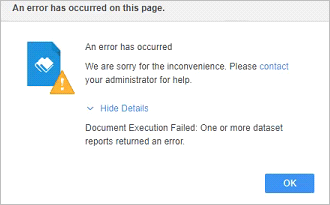
Attempting to run a dashboard or dossier that’s been migrated via an Object Manager package returns the following error when trying to run the report, “Document Execution Failed: One or more dataset reports returned an error.”
A detailed error message is found in the DSSErrors.log, "Object with ID 'xxxx' and type 26 (Column) is not found in the metadata."
Steps to Reproduce

  • Create an Object Manager package with a dashboard/dossier and Add All Used Dependencies.
  • Import the Object Manager package into another environment.
  • Attempt to run the dossier.
  • The following error occurs:
ka0PW0000001Jb0YAE_0EM2R000000nHJE.jpeg
  • The DSSErrors.log include the error, "Object with ID 'xxxx' and type 26 (Column) is not found in the metadata."

Why is This Happening?

This is a known defect in Strategy 2019 Update 1 and earlier. This defect causes columns to fail to be migrated from one environment to another via Object Manager packages.

Upgrade

Upgrade to Strategy 2019 Update 1 to resolve this issue. Upgrading does not correct existing issues with missing columns, but prevents the error from occurring when migrating new objects.
Workaround

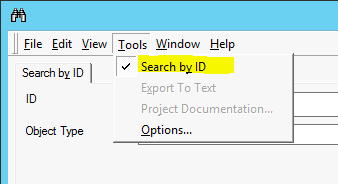
  • Migrate the missing column by searching for the column by ID in Object Manager.
ka0PW0000001Jb0YAE_0EM2R000000nHKg.jpeg
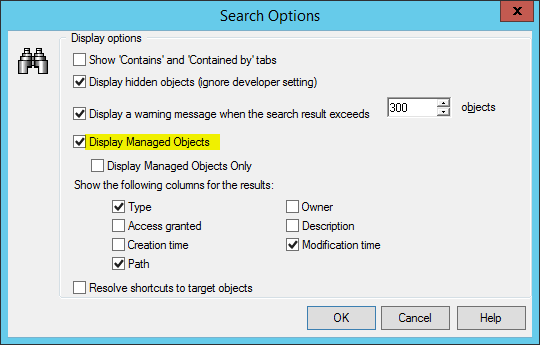
  • Enable Display Managed Objects in the Search Options menu.
ka0PW0000001Jb0YAE_0EM2R000000nHKl.jpeg
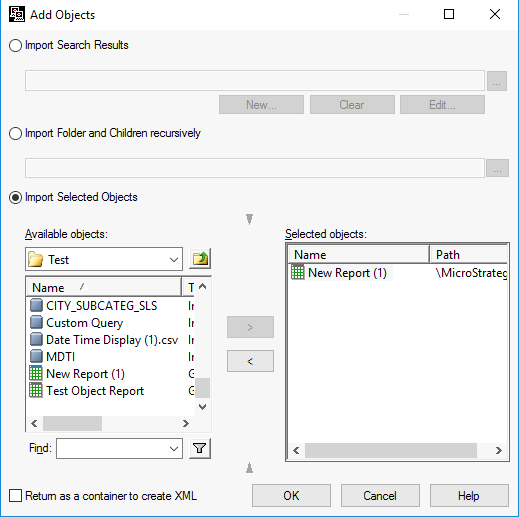
  • To add a column to an Object Manager package, make sure to first include another object, such as a test report (set to Replace), to migrate into the destination environment. The column cannot be added if you do not include another object.
ka0PW0000001Jb0YAE_0EM2R000000nHKq.jpeg
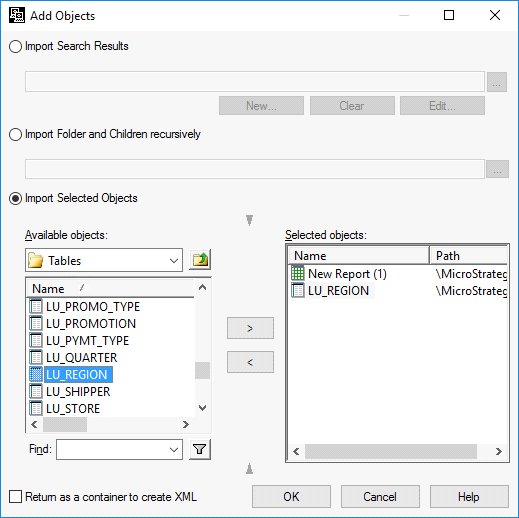
  • Add the column to the Object Manager package.
ka0PW0000001Jb0YAE_0EM2R000000nHKv.jpeg
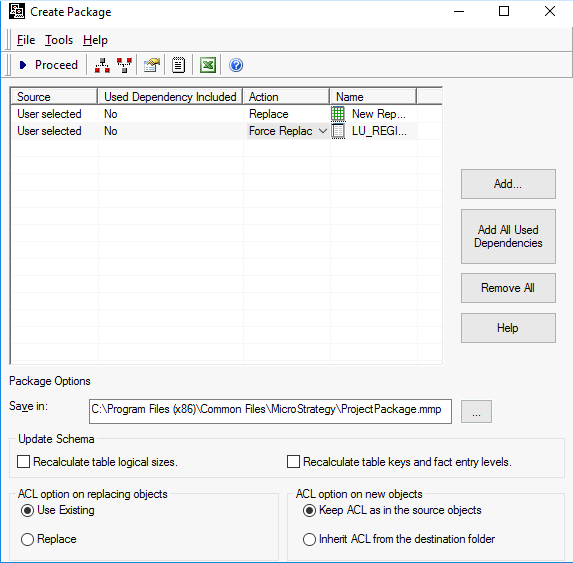
  • Set the test report to Replace and the column to Force Replace.
ka0PW0000001Jb0YAE_0EM2R000000nHL0.jpeg
  • Migrate the column using the Object Manager package into the other environment. The dossier should now run as expected.

Comment

0 comments

Details

Knowledge Article

Published:

December 23, 2019

Last Updated:

March 21, 2024