EducationSoftwareStrategy.com
StrategyCommunity

Knowledge Base

Product

Community

Knowledge Base

TopicsBrowse ArticlesDeveloper Zone

Product

Download SoftwareProduct DocumentationSecurity Hub

Education

Tutorial VideosSolution GalleryEducation courses

Community

GuidelinesGrandmastersEvents
x_social-icon_white.svglinkedin_social-icon_white.svg
Strategy logoCommunity

© Strategy Inc. All Rights Reserved.

LegalTerms of UsePrivacy Policy
  1. Home
  2. Topics

SAP CRM Cloud (C4C) Data Import via OData (Authenticated)


Henri-Francois Chadeisson

Director, Sales Engineering • MicroStrategy


Ever need to create a dashboard based on SAP Cloud CRM (C4C) ? Here is how to do it in 5 minutes!

Since Strategy natively support OData (10.5) with authentication (10.6), it is quite easy and straightforward to setup. Less easy is to understand how C4C API works and how to use them.
 
Here are some usefull links you might want to keep if you ever need to do this:

  • Usefull C4C Data API documentation : https://github.com/venkyvb/c4c-api
  • API Listing for a specific C4C instance : https://myNNNNNN.crm.ondemand.com/sap/byd/odata/v1/c4codata/$metadata (gives you all the available APIs + description, as shown in screenshot #1 below)
  • Sample Query to retrieve all the Sales Opportunities from a C4C platform, note the extension to get data in json  : https://myNNNNNN.crm.ondemand.com/sap/c4c/odata/v1/c4codata/OpportunityCollection/?$format=json (also note "byd" from the previous url needs to be replaced by "c4c in this url)
  • OpportunityCollection can be replaced by Accounts, Appointments, Contacts, etc.


When you have your Query URL built, just start Data Import --> File from URL --> paste your Query URL and setup authentication.
Then, just build your dashboard like you're used to.
 
Screenshot #1 : C4C APIs listing

ka02R000000g1L4QAI_0EM440000002Ld9.png

 
Screenshot #2 : Sample dashboard built directly on top of C4C
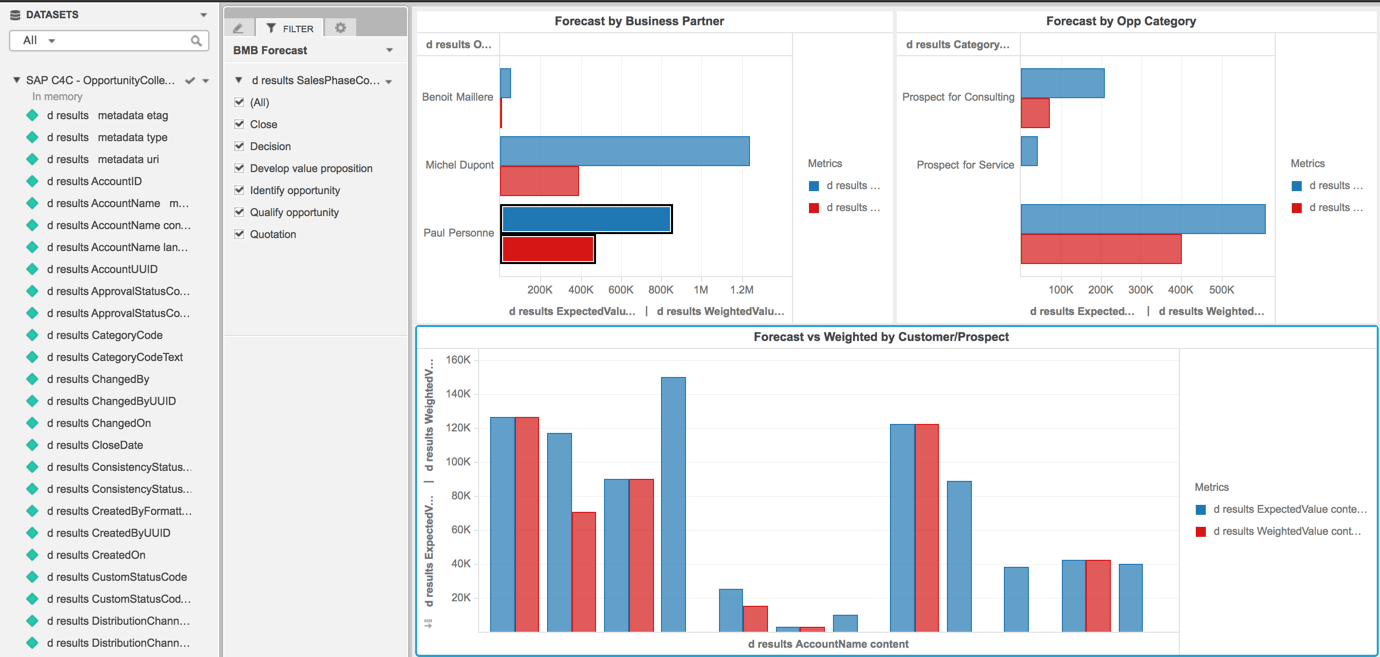
ka02R000000g1L4QAI_0EM440000002LdE.png

Comment

0 comments

Details

Knowledge Article

Published:

May 13, 2017

Last Updated:

May 25, 2017