EducationSoftwareStrategy.com
StrategyCommunity

Knowledge Base

Product

Community

Knowledge Base

TopicsBrowse ArticlesDeveloper Zone

Product

Download SoftwareProduct DocumentationSecurity Hub

Education

Tutorial VideosSolution GalleryEducation courses

Community

GuidelinesGrandmastersEvents
x_social-icon_white.svglinkedin_social-icon_white.svg
Strategy logoCommunity

© Strategy Inc. All Rights Reserved.

LegalTerms of UsePrivacy Policy
  1. Home
  2. Topics

KB440877: “SSL accept error : error:00000000:lib(0):func(0):reason(0) ” error appears in the DSSErrors.log while the SSL authentication works both on Developer and Web in MicroStrategy 10.x


Danfeng Zhan

Principal Product Specialist • Strategy


This issue has been classified as a defect by MicroStrategy. The impact is limited to ” error appears in the DSSErrors.log while the SSL authentication works both on Developer and Web in MicroStrategy 10.x. A code fix for this issue is not available in current releases but is being reviewed for a future MicroStrategy release.

SYMPTOM:
 
In Strategy 10.x, below error appears in the DSSErrors log while the SSL authentication works both on Developer and Web.
 
[Network Classes][Error] SSL accept error : error:00000000:lib(0):func(0):reason(0) 
In Project Source Manger configuration, the option of "Verify server certificate" is unchecked as shown below:
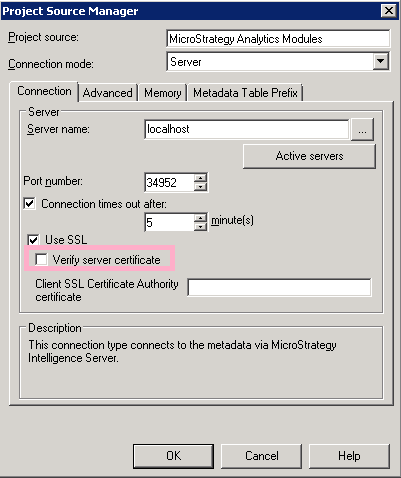
ka02R000000kV8XQAU_0EM44000000WP5O.png


REPRODUCING STEPS IN TUTORIAL:

  1. Disable the Verify certificate option in Developer
  2. Keep the path of the certificate in the text box of “Client SSL Certificate Authority certificate”, but delete a few letters in the path to make it incorrect. 
  3. Login in Developer, and notice the error in DSSErrors.log.


CAUSE:
 
This is a known issue with Strategy 10.x.
 
 
ACTION:
 
 
This issue has been addressed in Strategy 11.0. Please upgrade to take advantage of the fix when it is released.


Article Reference Number: KB440877


Comment

0 comments

Details

Knowledge Article

Published:

May 24, 2018

Last Updated:

November 9, 2018