With this script you can connect to Strategy server and use or download a report results. The results can be saved as JSON or CSV file.
In my example I am using a report with 3 attributes and 2 metrics.
API used: POST /reports/{reportId}/instances
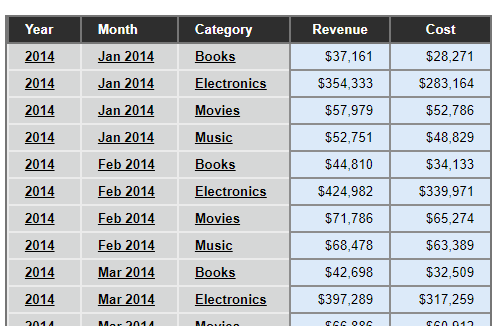
It is important to know that, because you need to modify the program accordingly to the structure of your report in case you want to save it as a CSV file.
If you want to export results to a CSV file:
JSON returned by Strategy is pretty complex and not easy to convert into a CSV string structure. If you know a better way to do that - please let me know in comments.
I believe you can easily change the script to connect to an Intelligent Cube instead; just change request URL (check documentation of GET /cubes/{cubeId} API).
CODE SAMPLE
# JSON DATA PUSH API by Robert Prochowicz, great help from Henri-Francois Chadeisson and Scott Rigney
# Tested with MSTR 10.10 / 2018-01-29

import requests
import base64
import json

### Parameters ###
environmentId = '82809'
api_login = 'mstr'
api_password = 'XXXXXXXXXXXXXXXXXXX'
project_id = 'B7CA92F04B9FAE8D941C3E9B7E0CD754'
base_url = "https://env-" + environmentId + ".customer.cloud.Strategy.com/MicroStrategyLibrary/api/";
report_id = "B902C83C11E801EF21B60080EF456F72"
instance_id = ""
offset_api=0
limit_api=1000

#### FUNCTIONS ###
def login(base_url,api_login,api_password):
    print("Getting token...")
    data_get = {'username': api_login,
                'password': api_password,
                'loginMode': 1}
    r = requests.post(base_url + 'auth/login', data=data_get)
    if r.ok:
        authToken = r.headers['X-MSTR-AuthToken']
        cookies = dict(r.cookies)
        print("Token: " + authToken)
        return authToken, cookies
    else:
        print("HTTP %i - %s, Message %s" % (r.status_code, r.reason, r.text))

def get_report(base_url, auth_token, cookies):
    print("Getting report results...")
    header_gs = {'X-MSTR-AuthToken': auth_token,
                 'Accept': 'application/json',
                 'X-MSTR-ProjectID': project_id}
    data_details = '' #Values used to determine the data included in the report instance – such as attribute values, metric values and view filters. JSON format. Leave empty to import everything
    r = requests.post(base_url + "reports/" + report_id + '/instances?offset=' + str(offset_api) + '&limit=' + str(limit_api), headers=header_gs, cookies=cookies, data=data_details)
    if r.ok:
        print("Report results received...")
        print("HTTP %i - %s" % (r.status_code, r.reason))
        return r.text
    else:
        print("HTTP %i - %s" % (r.status_code, r.reason))

def export_to_json(base_url, auth_token, cookies):
    print("Exporting report results to JSON file...")
    r = get_report(base_url, auth_token, cookies)
    text_file = open("report_results.json", "w", encoding="utf8")
    text_file.write(r)
    text_file.close()

def export_to_csv(base_url, auth_token, cookies):
    print("Exporting report results to JSON file...")

    csv_file = open('report_results.csv', "w", encoding="utf8")
    csv_file.write("Attribute1, Attribute2, Attribute3, Metric1, Metric2"+"\n") #manually modify this CSV file header
    csv_file.close()

    #there are 3 attributes in my example; add/remove levels according to the number of attributes in your case
    r = get_report(base_url, auth_token, cookies)
    report_parsed = json.loads(r)
    a1_list = report_parsed['result']['data']['root']['children']
    for a1 in a1_list:
        a1_val = a1['element']['name']
        a2_list=a1['children']
        for a2 in a2_list:
            a2_val=a2['element']['name']
            a3_list=a2['children']
            for a3 in a3_list:
                a3_val=a3['element']['name']
                metrics=a3['metrics']
                #print(metrics)
                #uncomment the line above in order to check metrics names; update metric names in 'csv_file.write' line below; in my case it is Cost and Revenue
                #there are 2 metric in this example, modify the script accordingly to the amount of metrics in your case
                csv_file = open('report_results.csv', "a", encoding="utf8")
                csv_file.write("'"+a1_val + "','" + a2_val + "','" + a3_val + "'," + str(metrics['Cost']['rv']) + "," + str(metrics['Revenue']['rv'])+"\n")
                csv_file.close()
    print("Export finished")

def main():
    authToken, cookies = login(base_url,api_login,api_password)
    choice = None
    while choice != "0":
        print \
        ("""
        ---MENU---

        0 - Exit
        1 - Generate and Print Token
        2 - Export report results to JSON file
        3 - Export report results to CSV file
        """)

        choice = input("Your choice: ") # What To Do ???
        print()

        if choice == "0":
            print("Good bye!")
        elif choice == "1":
            authToken, cookies = login(base_url,api_login,api_password)
        elif choice == "2":
            export_to_json(base_url, authToken, cookies)
        elif choice == "3":
            export_to_csv(base_url, authToken, cookies)
        else:
            print(" ### Wrong option ### ")

### Main program
main()