When SAML is enabled in Strategy Web, certain settings, such as the Default login mode, cannot be changed to the Default Properties of the Intelligence Servers on the Web Admin. These settings are enforced after making the required changes to the
web.xmlto enable SAML authentication. However, users should be able to save changes to the other settings on the Default Properties page such as the Server busy timeout and Request timeout settings.
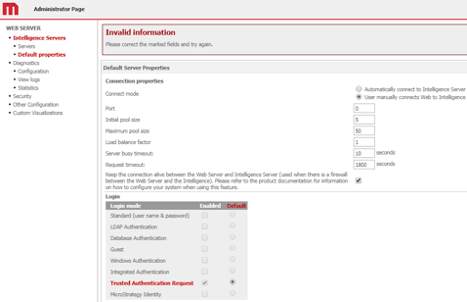
https://<server>:8080/MicroStrategy/servlet/mstrWebAdmin
This behavior is seen when trusted authentication is not enabled on the Web Admin page before modifying the
web.xmlto enable SAML.
The below steps can be followed to resolve the issue without disabling SAML authentication to enable trusted authentication on the Web Admin page.
sys_default.propertiesfile located at
<MicroStrategyWeb>\WEB-INF\xml.
sys_defaults.properitesfile and add the following two lines:
defaultloginmode=64
enabledloginmode=65
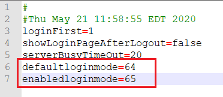
sys_defaults.propertiesfile.
