Seamless login between Web ASP and Library does not work after upgrading to Strategy 2020 Update 3.
In developer tools, you can see the following error:
com/fasterxml/jackson/core/JsonProcessingException

The jackson related JARs in the Strategy path is 2.11.1.
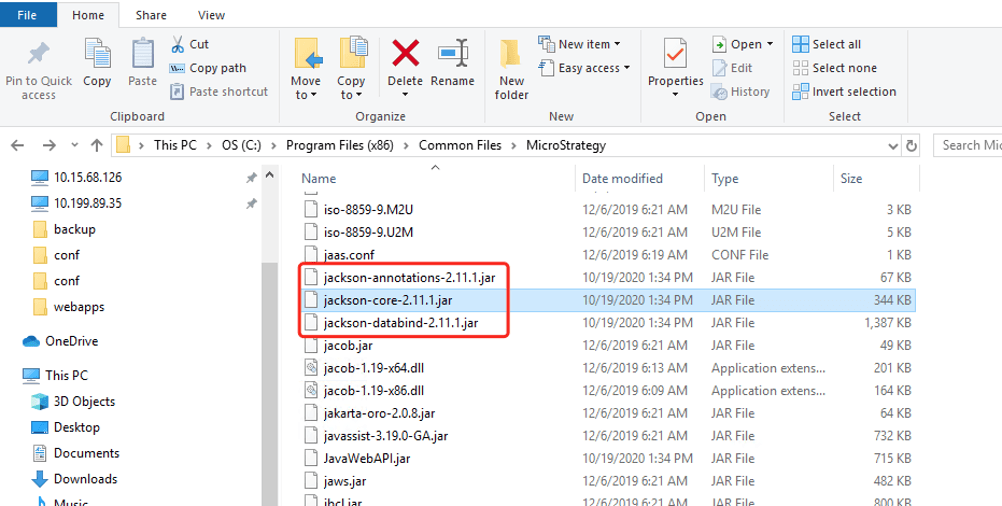
However, the jackson related JARs in "JVM ClassPath" registry still point to 2.10.1, as below shown below.
%MSTR_CLASSPATH%\guava-27.0.1-jre.jar;%MSTR_CLASSPATH%\owasp-java-html-sanitizer-20180219.1.jar;%MSTR_CLASSPATH%\jackson-annotations-2.10.1.jar;%MSTR_CLASSPATH%\jackson-core-2.10.1.jar;%MSTR_CLASSPATH%\jackson-databind-2.10.1.jar;%MSTR_CLASSPATH%\jjwt-0.9.0.jar;%MSTR_CLASSPATH%\JSON.jar;%MSTR_CLASSPATH%\WebTransform.jar;%MSTR_CLASSPATH%\WebBeans.jar;%MSTR_CLASSPATH%\RegistryBridge.jar;%MSTR_CLASSPATH%\mainstj.jar;%MSTR_CLASSPATH%\JavaWebAPI.jar;%MSTR_CLASSPATH%\WebTags.jar;%MSTR_CLASSPATH%\WebObjects.jar;%MSTR_CLASSPATH%\WebUtils.jar;%MSTR_CLASSPATH%\WebXMLUtils.jar;%MSTR_CLASSPATH%\WebAppUtils.jar;
Upgrade to Strategy 2021 to take advantage of the fix.
Modify the jackson's version to 2.11.1 in both Web SDK JVM ClassPath locations for JNI Bridge and JNI Bridge 64 in Windows Registry. The location is as shown below.

Then restart IIS.
