EducationSoftwareStrategy.com
StrategyCommunity

Knowledge Base

Product

Community

Knowledge Base

TopicsBrowse ArticlesDeveloper Zone

Product

Download SoftwareProduct DocumentationSecurity Hub

Education

Tutorial VideosSolution GalleryEducation courses

Community

GuidelinesGrandmastersEvents
x_social-icon_white.svglinkedin_social-icon_white.svg
Strategy logoCommunity

© Strategy Inc. All Rights Reserved.

LegalTerms of UsePrivacy Policy
  1. Home
  2. Topics

KB439236: Searching a project for hidden objects named Delete, Dossier, or Published will cause Developer to crash in MicroStrategy 10.8-10.10


Jeff Wyman

Senior Lead, Technical Support - Federal • Strategy


Searching a project for hidden objects named Delete, Dossier, or Published will cause Developer to crash in MicroStrategy 10.8 - 10.10

Starting with the release of Strategy ONE (March 2024), dossiers are also known as dashboards.
SUMMARY
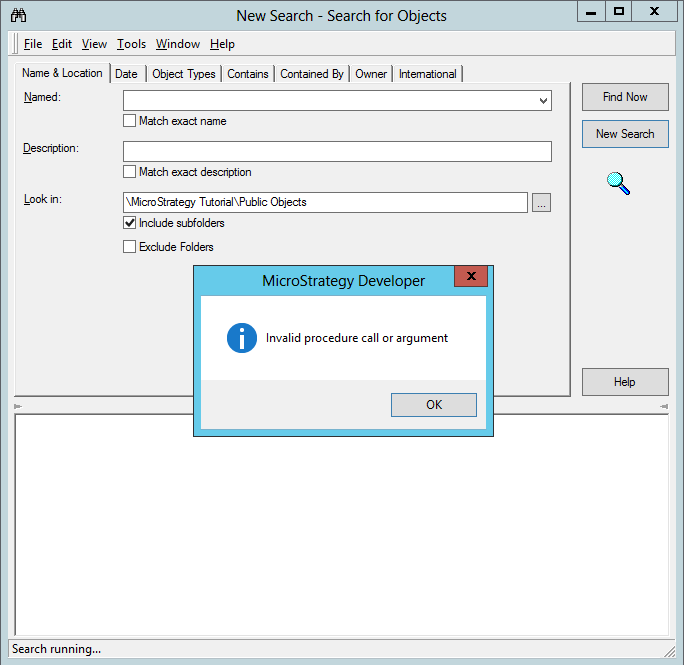
Two system managed shortcut objects were added in Strategy 10.8 metadatas that will cause the search function to hang and crash if they would normally appear in a search with hidden objects enabled. Keywords or partial words of delete, dossier, and published would cause these shortcuts to appear in search results. Known errors reported are 'Invalid procedure call or argument' or 'Out of stack space.'
STEPS TO REPRODUCE
This article will document two different ways to cause this behavior, however several variants can cause this issue to occur. 

  • Open a project and begin a search
ka0PW0000001JTwYAM_0EM44000000QBjQ.png
  • Enable the 'Display hidden objects' setting in the search options menu
ka0PW0000001JTwYAM_0EM44000000QBjV.png
  • Search for a named object including any of the words DELETE, DOSSIER, or PUBLISHED or fragments of these words such as ELE, PUB, IER for example. Captilization does not matter.
ka0PW0000001JTwYAM_0EM44000000QBja.png
  • As an alternative, in the 'Object Types' tab select the shortcut object and begin a search for all shortcuts.
ka0PW0000001JTwYAM_0EM44000000QBjf.png
  • If you let Developer stay open, Windows will report an application crash
ka0PW0000001JTwYAM_0EM44000000QBjk.png

CAUSE
The cause of these errors are two system managed shortcut objects present in the Public Objects folder. They are titled: 'Deleted Dossier Placeholder' and 'Published Dossier Placeholder.' It is not possible to navigate to these objects and at this time they should not be removed. 
WORKAROUND
It is possible to search a project if you choose to ignore all shortcut objects in the search, or specify a folder other than the \<Project name>\Public Objects\ directory.

ka0PW0000001JTwYAM_0EM44000000QBjp.png

It is then safe to search for named elements that would normally trigger this error as those objects would not be found in the search.

ka0PW0000001JTwYAM_0EM44000000QBju.png

You can also choose to not search for hidden objects in the search options menu.
ACTION
Currently this issue is being reviewed by Strategy for a potential code fix on an upcoming Strategy release. 
The Strategy Internal Reference Number for the issue discussed in this technical note is DE82372 KB439236


Comment

0 comments

Details

Knowledge Article

Published:

December 29, 2017

Last Updated:

March 21, 2024