Starting in Strategy 2021, parameterized queries are used by default when interacting with the Snowflake ODBC driver for an increased protection against SQL injection attacks. At the same time, parameterized queries are not allowed by Snowflake ODBC driver in the following case:
When parameterized queries are used with temporary views in Snowflake, the following error appears during report execution.
[Bind variables not allowed in view and UDF definition]
Workaround is to switch the intermediate table type used in the report from Temporary View to other Intermediate table type, for example Permanent Table. Notice that other intermediate table types will also work (as long as the report analysis can be resolved using such Intermediate table type[*]). Below explains how to switch to Permanent Table, although same steps can be followed to switch to Derived table, Common table expression and True temporary table types.
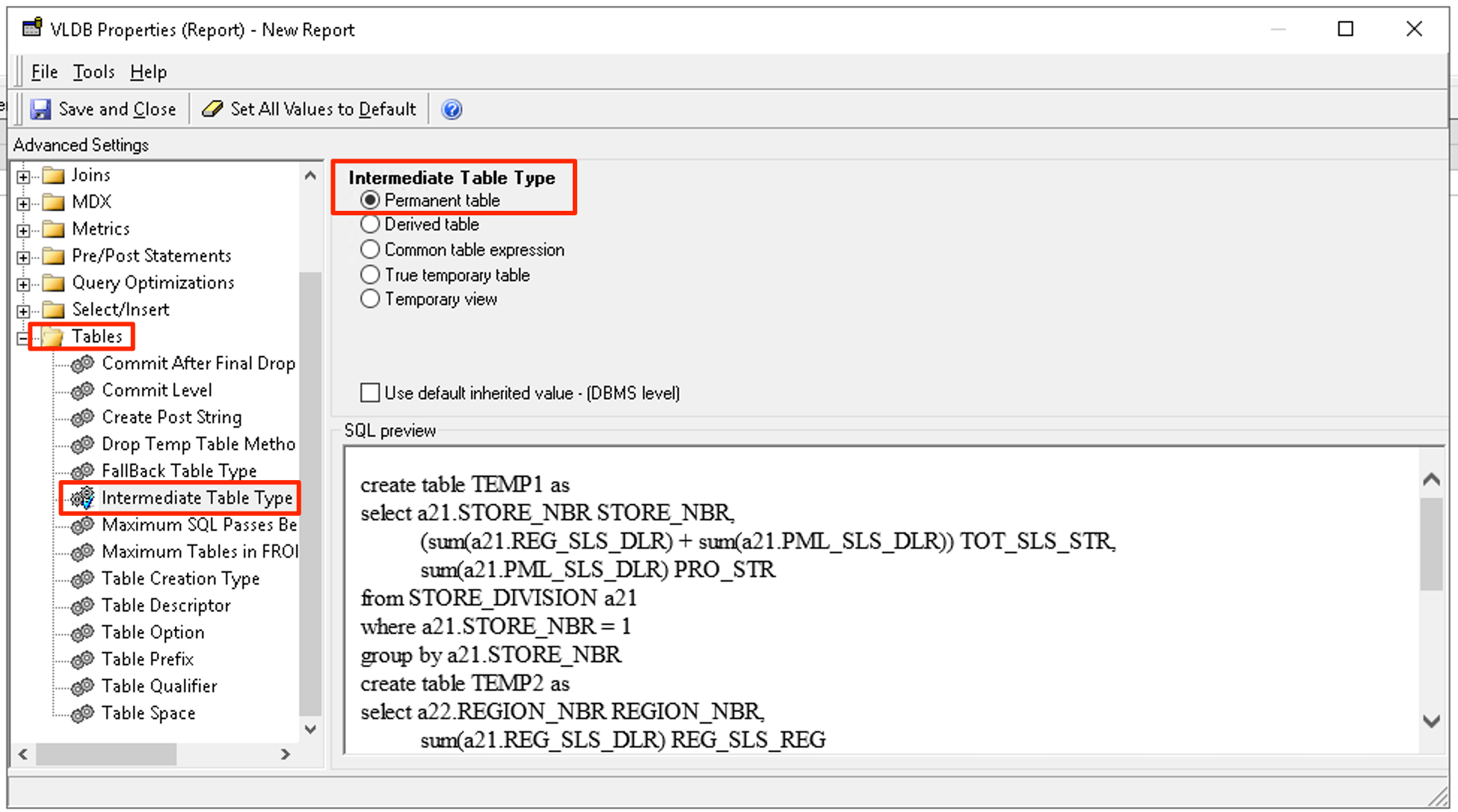
[*] Some intermediate table types such as derived table cannot be used for reports that use certain feature like custom groups or when there is an intermediate step to write back temporary results into the database (a.k.a analytical engine SQL). In those cases when the specified table type cannot be used, the intermediate table type specified in [VLDB setting Tables] > [Fallback Table Type] will be used.
Parametrized query is a way to prepare a SQL statement (such as INSERT INTO or SELECT statements) before submitting to the database. During the parametrization of the SQL statement string fields are replaced by variables. Parametrized query are used to prevent SQL injection attacks.
For more information, see this documentation.
Let warehouse be with the below tables:
CREATE TABLE lu_category (
CATEGORY_ID smallint ,
CATEGORY_DESC varchar(50)
)
CREATE TABLE lu_subcateg (
SUBCAT_ID smallint,
CATEGORY_ID smallint,
SUBCAT_DESC varchar(50)
)
CREATE TABLE subcateg_mnth_ctr_sls (
SUBCAT_ID smallint,
MONTH_ID int,
TOT_DOLLAR_SALES double,
TOT_UNIT_SALES double,
TOT_COST double,
GROSS_DOLLAR_SALES double
)
With below attributes:
Category :
ID form : lu_category:CATEGORY_ID, lu_subcateg :CATEGORY_ID
DESC form: lu_category:CATEGORY_DESC
Subcategory:
ID form : lu_subcateg: SUBCAT_ID, subcateg_mnth_ctr_sls:SUBCAT_ID
DESC form : lu_subcateg: SUBCAT_DESC
Facts:
Cost : , subcateg_mnth_ctr_sls: TOT_COST
Metrics:
Cost : Sum(Cost){~}
Cost@Category : Sum(Cost){Category,~} ; Dimensionality for Category has its filtering in Absolute.
Then let report be:
Atttribute: Category
Metrics: Cost, Cost@Category
Filter: Subcategory@DESC in {“TV”}
Set the Intermediate Table Type VLDB setting to Temporary View.
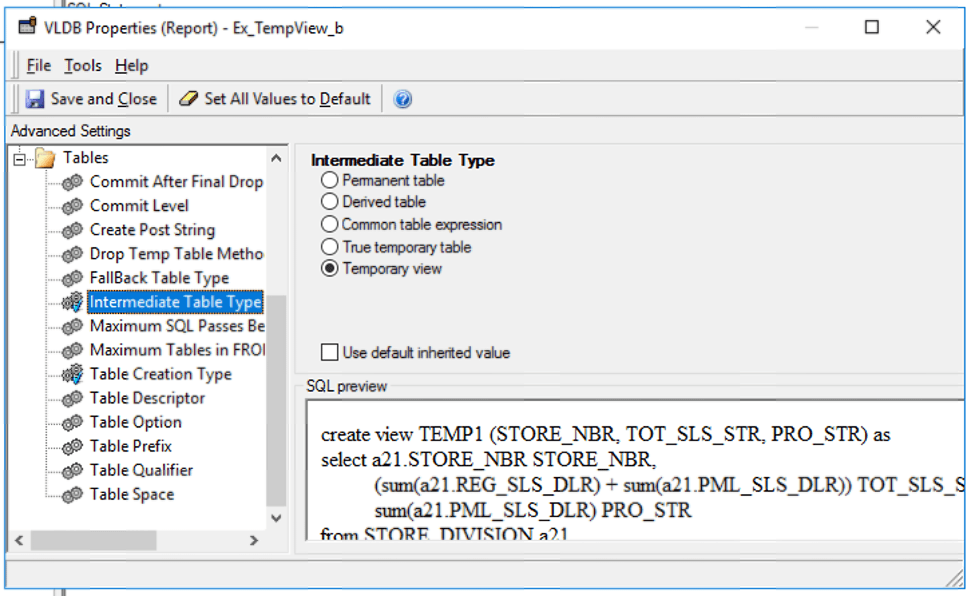
The resulting SQL is:
SQL statement:
create view ZZMD00 ("CATEGORY_ID", "WJXBFS1") as
select	"a12"."CATEGORY_ID"  "CATEGORY_ID",
	sum("a11"."TOT_COST")  "WJXBFS1"
from	"city_subcateg_sls"	"a11"
	join	"lu_subcateg"	"a12"
	  on 	("a11"."SUBCAT_ID" = "a12"."SUBCAT_ID")
where	"a12"."SUBCAT_DESC" in ('TV''s')
group by	"a12"."CATEGORY_ID"

create view ZZMD01 ("CATEGORY_ID", "WJXBFS1") as
select	"a11"."CATEGORY_ID"  "CATEGORY_ID",
	sum("a11"."TOT_COST")  "WJXBFS1"
from	"yr_category_sls"	"a11"
where	(("a11"."CATEGORY_ID")
 in	(select	"s21"."CATEGORY_ID"
	from	"lu_subcateg"	"s21"
	where	"s21"."SUBCAT_DESC" in ('TV''s')))
group by	"a11"."CATEGORY_ID"

select	"pa11"."CATEGORY_ID"  "CATEGORY_ID",
	"a13"."CATEGORY_DESC"  "CATEGORY_DESC",
	"pa11"."WJXBFS1"  "WJXBFS1",
	"pa12"."WJXBFS1"  "WJXBFS2"
from	ZZMD00	"pa11"
	join	ZZMD01	"pa12"
	  on 	("pa11"."CATEGORY_ID" = "pa12"."CATEGORY_ID")
	join	"lu_category"	"a13"
	  on 	("pa11"."CATEGORY_ID" = "a13"."CATEGORY_ID")
where	(("pa11"."CATEGORY_ID")
 in	(select	"s21"."CATEGORY_ID"
	from	"lu_subcateg"	"s21"
	where	"s21"."SUBCAT_DESC" in ('TV''s')))
