EducationSoftwareStrategy.com
StrategyCommunity

Knowledge Base

Product

Community

Knowledge Base

TopicsBrowse ArticlesDeveloper Zone

Product

Download SoftwareProduct DocumentationSecurity Hub

Education

Tutorial VideosSolution GalleryEducation courses

Community

GuidelinesGrandmastersEvents
x_social-icon_white.svglinkedin_social-icon_white.svg
Strategy logoCommunity

© Strategy Inc. All Rights Reserved.

LegalTerms of UsePrivacy Policy
  1. Home
  2. Topics

Spaces are encoded improperly in Dossier when validating a link


Community Admin

• Strategy


This article provides the steps to use the create link function in Dossier to encode spaces correctly.

Starting with the release of Strategy ONE (March 2024), dossiers are also known as dashboards.
[Symptom]
In Strategy 10.11, the encoding of spaces becomes %2520 rather than the correct %20 in the URL when validating the link, leading to a page not found when clicking the link.
 
[Steps to Reproduce]

  1. Generate a URL that uses %20 like the sample below:
    1. <Domain name>/MicroStrategy/asp/Main.aspx?evt=4001&src=Main.aspx.4001&visMode=0&reportViewMode=1&reportID=CEF3C2B64463B7202F49AF81FCA9BE35&Server=<Server Name>&Project=Strategy%20Tutorial&Port=0&share=1


NOTE: This can be obtained in the Strategy Tutorial project by right-clicking any report, document or dossier and selecting Share…
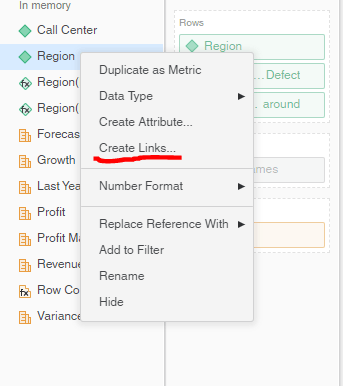
 

  1. Navigate to an attribute from Dossier, right click it and select Create Links:
ka0PW0000001JVUYA2_0EM44000000RdJI.png
  1. Paste the link gotten in step 1 to the Link Editor
ka0PW0000001JVUYA2_0EM44000000RdJS.png
  1. Validate the URL and click save.
  2. Click on one of the attribute elements to use the link. You will find that the %20 encoding has been changed to %2520
    1. http://<Domain name>/MicroStrategy/asp/Main.aspx?evt=4001&src=Main.aspx.4001&visMode=0&reportViewMode=1&reportID=CEF3C2B64463B7202F49AF81FCA9BE35&Server=<Server Name>&Project=Strategy%2520Tutorial&Port=0&share=1


[Cause]
This happens since the Link Editor from Dossier is set up to automatically encode spaces, causing the %20 to be encoded once again thus leading to the change in the URL.
 
[Workaround]
When using URLs that involve the use of %20, replace the %20 with a space and the URL will be generated correctly. You can refer to the following steps:
 

  1. Delete the %20 from the copied URL and replace it with a space
ka0PW0000001JVUYA2_0EM44000000RdJh.png
  1. When clicking on the link you will find the link is generated correctly.
    1. <Domain name>/MicroStrategy/asp/Main.aspx?evt=4001&src=Main.aspx.4001&visMode=0&reportViewMode=1&reportID=CEF3C2B64463B7202F49AF81FCA9BE35&Server=<Server Name>C&Project=Strategy%20Tutorial&Port=0&share=1


KB442547


Comment

0 comments

Details

Knowledge Article

Published:

January 2, 2019

Last Updated:

March 21, 2024