Starting with the release of Strategy ONE (March 2024), dossiers are also known as dashboards.
Almost every organization has a requirement for near-real time dashboards to show what is happening in a key business process at the current moment. Many scenarios exist where up-to-the-minute performance indicators, inventory levels, sales volumes, back-orders, equipment status or user activity can be visualized for decision support or to create notifications, such as:
The obstacle to near-real-time dashboards is usually the latency for data to be acquired, ingested and processed into the organization’s data warehouse or data lake (e.g. ETL and batch processing) and made available to the analytics system. Data may not be available for several minutes, hours or until the next day.
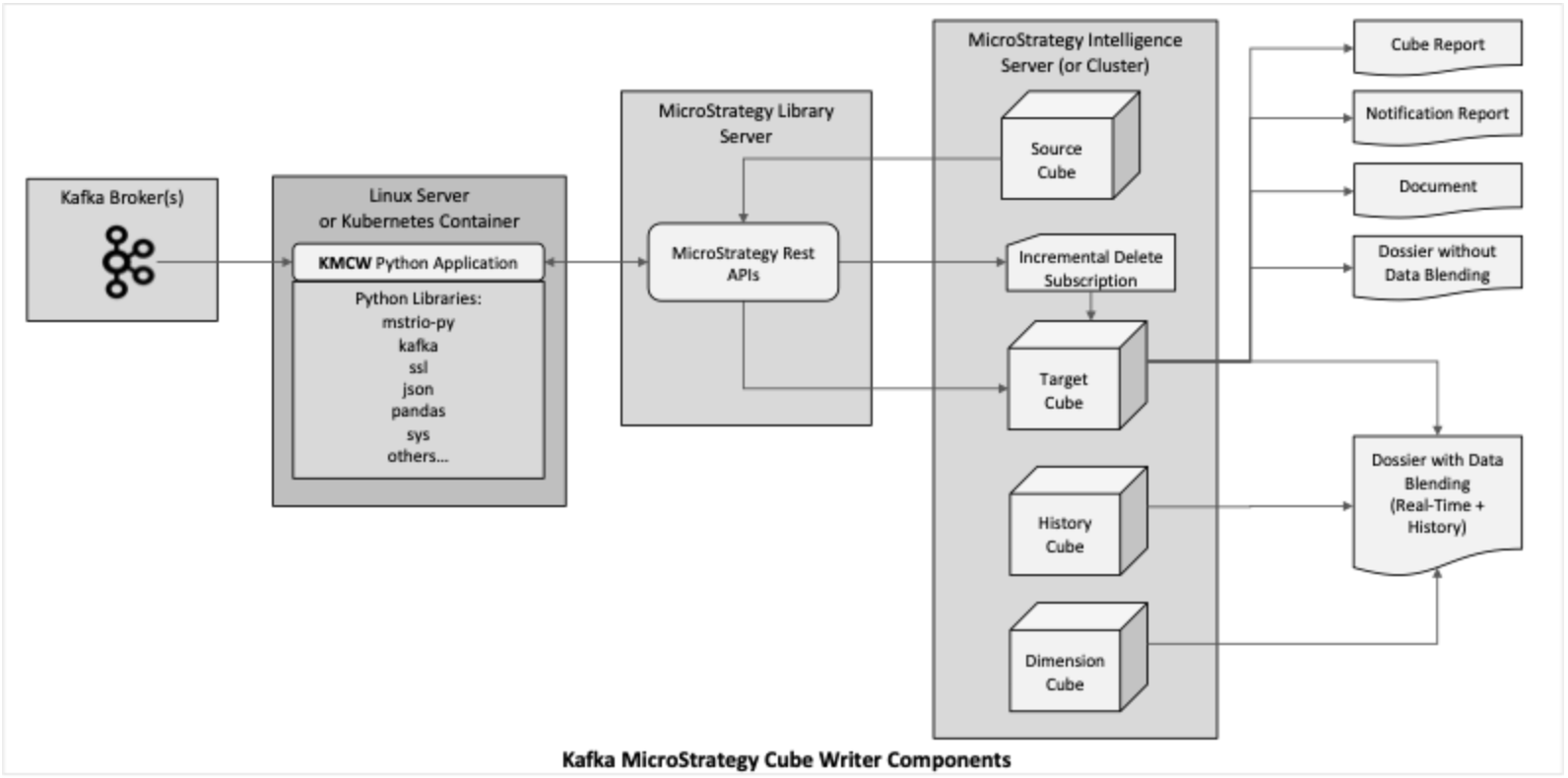
The Kafka Strategy Cube Writer (KMCW) is a python application built using Strategy’s MSTRIO python library and Strategy REST APIs. It fetches messages from Kafka Streams and writes the data to Strategy Super Cubes and has many features which allow a broad range of use cases to be implemented.
KMCW runs on Linux as a single instance (i.e. one cube writer) or several instances (multiple cube writers) or in Kubernetes containers.
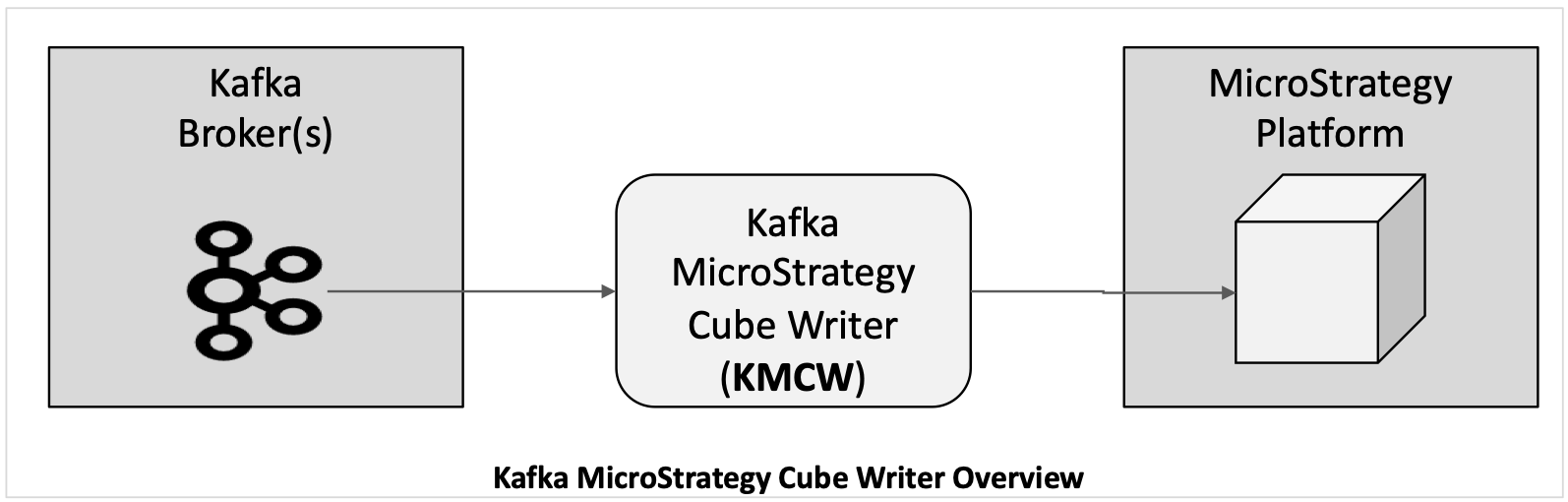
KMCW features include:
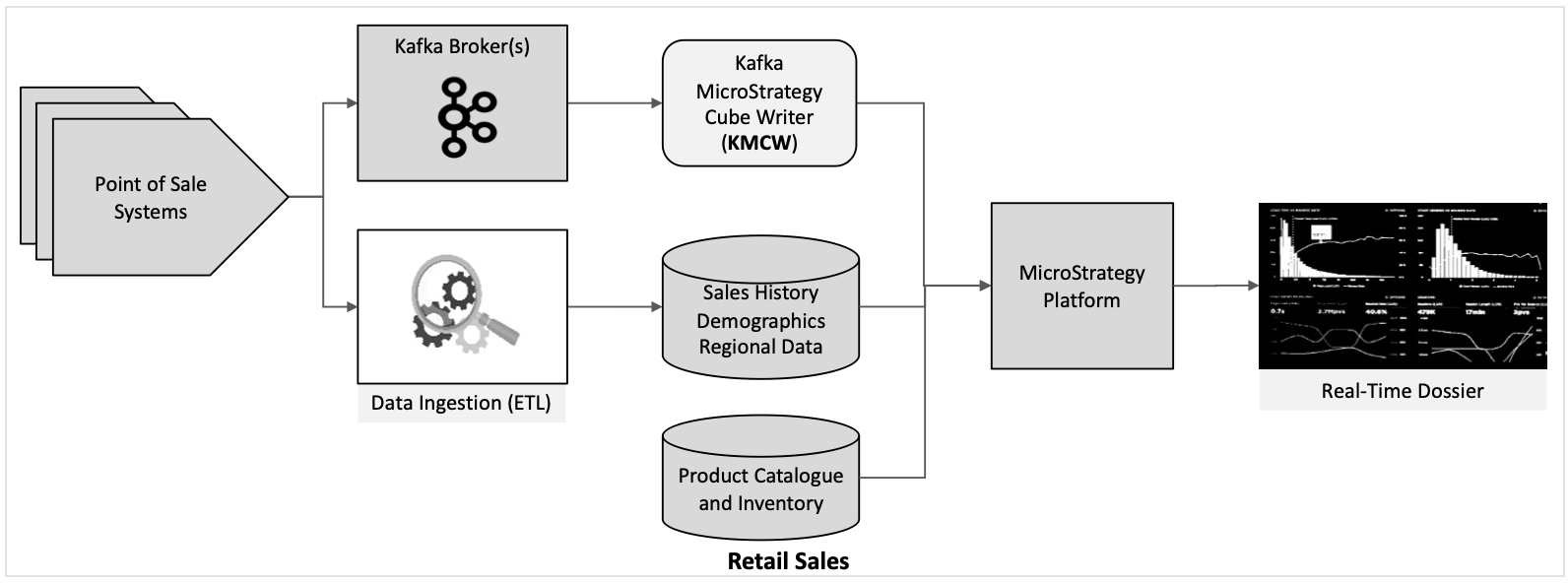
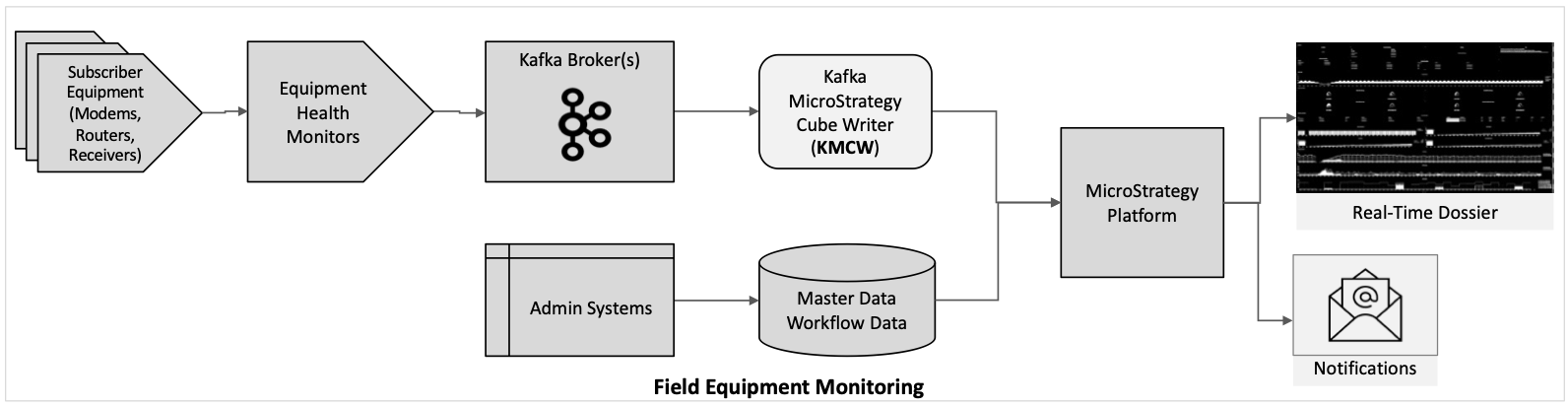
Here are some examples of use case scenarios where the KMCW facilitates real-time dashboards:
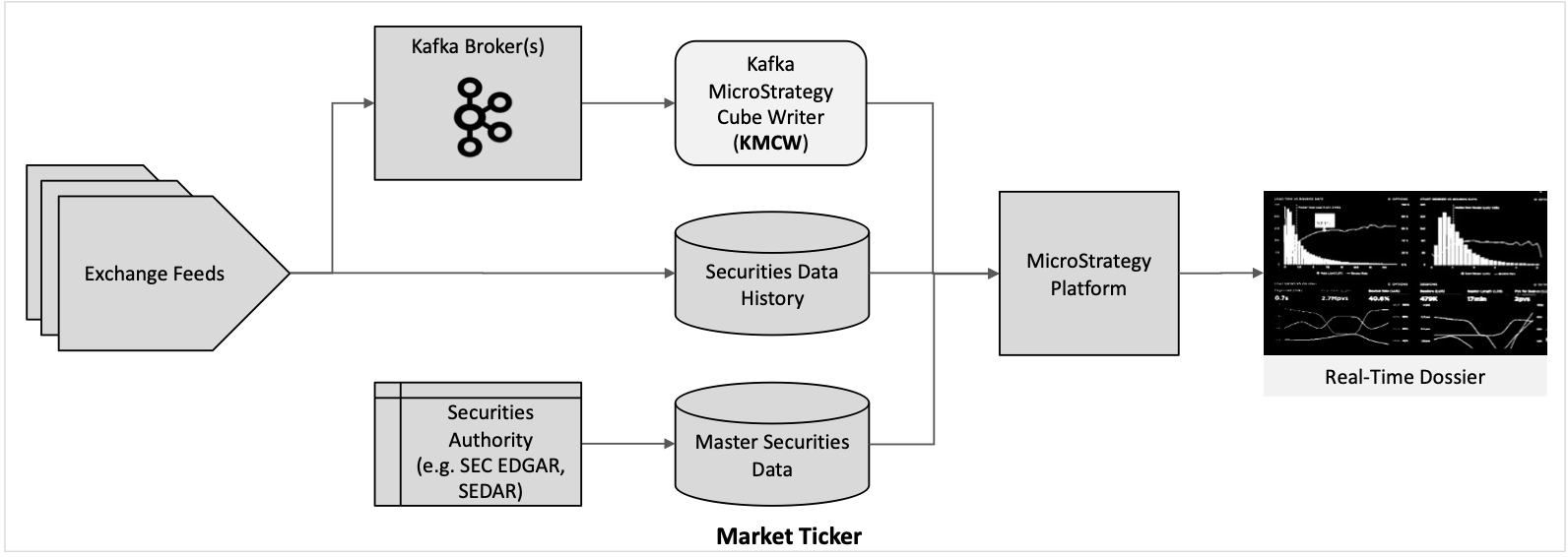
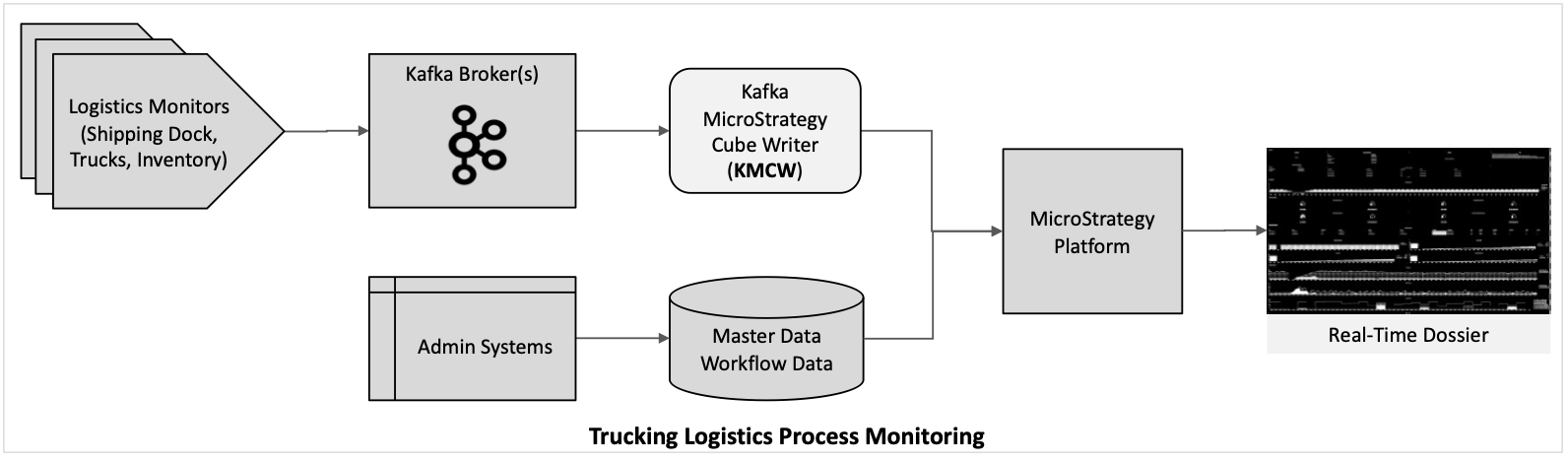
. .profile
pip3 install -r requirements/requirements.txt
mstr_userand
mstr_passin here, because they are set by the .profile file as environment variables which KMCW will use instead. Add a stream column definition for each column in the Kafka message. The debug level can be set to 2 here so that you can observe what KMCW is doing in the log. Normally debug level is set to 1.
{
    "application": {
        "name": "kafka_mstr_cubewriter",
        "service": "<MY NEW APP NAME>",
        "pid_dat_file": "dat/<MY NEW APP NAME>.pid",
    },
    "logging": {
        "debug_level": 2,
    },
    "Strategy": {
        "connect": {
            "base_url": "https://<LIBRARY SERVER>/StrategyLibrary/api",
            "project_name": "<PROJECT NAME>",
            "folder_path": "/<PROJECT NAME>/Public Objects/Reports/<FOLDER NAME>",
        },
        "cube": {
            "config": {
                "cube_name": "<CUBE NAME>",
                "cube_id_file": "dat/<MY NEW APP NAME>.dat",
            }
    },
    "kafka": {
        "topic_list": [
            "<KAFKA TOPIC>"
        ],
        "bootstrap_servers": [
            {
                "host": "<KAFKA BROKER HOST NAME OR IP ADDRESS>",
                "port": <HOST PORT NUMBER>
            }
        ],
    },
    "dataframe": {
        "column_definition": [
            {
                "stream_column_name": "<STREAM COLUMN 1>",
                "data_type": "object",
                "element_type": "attribute",
                "send_to_cube": "Y",
                "cube_column_name": "<CUBE COLUMN 1>",
            },
            {
                "stream_column_name": "<STREAM COLUMN 2>",
                "data_type": "int64",
                "element_type": "attribute",
                "send_to_cube": "Y",
                "cube_column_name": "<CUBE COLUMN 2
            },
            …
            {
                "stream_column_name": "<STREAM COLUMN n>",
                "data_type": "float64",
                "element_type": "metric",
                "send_to_cube": "Y",
                "cube_column_name": "<CUBE COLUMN n
    }
 }
bin/kafka_mstr_cubewriter.sh
.If the configuration settings are correct the following will happen:
mstr_ko.shto produce more test messages
bin/kmcw.sh command=stop_all
. .profile
pip3 install -r requirements/requirements.txt
mstr_userand
mstr_passin here, because they are set by the .profile file as environment variables which KMCW will use instead.
{
    "logging": {
        "debug_level": 2,
    },
    "Strategy": {
        "connect": {
            "base_url": "https://<LIBRARY SERVER>/StrategyLibrary/api",
            "project_name": "<PROJECT NAME>",
            "folder_path": "/<PROJECT NAME>/Public Objects/Reports/<FOLDER NAME>",
        }
}
mstr_ko.shutility to Start up the Kafka server and Kafka Connect. Add Kafka topics as follows:
bin/mstr_ko.sh
bin/kafka_mstr_cubewriter.sh .If the configuration settings are correct the following will happen:
mstr_ko.shto produce 1000 test messages as follows:
bin/mstr_ko.sh
mstr_ko.shto produce more test messages
bin/kmcw.sh command=stop_all
bin/kafka_mstr_cubewriter.sh
mstr_ko.shto produce 1000 test messages
mstr_ko.shto produce more test messages
