EducationSoftwareStrategy.com
StrategyCommunity

Knowledge Base

Product

Community

Knowledge Base

TopicsBrowse ArticlesDeveloper Zone

Product

Download SoftwareProduct DocumentationSecurity Hub

Education

Tutorial VideosSolution GalleryEducation courses

Community

GuidelinesGrandmastersEvents
x_social-icon_white.svglinkedin_social-icon_white.svg
Strategy logoCommunity

© Strategy Inc. All Rights Reserved.

LegalTerms of UsePrivacy Policy
  1. Home
  2. Topics

KB413718: Subtotal value is incorrect for a level metric in MicroStrategy 9.x-10.x


Community Admin

• Strategy


In MicroStrategy 9.x-10.x, subtotal value does not calculate as expected for a level metric. The subtotal sums up all the metric values instead of displaying the level metric result.

SYMPTOM
In Strategy 9.x-10.x, subtotal value does not calculate as expected for a level metric. The subtotal sums up all the metric values instead of displaying the level metric result.
 
STEPS TO REPRODUCE
The following steps are based on the Strategy Tutorial project: 

  • Create 2 metrics:  M1=Sum(Revenue){Quarter+}, M2=Sum(Revenue){~+}
  • Create a report R1 with attributes Year, Month and metrics M1,M2; to simplify the report, a filter Quarter in list {2010 Q1} can also be added. 
  • Execute the report to get data as shown below:

ka04W000000ObkAQAS_0EM440000002C8x.jpeg
  • After enabling Total in the grid, Total value for M1 is not correct, it should be 1,682,656. However, the values are just summed. 

ka04W000000ObkAQAS_0EM440000002C8z.jpeg
  • Add attribute Quarter to template; the Total value for M1 is now correct. 

ka04W000000ObkAQAS_0EM440000002C8v.jpeg


CAUSE
This is a known issue with Strategy 9.x.-10.x
 
WORKAROUND
To workaround this issue, one of the following methods can be implemented:
Method 1:

  1. Add the metric’s level attribute(s) to the report template.


Method 2:

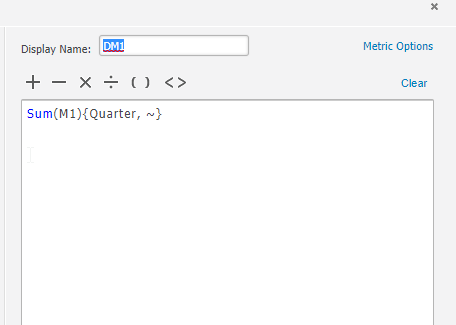
  • Create a derived metric DM1 with definition: Sum(M1){Quarter, ~}            
ka04W000000ObkAQAS_0EM44000000WNp0.png
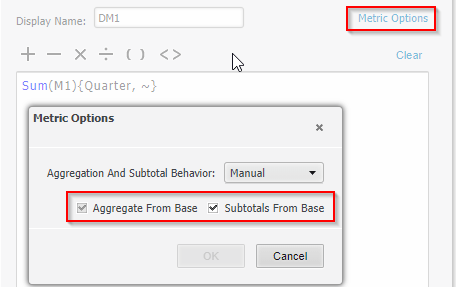
  • Enable 'Aggregate from Base' and 'Subtotal from Base' from the metric options
ka04W000000ObkAQAS_0EM44000000WNp5.png
  • Execute the report, notice the derived metric total is showing correct aggregation with the Quarter attribute in the report object
ka04W000000ObkAQAS_0EM44000000WNpP.png

 
ACTION
Currently this issue is still being reviewed for feasibility by our Technology team and it is not scoped for any upcoming scheduled Strategy release. 
 
 
The internal reference number for this is DE3628 and 000013718
KB413718


Comment

0 comments

Details

Knowledge Article

Published:

April 7, 2017

Last Updated:

December 24, 2018