EducationSoftwareStrategy.com
StrategyCommunity

Knowledge Base

Product

Community

Knowledge Base

TopicsBrowse ArticlesDeveloper Zone

Product

Download SoftwareProduct DocumentationSecurity Hub

Education

Tutorial VideosSolution GalleryEducation courses

Community

GuidelinesGrandmastersEvents
x_social-icon_white.svglinkedin_social-icon_white.svg
Strategy logoCommunity

© Strategy Inc. All Rights Reserved.

LegalTerms of UsePrivacy Policy
  1. Home
  2. Topics

KB484337: Support for SAP HANA calculation views with input parameters


Community Admin

• Strategy


This article provides an overview of the support for SAP HANA calculation views with input parameters. This article also explains the workflow for using input parameters in MicroStrategy for SAP HANA 2.0 SPS04.

Description


Strategy supports SAP HANA calculation views (CV) with input parameters created in HANA Studio (XSC) via prompt objects, which generate a popup for providing answers to the IP. Hence, prompt behavior and capabilities constitute a basis of Strategy capabilities for supporting IPs. Strategy does not support input parameters in XSA to XSC deployed calculation views. Such CV is seen by MicroStartegy as a regular table in the Warehouse Catalog. The two types of prompts that are most often used are the value prompt, which is the default, and attribute element list type, which can be used as a replacement to the default prompt in a setup where CV is added to the Warehouse Catalog in Developer - a logical table object workflow. If a Strategy user uses CV by creating a cube, they are limited to the capabilities of the default value prompt – this is referred to as cube workflow. OLAP cubes (cubes created in Strategy Developer) do not support prompted objects at all.
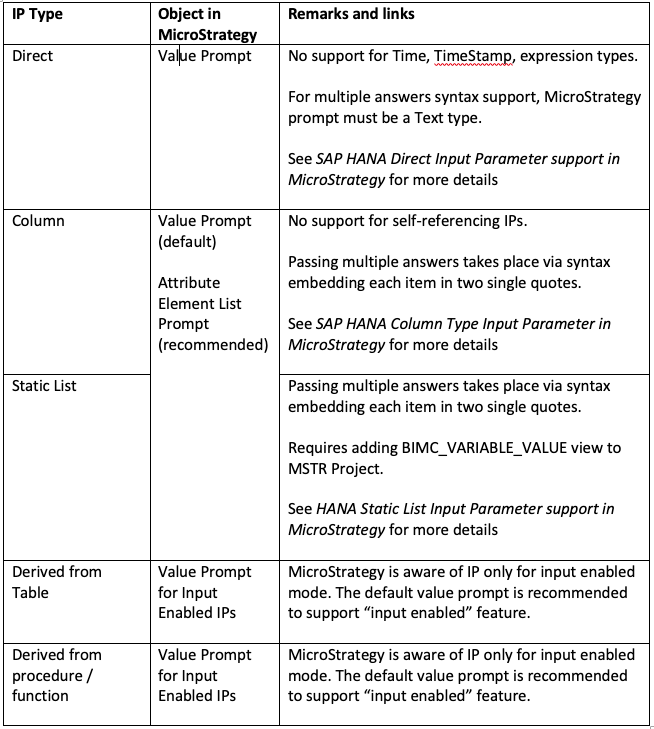
Types and subtypes of input parameters in SAP HANA 2.0 SP204

  1. Direct
    • single/multiple answers
    • mandatory/optional 
  2. Static List
    • single/multiple answers
    • mandatory/optional
  3. Column
    • self/non-self referencing
    • single/multiple answers
    • mandatory/optional
  4. Derived from table
    • input disabled/enabled
    • mandatory/optional if input enabled
  5. Derived from procedure/scalar function
    • input disabled/enabled
    • mandatory/optional if input enabled 

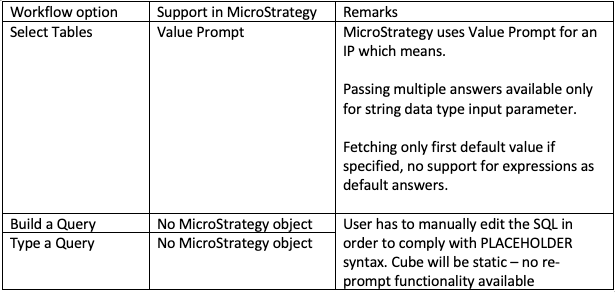
Support via logical table object workflow

ka04W000001IwnhQAC_0EM2R000000fwug.jpeg

Support via cube workflow 

ka04W000001IwnhQAC_0EM2R000000fwul.jpeg


Strategy supports input parameters via prompt objects. When a calculation view is added to the Warehouse Catalog, Strategy automatically creates and assigns it to a value prompt. A value prompt allows the user to type in a value which later ends up in PLACEHOLDER SQL syntax. Value prompts allow you to pass multiple answers to input parameters when the value prompt type is set to Text. By default, the type of value prompt corresponds to the IP’s data type. Therefore, one needs to replace the prompt in case of an incorrect data type. Value prompt (text datatype) user interface:
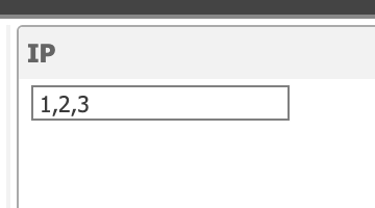
ka04W000001IwnhQAC_0EM2R000000fwuq.jpeg


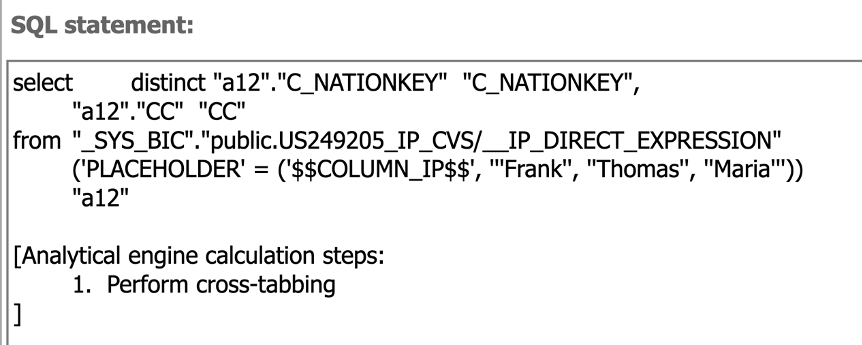
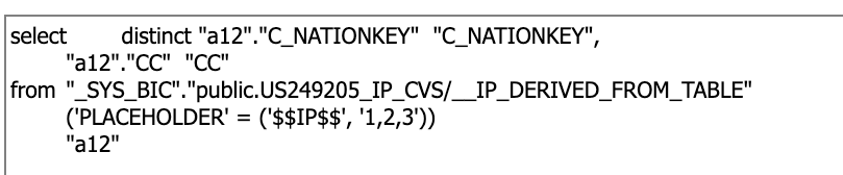
The prompt answer is passed to the PLACEHOLDER clause in SQL:
ka04W000001IwnhQAC_0EM2R000000fwuv.jpeg


Attribute element list interface:

ka04W000001IwnhQAC_0EM2R000000fwv0.jpeg
ka04W000001IwnhQAC_0EM2R000000fwv5.jpeg


Notice that the syntax used by Strategy puts each answer in two single quotes.


Comment

0 comments

Details

Knowledge Article

Published:

June 15, 2020

Last Updated:

June 15, 2020