EducationSoftwareStrategy.com
StrategyCommunity

Knowledge Base

Product

Community

Knowledge Base

TopicsBrowse ArticlesDeveloper Zone

Product

Download SoftwareProduct DocumentationSecurity Hub

Education

Tutorial VideosSolution GalleryEducation courses

Community

GuidelinesGrandmastersEvents
x_social-icon_white.svglinkedin_social-icon_white.svg
Strategy logoCommunity

© Strategy Inc. All Rights Reserved.

LegalTerms of UsePrivacy Policy
  1. Home
  2. Topics

KB441116: The sub-folders specified by the Burst Sub-folder field are not created when bursting a file subscription in MicroStrategy 10.x


Frederick Kellerman

Cloud Support Expert I • MicroStrategy


This article describes an issue that can occur when configuring bursted sub-folders when using file bursting in MicroStrategy 10.x

DISCUSSION
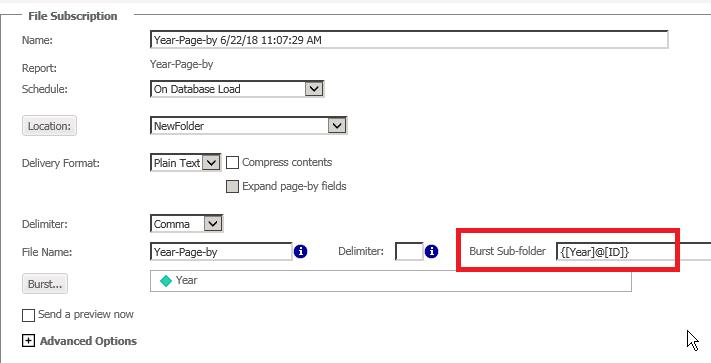
In some cases users may notice that the folders specified by the Burst Sub-folder field are not created when bursting a file subscription in Strategy 10.x. Consider a scenario where a user attempts to create sub-folders based on the bursting attribute as seen below. This example uses the Year attribute from the Strategy Tutorial project:
ka02R000000kb69QAA_0EM44000000WUSm.png

When the subscription is executed it is expected that a separate sub-folder will be created for each element of Year. However, when the subscription is executed the user sees that no sub-folders are created.
CAUSE
The issue can occur if the option to "Allow and append user entered path" is not checked in the File device that is used by the subscription.

ka02R000000kb69QAA_0EM44000000WUTQ.png

ACTION
Users should check the box to "Allow and append user entered path." After doing this the bursted sub-folders can be created as desired.

ka02R000000kb69QAA_0EM44000000WUTa.png


Comment

0 comments

Details

Knowledge Article

Published:

June 25, 2018

Last Updated:

June 25, 2018