After upgrading to Strategy 2020, the Collaboration Server is unable to connect to the Library Server. The connection error between the Collaboration Server and Library Server can be seen on the Library Admin page as shown below. Additionally, the Collaboration Server is in a paused state.
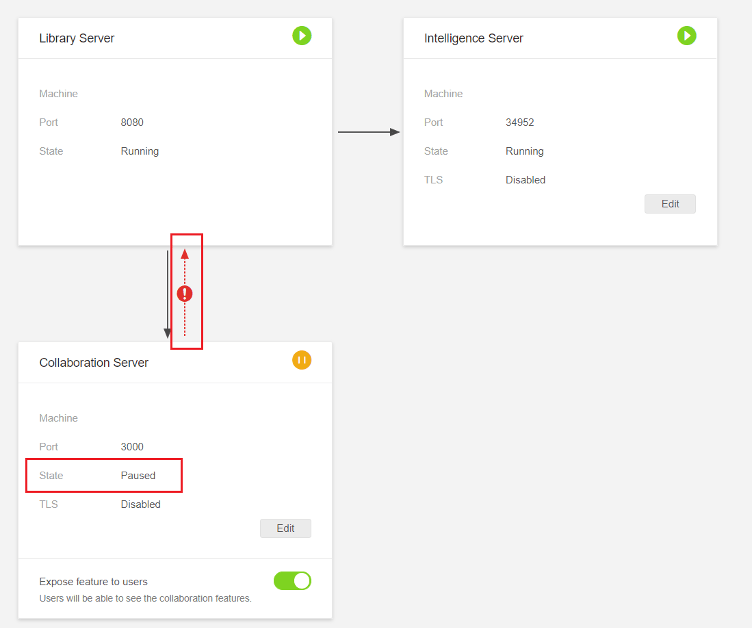
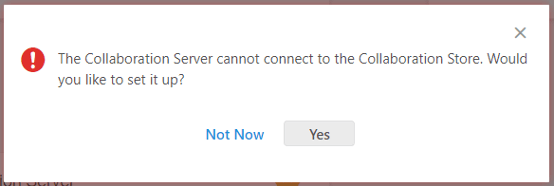
When clicking on the error icon, the following error is seen:
The Collaboration Server cannot connect to the Collaboration Store. Would you like to set it up?
http://<Library Server>:<port>/MicroStrategyLibrary/admin.
A potential cause of this issue is that the
StrategyLibrary.warfile was not redeployed after upgrading to Strategy 2020. As a result, Strategy Library was not upgraded and still on the previous version of Strategy.
http://<Strategy Library Server>:<port>/MicroStrategyLibrary/app/version. As seen below, the Strategy Library version is still 11.1 (2019) rather than 11.2 (2020).

Deploy the 2020 StrategyLibrary.war file to upgrade Strategy Library. The below steps can be used to deploy the
StrategyLibrary.warfile on a default Strategy Windows installation.
C:\Program Files (x86)\Common Files\MicroStrategy\Tomcat\apache-tomcat-9.0.30\webapps.
StrategyLibrary.warfile.
C:\Program Files (x86)\MicroStrategy\Libraryto
C:\Program Files (x86)\Common Files\MicroStrategy\Tomcat\apache-tomcat-9.0.30\webapps.
