EducationSoftwareStrategy.com
StrategyCommunity

Knowledge Base

Product

Community

Knowledge Base

TopicsBrowse ArticlesDeveloper Zone

Product

Download SoftwareProduct DocumentationSecurity Hub

Education

Tutorial VideosSolution GalleryEducation courses

Community

GuidelinesGrandmastersEvents
x_social-icon_white.svglinkedin_social-icon_white.svg
Strategy logoCommunity

© Strategy Inc. All Rights Reserved.

LegalTerms of UsePrivacy Policy
  1. Home
  2. Topics

KB483832: The Import Data and Prepare Data buttons are not displaying in MicroStrategy for Office versions 2019 Update 3 and 2019 Update 4 on Google Chrome and Firefox browsers


Community Admin

• Strategy


This article explains why the Import Data and Prepare Data buttons are not displaying in MicroStrategy for Office on Google Chrome and Firefox browsers.

Description

After logging in to Strategy for Office on Google Chrome version 78 or Firefox version 70, the Import Data and Prepare Data buttons do not appear. You can still click the invisible button to import or prepare data, but the button never displays.
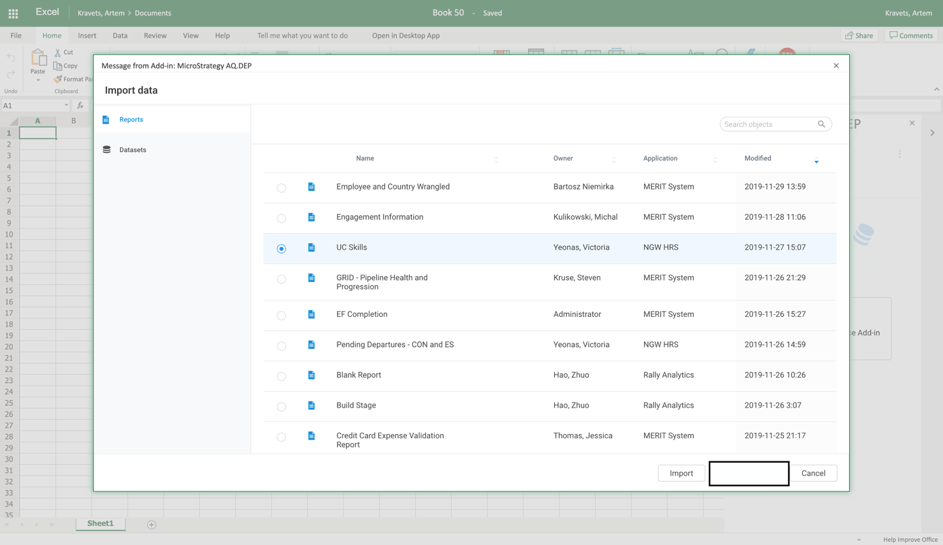
Missing Import Button

Missing Prepare Data Button

ka04W000001IwvaQAC_0EM2R000000myxJ.jpeg

Why is this happening?


The reason these buttons are not displaying is because of parsing CSS changes in Google Chrome version 78 and Firefox 70. As a result, the opacity for the button class has been changed from 100% to 1%.

Solution


If you are using Strategy for Office on 2019 Update 3 or 2019 Update 4, please use a previous version of Google Chrome 78 or Firefox 70 with the add-in. Alternatively, you can use a different browser like Safari or Internet Explorer.


Comment

0 comments

Details

Knowledge Article

Published:

December 2, 2019

Last Updated:

December 2, 2019