EducationSoftwareStrategy.com
StrategyCommunity

Knowledge Base

Product

Community

Knowledge Base

TopicsBrowse ArticlesDeveloper Zone

Product

Download SoftwareProduct DocumentationSecurity Hub

Education

Tutorial VideosSolution GalleryEducation courses

Community

GuidelinesGrandmastersEvents
x_social-icon_white.svglinkedin_social-icon_white.svg
Strategy logoCommunity

© Strategy Inc. All Rights Reserved.

LegalTerms of UsePrivacy Policy
  1. Home
  2. Topics

The Layout of a Dossier Breaks When Switching Pages Using Arrow Keys in MicroStrategy Library 2019


Min Zheng

Senior Manager, Cloud Support • MicroStrategy


This article outlines symptom, cause, and solution to an issue in Library 2019 where dossier formatting breaks when switching between pages with arrow keys before rendering is complete.

Starting with the release of Strategy ONE (March 2024), dossiers are also known as dashboards.

Symptom


The layout of a dossier breaks when quickly switching between pages with the arrow keys in Library 2019. The issue exists when the dossier contains multiple pages and users utilize the arrow keys to switch pages while the current page is still rendering.
For example, this is the original layout of a sample dossier:
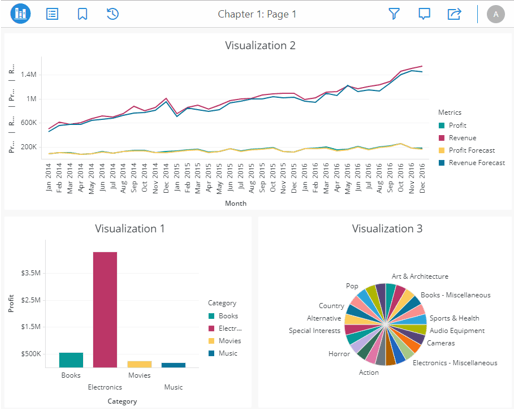
ka0PW0000001JX8YAM_0EM2R000000h3Ta.jpeg

But when switching pages with the arrow keys, this defect breaks the format:

ka0PW0000001JX8YAM_0EM2R000000h3Us.jpeg


Cause


This is a known defect for Strategy Library 2019.


Action


This issue has been addressed in Strategy Library 2019 Update 2+. The Strategy Internal Reference Number is DE131916.
 KB483292


Comment

0 comments

Details

Knowledge Article

Published:

May 14, 2019

Last Updated:

March 21, 2024