The Platform Analytics wWarehouse doesn’t contain updated data when running the below SQL from the DBQuery tool on Strategy 2020.
SELECT * FROM platform_analytics_wh.access_transactions order by tran_timestamp desc;

KFKProducerError.logcontains many of the following entry:
[HOST:sup-w-003624][PID:12008][THR:13456]Open file C:\Program Files (x86)\Common Files\MicroStrategy\Log\FailedSentOutMessages\KafkaFailMessage_812 for storing fail messages.
FailedSentOutMessagesfolder contains many
KafkaFailMessage_xfiles generated in the same folder as the
DSSError.logfile, as shown in the following screenshot.
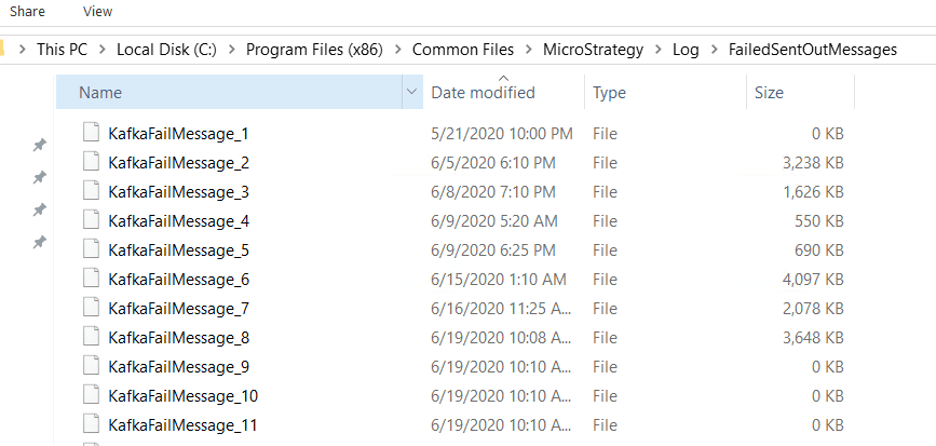
The Kafka Server is down unexpectedly as indicated by Kafka
server.log, as shown below.
INFO [KafkaServer id=0] shut down completed (kafka.server.KafkaServer) ERROR Exiting Kafka. (kafka.server.KafkaServerStartable) INFO [KafkaServer id=0] shutting down (kafka.server.KafkaServer)
Start the Kafka Server from services. You can see the
FailedSentOutMessagesfolder is is immediately emptied. The below entries are observed in
KFKProducerError.log, as shown below.
[HOST:xxx][PID:5876][THR:14988]Start processing fail messages in file C:\Program Files (x86)\Common Files\MicroStrategy\Log\FailedSentOutMessages\KafkaFailMessage_1365. [HOST:xxx][PID:5876][THR:14988]Finish processing 1872 fail messages in the file.
FailedSentOutStatisticsto the Kafka Broker in Strategy 2020.
