EducationSoftwareStrategy.com
StrategyCommunity

Knowledge Base

Product

Community

Knowledge Base

TopicsBrowse ArticlesDeveloper Zone

Product

Download SoftwareProduct DocumentationSecurity Hub

Education

Tutorial VideosSolution GalleryEducation courses

Community

GuidelinesGrandmastersEvents
x_social-icon_white.svglinkedin_social-icon_white.svg
Strategy logoCommunity

© Strategy Inc. All Rights Reserved.

LegalTerms of UsePrivacy Policy
  1. Home
  2. Topics

KB440607:The cell that applied selections in the first level is not highlighted after refreshing the Dossier with outline mode enabled in MicroStrategy Web 10.11


Diqing Shen

Senior Manager, Cloud Support • MicroStrategy


Starting with the release of Strategy ONE (March 2024), dossiers are also known as dashboards.
SYMPTOM:
In Strategy Web 10.11, the cell that applied selections in the first level is not highlighted after refreshing the Dossier with outline mode enabled.
STEPS TO REPRODUCE:
1. Create a Dossier with a grid visualization and bar graph visualization with Category, Subcategory and Cost.
2. Enable the outline mode for the grid visualization.
3. Configure the grid visualization filtering the graph visualization, note that the filtering and highlight works correctly:
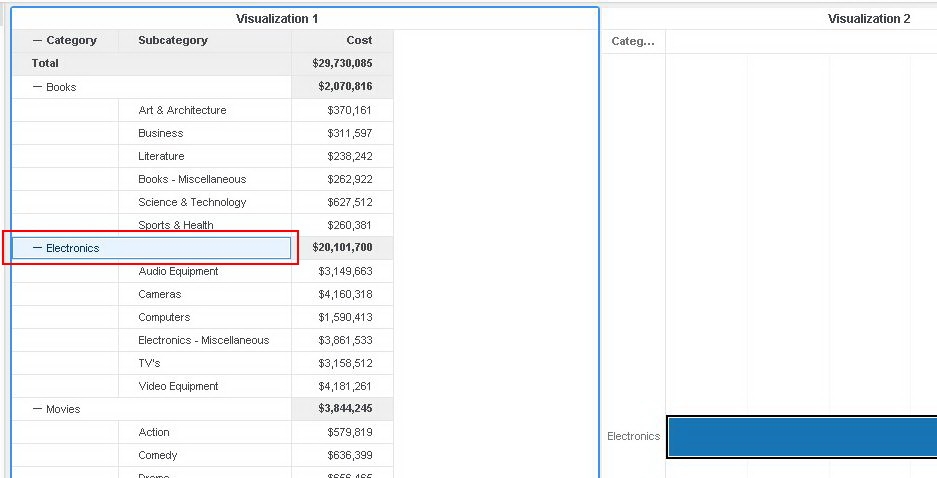
ka0PW0000001JSMYA2_0EM44000000WJ3q.jpeg

4. Refresh the Dossier, note that the highlight from the source grid is missing:
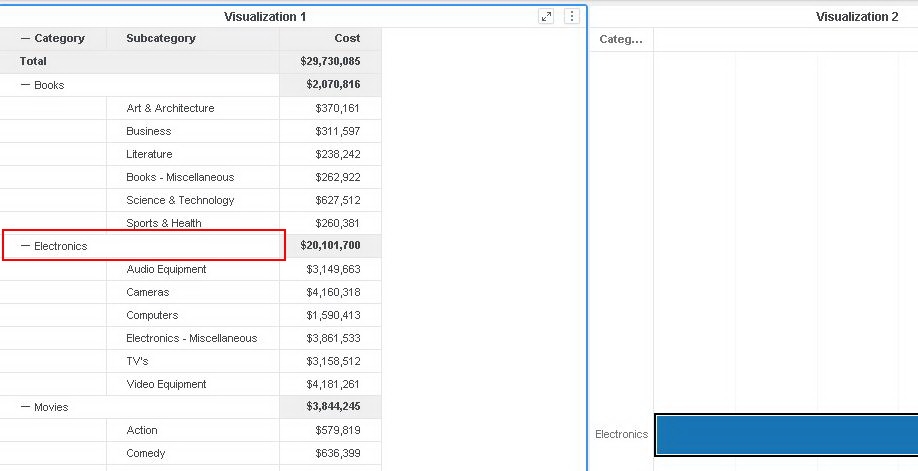
ka0PW0000001JSMYA2_0EM44000000WJ3v.jpeg

CAUSE:
This is a known issue in Strategy Web 10.11.
ACTION:
Currently this issue is still being reviewed for feasibility by our Technology team and it is not scoped for any upcoming scheduled Strategy release.


Comment

0 comments

Details

Knowledge Article

Published:

April 14, 2018

Last Updated:

March 21, 2024