EducationSoftwareStrategy.com
StrategyCommunity

Knowledge Base

Product

Community

Knowledge Base

TopicsBrowse ArticlesDeveloper Zone

Product

Download SoftwareProduct DocumentationSecurity Hub

Education

Tutorial VideosSolution GalleryEducation courses

Community

GuidelinesGrandmastersEvents
x_social-icon_white.svglinkedin_social-icon_white.svg
Strategy logoCommunity

© Strategy Inc. All Rights Reserved.

LegalTerms of UsePrivacy Policy
  1. Home
  2. Topics

KB486165: "The columns ABC can't be found in table XYZ" error appears when validating an attribute form expression in MicroStrategy Workstation


Vanessa Munoz

Cloud Support Expert I • MicroStrategy


This article describes a behavior observed when validating an attribute form expression, and which is due to the presence of duplicated columns in the project.

SYMPTOM:
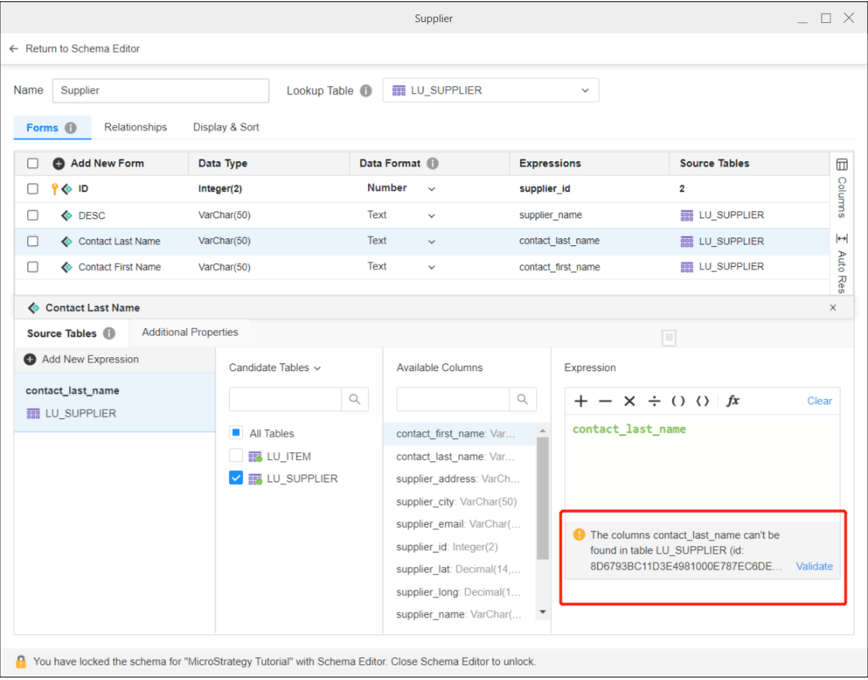
When validating an attribute form expression, that is mapped to a column, the following error appears:
ka04W000000uGbIQAU_0EM4W00000911Rq.jpeg

The columns contact_last_name can't be found in table LU_SUPPLIER.
In order to avoid this error, the same column name can be picked from the list of available columns and moved to the expressions panel.
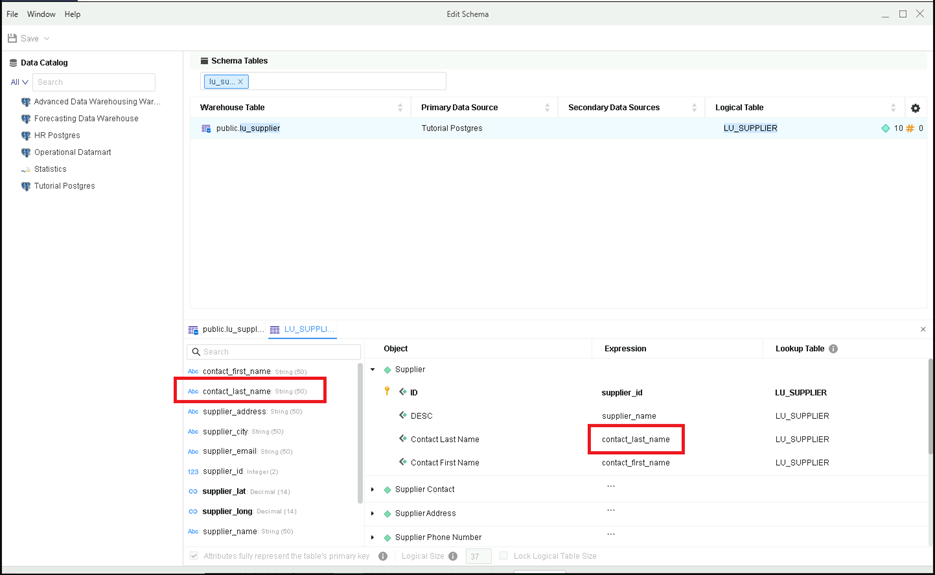
Another symptom of the same issue can be observed when editing Schema, as the attribute expression column does not seem to be mapped to the table column (it should appear in bold):
ka04W000000uGbIQAU_0EM4W00000911SZ.jpeg

CAUSE:
The behavior observed occurs due to the presence of duplicate columns in the project.
ACTION:
Contact Strategy Technical Support in order to get assistance removing the duplicate columns from the project.


Comment

0 comments

Details

Knowledge Article

Published:

October 3, 2023

Last Updated:

October 3, 2023