EducationSoftwareStrategy.com
StrategyCommunity

Knowledge Base

Product

Community

Knowledge Base

TopicsBrowse ArticlesDeveloper Zone

Product

Download SoftwareProduct DocumentationSecurity Hub

Education

Tutorial VideosSolution GalleryEducation courses

Community

GuidelinesGrandmastersEvents
x_social-icon_white.svglinkedin_social-icon_white.svg
Strategy logoCommunity

© Strategy Inc. All Rights Reserved.

LegalTerms of UsePrivacy Policy
  1. Home
  2. Topics

KB484028: The error, "Request method 'POST' not supported," is received when accessing the Community Connectors setup page


Jianglong Ma

Software Engineer, Principal • MicroStrategy


This article explains why the error, "Request method 'POST' not supported," appears when launching the Community Connectors page on Chromium-based browsers (Google Chrome, Microsoft Edge) for the first time. This article also provides a solution to avoid this error.

Description


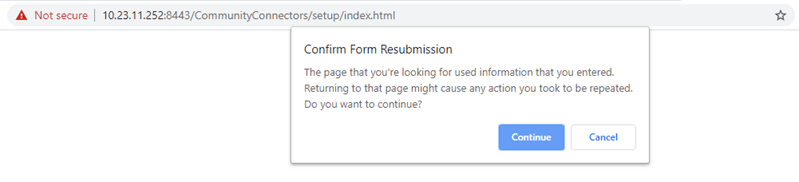
When accessing the Community Connectors setup page, CommunityConnectors/setup/index.html, you may see the following page at first.
ka02R000000g6ALQAY_0EM2R000000nlZH.jpeg

After clicking the Continue button, you see the following error.

ka02R000000g6ALQAY_0EM2R000000nlZM.jpeg

Why is this happening? 

You are encountering this issue due to a defect on Chromium-based browsers.
After clicking the Continue button in the Confirm Form Resubmission dialog, the browser resends the request using POST method, while GET is expected.

ka02R000000g6ALQAY_0EM2R000000nlZb.jpeg

Solution


Close and revisit the Community Connectors setup page. 


Comment

0 comments

Details

Knowledge Article

Published:

February 7, 2020

Last Updated:

February 7, 2020