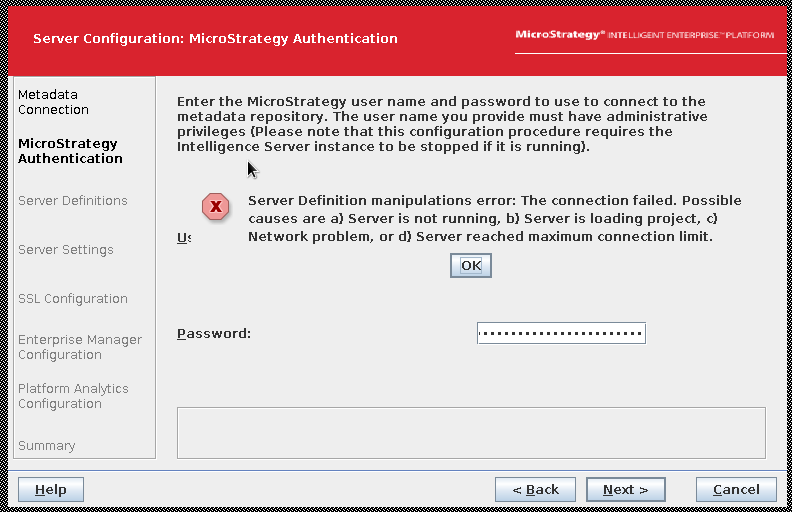
After the migration of metadata tables from one metadata database to another, the error message ‘The connection failed. Possible causes are a) Server is not running, b) Server is loading project, c) Network problem, or d) Server reached maximum connection limit.’ is shown when trying to point the I-Server to it via Configuration Wizard.
1. Migrate metadata tables to a new database server via any 3rd party tools, for example Apache Nifi, which move all tables from one repository to another.
2. Launch Configuration Wizard, select ‘Configure Intelligent Server’.
3. In ‘Metadata Connection’ tab, select the DSN pointing to the database containing the migrated metadata tables. Click Next
4. In ‘Strategy Authentication’ tab, provide the credentials for the Administrator user – the error below is shown
CAUSE
In order to migrate metadata tables from one metadata database to another, Strategy team recommend one of the following methods:
Currently, it is not supported the usage of other 3rd party tools, for example Apache Nifi, which would directly move all tables from one repository to another; before the migration, new empty metadata shells must be created in the target database to properly populate the table DSSMDSYSPROP which contains metadata system properties. The lack of this step generates an inconsistency scenario, where metadata tables, in the target database platform, are still pointing to the system properties of the source ones, making impossible to complete the configuration of I-Server to it in Configuration Wizard
ACTION:
This is an expected behavior; use one of the supported method to migrate metadata tables to a new database server.
