EducationSoftwareStrategy.com
StrategyCommunity

Knowledge Base

Product

Community

Knowledge Base

TopicsBrowse ArticlesDeveloper Zone

Product

Download SoftwareProduct DocumentationSecurity Hub

Education

Tutorial VideosSolution GalleryEducation courses

Community

GuidelinesGrandmastersEvents
x_social-icon_white.svglinkedin_social-icon_white.svg
Strategy logoCommunity

© Strategy Inc. All Rights Reserved.

LegalTerms of UsePrivacy Policy
  1. Home
  2. Topics

KB441204: The grid is not reset properly when running a report applying the VLDB property "Include higher-level related attribute in metric level (deprecated)" in MicroStrategy 10.4


Xiaodan Ma

Senior Cloud Support Engineer III • MicroStrategy


The grid is not reset properly when running a report applying the VLDB property "Include higher-level related attribute in metric level (deprecated)" in MicroStrategy 10.4

SYMPTOM:
To fix the issue mentioned in KB30419  the VLDB property "Include higher-level related attribute in metric level (deprecated)" is applied to the report.  But the grid is not reset properly when adding and removing a derived element.
STEPS TO REPRODUCE:
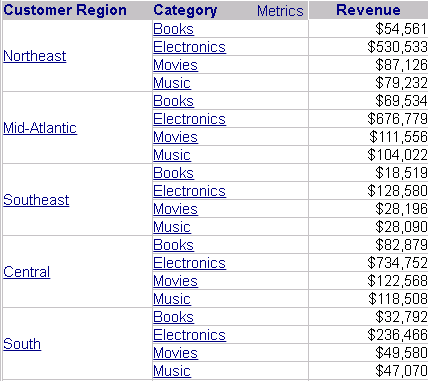
  • In Web, create a report with the attributes Customer Region, Category, and the metric Revenue, as shown below:
ka04W000001IsRBQA0_0EM44000000WVqV.png
  • Go to Developer, edit the report, open Data menu > VLDB properties.  Check "Include higher-level related attribute in metric level (deprecated)" under Metric Level Determination and save.
  • Run the report in Web, right-click the Category attribute on the grid and create a derived element, as shown below:
ka04W000001IsRBQA0_0EM44000000WVqa.png
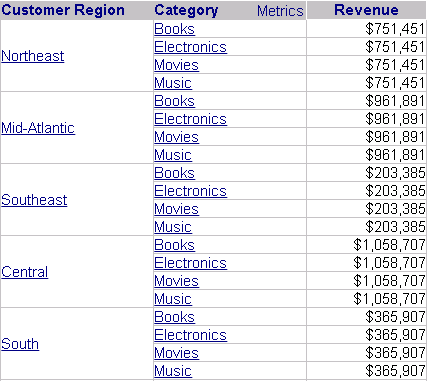
  • Right-click the Category attribute on the grid and clear the derived element.  Note that the grid is not reset correctly, as shown below:
ka04W000001IsRBQA0_0EM44000000WVqf.png

CAUSE:
This is a known issue with Strategy 10.4.
ACTION:
This VLDB setting has been deprecated. 


Comment

0 comments

Details

Knowledge Article

Published:

July 2, 2018

Last Updated:

August 27, 2019