EducationSoftwareStrategy.com
StrategyCommunity

Knowledge Base

Product

Community

Knowledge Base

TopicsBrowse ArticlesDeveloper Zone

Product

Download SoftwareProduct DocumentationSecurity Hub

Education

Tutorial VideosSolution GalleryEducation courses

Community

GuidelinesGrandmastersEvents
x_social-icon_white.svglinkedin_social-icon_white.svg
Strategy logoCommunity

© Strategy Inc. All Rights Reserved.

LegalTerms of UsePrivacy Policy
  1. Home
  2. Topics

KB483063: “… The input URL ‘file://path/file.ext’ does not meet the criteria set in the ‘Allowed URLs’ ...” in MicroStrategy Web message on data import from file-based URL


Willian Tomazini

Senior Cloud Support Engineer I • MicroStrategy


This article describes how to successfully import data from file-based URLs when “… The input URL ‘file://path/data.txt’ does not meet the criteria set in the ‘Allowed URLs’ list that is controlled by the administrator” shows up in MicroStrategy Web even though the ‘Allowed URLs’ are properly configured.

SYMPTOM:
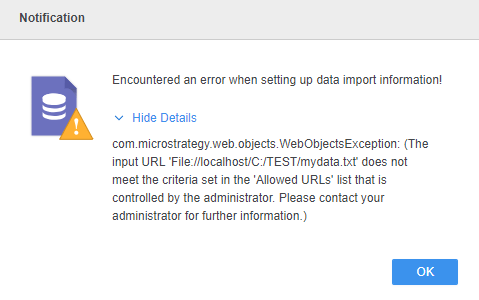
“… The input URL ‘file:// path/data.txt’ does not meet the criteria set in the ‘Allowed URLs’ list that is controlled by the administrator” message shows up after configuring an Intelligence Server machine path in the ‘file://’ format on the ‘Allowed URLs’ list:
ka04W000001IvDBQA0_0EM44000000gi2T.jpeg


Encountered an error when setting up data import information!
com.Strategy.web.objects.WebObjectsException: (The input URL
'file://localhost/C:/TEST/mydata.txt' does not meet
the criteria set in the 'Allowed URLs' list that is controlled by the
administrator. Please contact your administrator for further information.)
 
ACTION
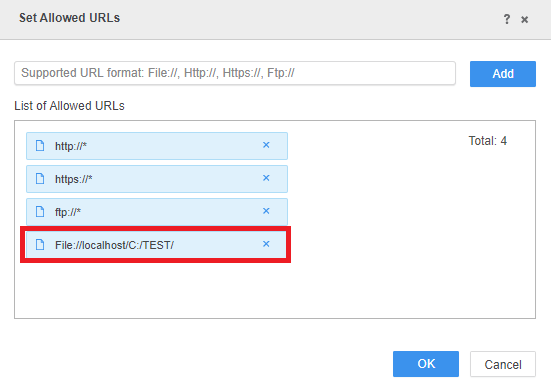
If the desired path on 'Allowed URLs' list contains an asterisk (*) as a wildcard, remove it from the desired file-based path and save the configuration as in the image below:

ka04W000001IvDBQA0_0EM44000000gi2Y.jpeg

KB483063


Comment

0 comments

Details

Knowledge Article

Published:

March 29, 2019

Last Updated:

March 29, 2019