EducationSoftwareStrategy.com
StrategyCommunity

Knowledge Base

Product

Community

Knowledge Base

TopicsBrowse ArticlesDeveloper Zone

Product

Download SoftwareProduct DocumentationSecurity Hub

Education

Tutorial VideosSolution GalleryEducation courses

Community

GuidelinesGrandmastersEvents
x_social-icon_white.svglinkedin_social-icon_white.svg
Strategy logoCommunity

© Strategy Inc. All Rights Reserved.

LegalTerms of UsePrivacy Policy
  1. Home
  2. Topics

KB441770: The input URL 'file://xxx/yyy.xlsx' does not met the criteria set in the 'Allowed URLs' list that is controlled by administrator received when publishing a Cube


Fernando Iwamoto

Senior Cloud Support Engineer III • MicroStrategy


This document shows an issue when republish a Cube from Data import in MicroStrategy Web. This document provides the steps to set the allowed URLs so the cube can be republished.

SYMPTOM:
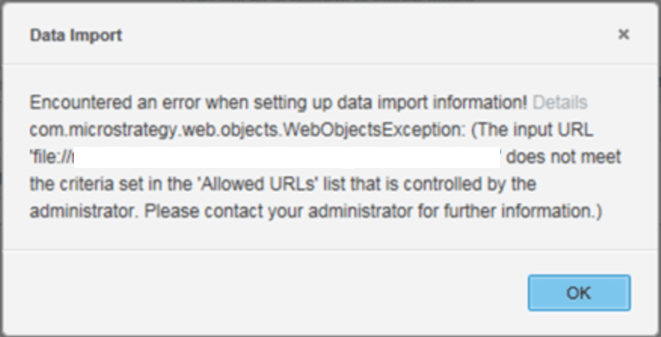
When republishing a Cube from Data Import the following error message pop up in the screen:
ka0PW0000000v1VYAQ_0EM44000000Qppc.png


Data Import
Encountered an error when setting up data import information! Details
com.Strategy.web.objects.WebObjectsException: (The input URL
'file://xxx/file.xlsx' does not meet
the criteria set in the 'Allowed URLs' list that is controlled by the
administrator. Please contact your administrator for further information.)
CAUSE:
This is an expected behavior since the URL was not set as Allowed in Data import.
ACTION:
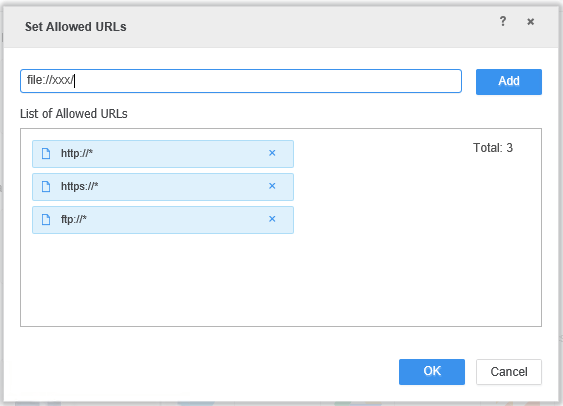
​Go to Add External Data > File from URL> Set Allowed URLs and add the required URL

ka0PW0000000v1VYAQ_0EM44000000Qpqz.png

  
KB441770


Comment

0 comments

Details

Knowledge Article

Published:

September 21, 2018

Last Updated:

February 26, 2024