EducationSoftwareStrategy.com
StrategyCommunity

Knowledge Base

Product

Community

Knowledge Base

TopicsBrowse ArticlesDeveloper Zone

Product

Download SoftwareProduct DocumentationSecurity Hub

Education

Tutorial VideosSolution GalleryEducation courses

Community

GuidelinesGrandmastersEvents
x_social-icon_white.svglinkedin_social-icon_white.svg
Strategy logoCommunity

© Strategy Inc. All Rights Reserved.

LegalTerms of UsePrivacy Policy
  1. Home
  2. Topics

KB438893:"The metadata you selected has not been upgraded to the current version of Intelligence Server" message occurs when configuring the Intelligence Server to a new Access metadata


Amanda Gordon

Quality Engineer, Senior • MicroStrategy


SUMMARY:
The issue described in this document has been classified as a defect by Strategy.  This issue only affects new metadata shells created in Microsoft Access databases.  A code fix for this issue is not available in current releases but is being reviewed for a future Strategy release.  A workaround is provided int he current document.
DESCRIPTION:
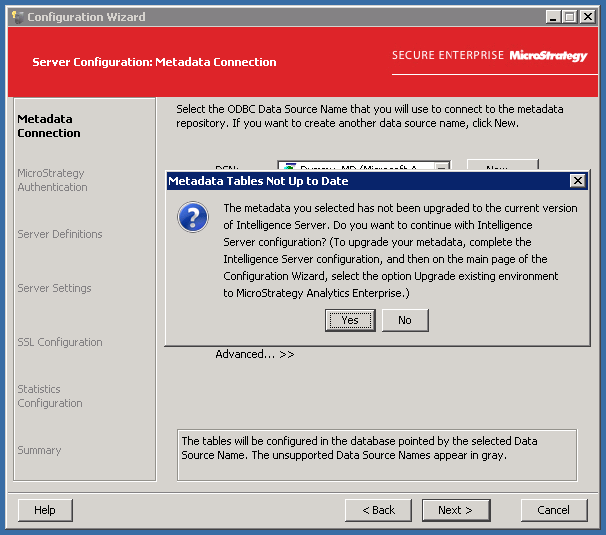
In Strategy 10.4 Hotfix 4 or Hotfix 5, Strategy 10.8, and Strategy 10.9, users may configure a new metadata shell in a Microsoft Access database.  When they try to configure the Intelligence Server to this metadata shell, they may see the following error:
ka02R000000kV4NQAU_0EM44000000Q7AH.png


The metadata you selected has not been upgraded to the current version of Intelligence Server. Do you want to continue with Intelligence Server configuration? (To upgrade your metadata, complete the Intelligence Server configuration, and then on the main page of the Configuration Wizard, select the option Upgrade existing environment to Strategy Analytics Enterprise.)
 
CAUSE:
The metadata shell in Microsoft Access is created with an incorrect SCHEMAVERSION in the DSSMDSYSPROP table.
ACTION:
Currently this issue is being reviewed by Strategy for a potential code fix on an upcoming Strategy release.
 
WORKAROUND:
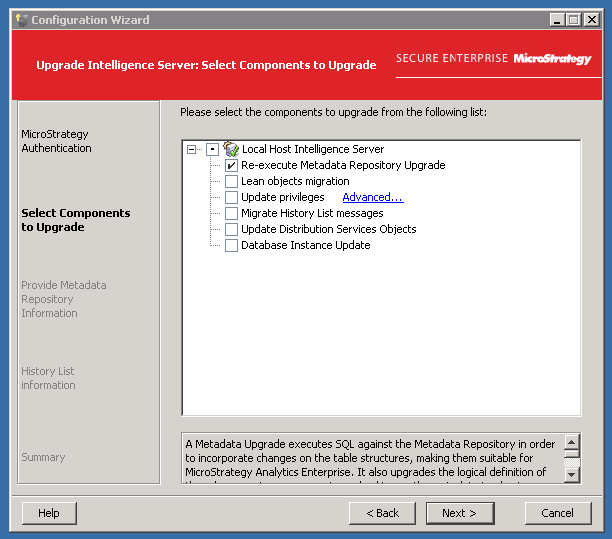
Upgrade the metadata in Configuration Wizard and choose the option "Re-execute Metadata Repository Upgrade".  This will fix the value for SCHEMAVERSION in the DSSMDSYSPROP table.

ka02R000000kV4NQAU_0EM44000000Q7Ji.png


38893 KB438893


Comment

0 comments

Details

Knowledge Article

Published:

November 16, 2017

Last Updated:

December 4, 2018