EducationSoftwareStrategy.com
StrategyCommunity

Knowledge Base

Product

Community

Knowledge Base

TopicsBrowse ArticlesDeveloper Zone

Product

Download SoftwareProduct DocumentationSecurity Hub

Education

Tutorial VideosSolution GalleryEducation courses

Community

GuidelinesGrandmastersEvents
x_social-icon_white.svglinkedin_social-icon_white.svg
Strategy logoCommunity

© Strategy Inc. All Rights Reserved.

LegalTerms of UsePrivacy Policy
  1. Home
  2. Topics

KB442428: Three question marks ("???") displayed in SQL View after Intelligent Cube published with MicroStrategy Developer 10.4 and above


Mari Sugimura

Senior Cloud Support Engineer III • MicroStrategy


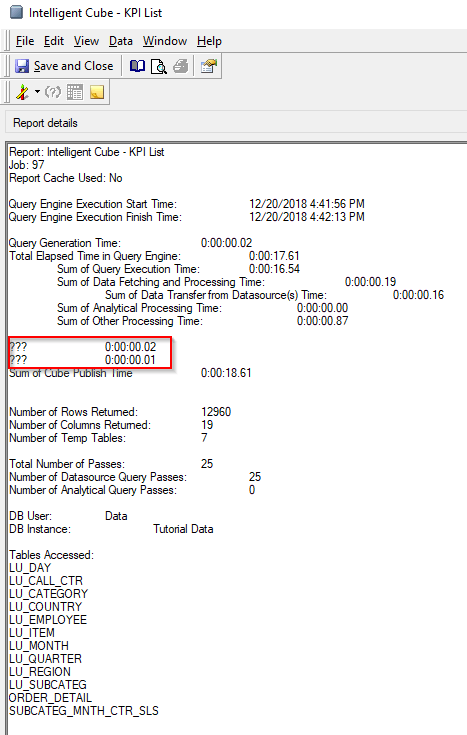
This article explained the known issue that there are three question marks displayed in SQL View of Intelligent Cube after published and what they are actually supposed to be displayed.

SYMPTOM:
"View SQL" option of Intelligent Cube has two lines with three question marks like "???" as shown below:
ka02R000000kV2sQAE_0EM44000000RZL5.png

STEPS TO REPRODUCE:
1. Create an Intelligent Cube object using Strategy Developer and publish the cube. 
2. View SQL and confirm Cube statistics.
CAUSE:
This issue is logged as a defect with Strategy 10.4 and above. 
ACTION:
These two lines should be read as follows:
Sum of Template Calculate Time
Sum of AE Data Persisting Time
KB442428


Comment

0 comments

Details

Knowledge Article

Published:

December 20, 2018

Last Updated:

December 20, 2018