EducationSoftwareStrategy.com
StrategyCommunity

Knowledge Base

Product

Community

Knowledge Base

TopicsBrowse ArticlesDeveloper Zone

Product

Download SoftwareProduct DocumentationSecurity Hub

Education

Tutorial VideosSolution GalleryEducation courses

Community

GuidelinesGrandmastersEvents
x_social-icon_white.svglinkedin_social-icon_white.svg
Strategy logoCommunity

© Strategy Inc. All Rights Reserved.

LegalTerms of UsePrivacy Policy
  1. Home
  2. Topics

KB440971: Time zone issue in Web preferences


Community Admin

• Strategy


This Knowledge Base article describes a known limitation of MicroStrategy Web application that doesn’t allow users to choose (GMT +5.00) Pakistan/Lahore time zone due to an error.

SYMPTOM
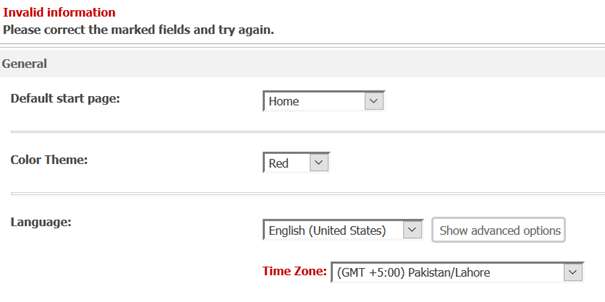
When users go to Web Preferences -> [Language] section, choose Time Zone: GMT+5 Pakistan/Lahore and try to save their changes, they may face the following error:
Invalid Information
Please correct the marked fields and try again.
ka04W000000ObWjQAK_0EM44000000WRF1.png

CAUSE
This is an identified limitation of Strategy Web application and is not related to any end-user/client/browser settings.
 
ACTION
This reported defect has been already brought to Strategy’s attention and the fix is implemented in upcoming version 11.1. Please consider upgrading to benefit from the fix.
Workaround
The issue can be fixed by modifying the sys_definition.xml which handles the validation. The file is located at <MSTR-Web root directory>/WEB-INF/xml/sys_definitions.xml. Below are the steps:

  1. On the Strategy Web machine navigate to WEB-INF/xml
  2. Open the sys_definitions.xml
  3. Locate the following block of code
    <allowableValue n="26" des="(GMT +5:00) Pakistan/Lahore"
          des-id="mstrWeb.2628" v="1" />
  4. Replace it with the following block of code
    <allowableValue n="26" des="(GMT +5:00) Pakistan/Lahore"
          des-id="mstrWeb.2628" v="PLT" />
  5. Save and close the file
  6. Restart your Web Application Server for the change to take effect

Comment

0 comments

Details

Knowledge Article

Published:

June 7, 2018

Last Updated:

September 13, 2018