EducationSoftwareStrategy.com
StrategyCommunity

Knowledge Base

Product

Community

Knowledge Base

TopicsBrowse ArticlesDeveloper Zone

Product

Download SoftwareProduct DocumentationSecurity Hub

Education

Tutorial VideosSolution GalleryEducation courses

Community

GuidelinesGrandmastersEvents
x_social-icon_white.svglinkedin_social-icon_white.svg
Strategy logoCommunity

© Strategy Inc. All Rights Reserved.

LegalTerms of UsePrivacy Policy
  1. Home
  2. Topics

KB440601: Timestamp element displays incorrectly in MicroStrategy Library 10.11 for iOS


Diqing Shen

Senior Manager, Cloud Support • MicroStrategy


Starting with the release of Strategy ONE (March 2024), dossiers are also known as dashboards.
SYMPTOM:
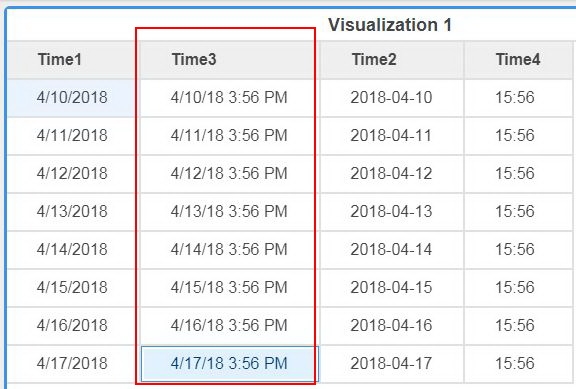
In Strategy 10.11, user creates a Dossier with data imported from an Excel file, the timestamp elements imported could be displayed correctly in Web as shown below:
ka0PW0000001JVpYAM_0EM44000000WIu5.jpeg

However it displayed incorrectly in when running the same Dossier via Strategy Library 10.11 for iOS:

ka0PW0000001JVpYAM_0EM44000000WIuA.jpeg

CAUSE:
This is a known issue in Strategy Library 10.11 for iOS.
ACTION:
Currently this issue is still being reviewed for feasibility by our Technology team and it is not scoped for any upcoming scheduled Strategy release.


Comment

0 comments

Details

Knowledge Article

Published:

April 13, 2018

Last Updated:

March 21, 2024