EducationSoftwareStrategy.com
StrategyCommunity

Knowledge Base

Product

Community

Knowledge Base

TopicsBrowse ArticlesDeveloper Zone

Product

Download SoftwareProduct DocumentationSecurity Hub

Education

Tutorial VideosSolution GalleryEducation courses

Community

GuidelinesGrandmastersEvents
x_social-icon_white.svglinkedin_social-icon_white.svg
Strategy logoCommunity

© Strategy Inc. All Rights Reserved.

LegalTerms of UsePrivacy Policy
  1. Home
  2. Topics

KB439120: Tooltips in MicroStrategy Web 10.8 and 10.9 show line break characters


Community Admin

• Strategy


Tooltips in MicroStrategy Web 10.8 and 10.9 show line break and other special characters

SUMMARY
In Strategy Web 10.8 - 10.10 a display issue has been identified for handling special characters such as line breaks for tooltips. This defect will be addressed in an upcoming release of Strategy.
 
STEPS TO REPRODUCE
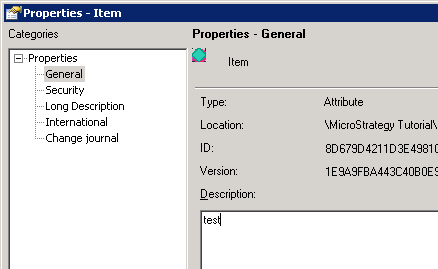
  • In Strategy Developer, edit the properties of an attribute and provide a description
ka04W000000OayRQAS_0EM44000000Q99B.png
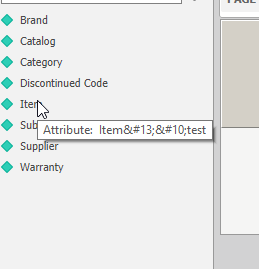
  • In Strategy Web, Create a new report and browse to this attribute in the object browser
ka04W000000OayRQAS_0EM44000000Q99L.png
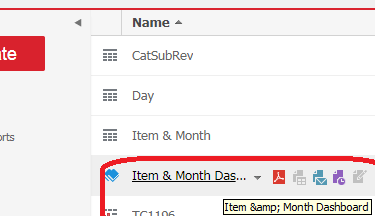
  • Note that instead of a new line for the description field, the characters  &10 are displayed between the attribute name and description.
  • This behavior can be seen in several other tooltips containing special characters.
ka04W000000OayRQAS_0EM44000000Q99p.png

CAUSE
These additional symbols represent carriage return and line feed in ASCII. Together they trigger a line break in Windows environments. In Strategy Web 10.8 - 10.10 these special characters are improperly handled for tooltip displays and displayed instead of remaining hidden.
 
ACTION
Currently this issue has been scoped to be addressed via a code fix in an upcoming Strategy release.  KB439120


Comment

0 comments

Details

Knowledge Article

Published:

November 30, 2017

Last Updated:

January 1, 2019