EducationSoftwareStrategy.com
StrategyCommunity

Knowledge Base

Product

Community

Knowledge Base

TopicsBrowse ArticlesDeveloper Zone

Product

Download SoftwareProduct DocumentationSecurity Hub

Education

Tutorial VideosSolution GalleryEducation courses

Community

GuidelinesGrandmastersEvents
x_social-icon_white.svglinkedin_social-icon_white.svg
Strategy logoCommunity

© Strategy Inc. All Rights Reserved.

LegalTerms of UsePrivacy Policy
  1. Home
  2. Topics

Transformation Metric with multiple transformation levels calculated using the lowest level after upgraded to Data Engine version 2019


Qinyi Chen

Quality Engineer, Principal • Strategy


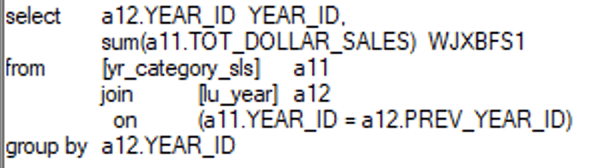
After user upgraded the project to MicroStrategy 10.11 and change the Data Engine version to 2019, the reports which use transformation metric with multiple transformation levels show incorrect data and SQL as the data were retrieved from lower level fact tables, e.g, the fact table used before was at Year level, now become at the Day level. Both SQL and Data could be affected. This is addressed in MicroStrategy 2021 Update 5 with Data Engine Version 2021.

Symptom


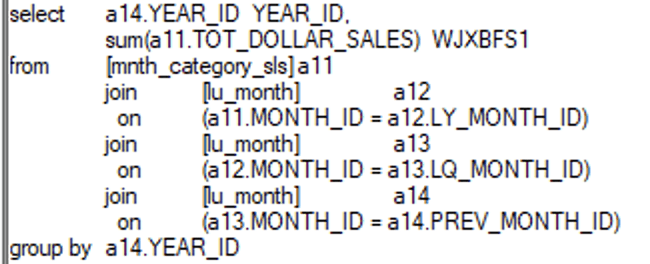
When a report uses a Transformation Metric with multiple transformation levels(e.g. [Last Year's], [Last Quarter's], [Last Month's]), Engine will pick the best fact tables with metric level. Since Strategy 10.11 and Data Engine Version 2019, Engine picks fact tables with lower levels, e.g., when Year level fact table is available and can be used, the Engine picks a table at the Day level. Both SQL and Data could be affected by this issue. 
Reproduce

  • Use Strategy Tutorial Project
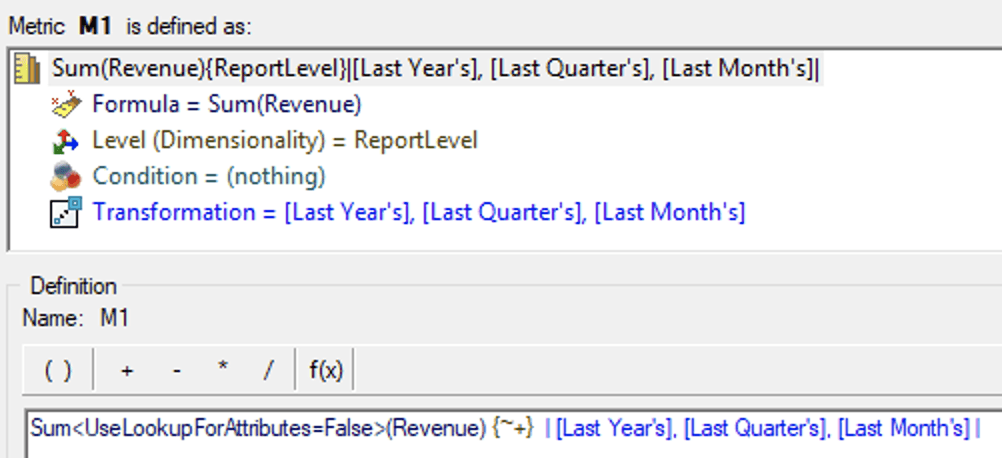
  • Create a Transformation Metric M1 with multiple transformation levels
ka04W000001Iuk2QAC_0EM4W000004XMTP.jpeg
  • Create a Report and put Year and M1 on the template
  • View SQL:
    • In Data Engine 10.4 (join at year level table: yr_category_sls)
ka04W000001Iuk2QAC_0EM4W000004XMcv.jpeg
    • In Data Engine 2019 (join at month level table, mnth_category_sls)
ka04W000001Iuk2QAC_0EM4W000004XMdF.jpeg

Cause


When there is more than one Transformation level, the Data Engine incorrectly picked an attribute that is lower than the optimal choice and thus could yield less optimal data and worse performance.
This is a known issue starting from Strategy 10.11 with Data Engine Version 2019 or above.

Solution


To fix the data issue, upgrade to Strategy 2021 Update 5 and set the Data Engine Version to be 2021. To set Data Engine Version, refer to How to set Date Engine Version.
After the fix, the behavior will be reverted back to the same as Data Engine 10.4
Strategy Internal Notes:
Strategy Internal Reference number for this technical note is DE205728.


Comment

0 comments

Details

Knowledge Article

Published:

January 12, 2022

Last Updated:

January 18, 2022