EducationSoftwareStrategy.com
StrategyCommunity

Knowledge Base

Product

Community

Knowledge Base

TopicsBrowse ArticlesDeveloper Zone

Product

Download SoftwareProduct DocumentationSecurity Hub

Education

Tutorial VideosSolution GalleryEducation courses

Community

GuidelinesGrandmastersEvents
x_social-icon_white.svglinkedin_social-icon_white.svg
Strategy logoCommunity

© Strategy Inc. All Rights Reserved.

LegalTerms of UsePrivacy Policy
  1. Home
  2. Topics

KB484143: "Trim leading and trailing white space for warehouse element data" option in Web Preference does not work for dossiers or documents in Presentation mode.


Min Zheng

Senior Manager, Cloud Support • MicroStrategy


This article explains why the "Trim leading and trailing white space for warehouse element data" setting is not properly applied to documents and dossiers in Presentation mode. This article also provides a workaround to avoid this behavior.

Starting with the release of Strategy ONE (March 2024), dossiers are also known as dashboards.

Description


The Trim leading and trailing white space for warehouse element data setting in Web Preferences does not work for dossiers and documents in Presentation mode.
Even with the setting enabled, the white space displays in a dossier in Presentation mode. 

 

ka0PW0000001JbuYAE_0EM2R0000019KZm.jpeg
ka0PW0000001JbuYAE_0EM2R0000019KZr.jpeg


The white space also displays in a document in Presentation mode. 
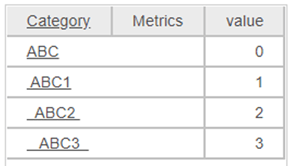
ka0PW0000001JbuYAE_0EM2R0000019KZw.jpeg


The setting works properly for a document in Editable mode.
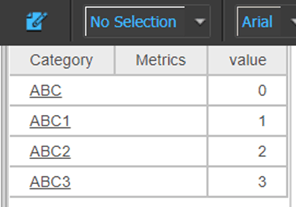
ka0PW0000001JbuYAE_0EM2R0000019Ka1.jpeg

Why is this happening?


The Trim leading and trailing white space for warehouse element data setting is designed for only Interactive mode (deprecated) and Editable mode on versions prior to Strategy 10.x. The setting will not work as expected for dossiers and documents in Presentation mode due to the design. An enhancement has been logged for this feature.
 

Solution

Currently, this is still being reviewed for feasibility by our Technology team and it is not scoped for any upcoming scheduled Strategy release. Please see the following workaround to resolve this issue.

Workaround


The trim function can be used in the formula to trim leading and trailing white space. For details on the Trim function, click here.
Dossier in Presentation mode
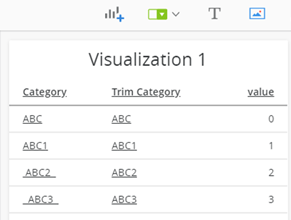
ka0PW0000001JbuYAE_0EM2R0000019KaB.jpeg

Document in Presentation mode

ka0PW0000001JbuYAE_0EM2R0000019KaG.jpeg

Comment

0 comments

Details

Knowledge Article

Published:

March 25, 2020

Last Updated:

March 21, 2024