EducationSoftwareStrategy.com
StrategyCommunity

Knowledge Base

Product

Community

Knowledge Base

TopicsBrowse ArticlesDeveloper Zone

Product

Download SoftwareProduct DocumentationSecurity Hub

Education

Tutorial VideosSolution GalleryEducation courses

Community

GuidelinesGrandmastersEvents
x_social-icon_white.svglinkedin_social-icon_white.svg
Strategy logoCommunity

© Strategy Inc. All Rights Reserved.

LegalTerms of UsePrivacy Policy
  1. Home
  2. Topics

Troubleshooting Intelligence Server's new governing mechanism - Part 1: Job throttling


Sigit Pambudi

Software Architect • MicroStrategy


This article offers the troubleshooting guideline for the new server governing mechanism (part 1). This article explains the throttling mechanism used to prevent the Intelligence Server from being exhausted by Smart Download jobs.

Starting with the release of Strategy ONE (March 2024), dossiers are also known as dashboards.
This article outlines the following topics for troubleshooting the new server governing mechanism, throttling: 

  • What is the throttling mechanism? 
  • Troubleshooting workflow
  • How to verify that throttling is working properly
  • How to tune the criteria for throttling

What is Throttling?


During its operation, the Intelligence Server receives various types of requests. This includes time-critical ones, such as interactive dossier manipulations, as well as background requests, such as Smart Download inquiries from Library on iOS. When the Server is busy, it is ideal to prioritize the processing and execution of the time-bound interactive requests over the background ones, so that the processing time of the former can be maintained.
To prioritize execution and maintain the performance of interactive requests, Strategy 2021 introduces a new, automatic Server governing mechanism. The first part of this governing is to provide a throttling algorithm that rejects extraneous background requests, so that more system resources become available for interactive requests. This job throttling algorithm is designed to maintain the response time performance of interactive requests and only occurs when the Server is in a busy status. To this end, the Server is said to be busy if any of the followings is satisfied.

  • The available (free) machine memory is less than 20%.
  • More than 50% of the processing units (PUs) for processing incoming requests/commands are occupied. By default, the Server has 40 of such PUs (also known as “Command PUs“).
  • The number of waiting jobs (i.e., those arrived at the Server but has not been executed) is larger than 50% of the number of CPU cores.


Note that background requests are rejected only if the server is busy (with the criteria mentioned above). Otherwise (i.e., when Server is idle), all background requests are still processed and provided full opportunity to occupy Server resources.
When not configured properly, however, job throttling may not deliver the promised response time improvement. This article provides a troubleshooting guideline for job throttling to prevent this issue.
 

Troubleshooting Workflow


To troubleshoot:

  1. Find the "Symptom" that matches your problem.
  2. Working from top to bottom, examine the “Possible Cause” and perform the “How to Confirm the Root Cause.”
  3. Implement the “How to Fix the Problem“ step(s).

Symptom A: Degraded throughput for interactive jobs when I-Server received many Smart Download request. 


Right click an Object → Get Info (need Read permission on the Object). Users without this privilege will not see the Advanced Settings tab.Right click an Object → Get Info (need Read permission on the Object). Users without this privilege will not see the Edit icon for Properties on Advanced Settings tab.NameDescriptionBrowseA User/User Group with this right should be informed about the existence of the target object when browsing a list of objects.ReadA User/User Group with this right should be able to examine the complete definition of the target object in metadata or in memory.
 ExecuteA User/User Group with this right should be permitted to execute queries built using the target object.UseA User/User Group with this right should be permitted to include references to the target object in the definition of other objects.ModifyA User/User Group with this right is permitted to modify the target object and save the modification to metadata.DeleteA User/User Group with this right is permitted to delete the target object from metadata.Control*A User/User Group with this right is permitted to modify the access control list of the target. Display NamePermissions IncludedView Browse, Read, Use, and ExecuteModifyEverything in View, Write, and DeleteFull ControlAll PermissionsDenyNo Permissions Possible CauseHow to Confirm the Root CauseHow to Fix the Problem1Job throttling is disabled


Right click an Object → Get Info (need Read permission on the Object). Users without this privilege will not see the Advanced Settings tab.Right click an Object → Get Info (need Read permission on the Object). Users without this privilege will not see the Edit icon for Properties on Advanced Settings tab.NameDescriptionBrowseA User/User Group with this right should be informed about the existence of the target object when browsing a list of objects.ReadA User/User Group with this right should be able to examine the complete definition of the target object in metadata or in memory.
 ExecuteA User/User Group with this right should be permitted to execute queries built using the target object.UseA User/User Group with this right should be permitted to include references to the target object in the definition of other objects.ModifyA User/User Group with this right is permitted to modify the target object and save the modification to metadata.DeleteA User/User Group with this right is permitted to delete the target object from metadata.Control*A User/User Group with this right is permitted to modify the access control list of the target. Display NamePermissions IncludedView Browse, Read, Use, and ExecuteModifyEverything in View, Write, and DeleteFull ControlAll PermissionsDenyNo Permissions Possible CauseHow to Confirm the Root CauseHow to Fix the Problem1Job throttling is disabled


Right click an Object → Get Info (need Read permission on the Object). Users without this privilege will not see the Advanced Settings tab.Right click an Object → Get Info (need Read permission on the Object). Users without this privilege will not see the Edit icon for Properties on Advanced Settings tab.NameDescriptionBrowseA User/User Group with this right should be informed about the existence of the target object when browsing a list of objects.ReadA User/User Group with this right should be able to examine the complete definition of the target object in metadata or in memory.
 ExecuteA User/User Group with this right should be permitted to execute queries built using the target object.UseA User/User Group with this right should be permitted to include references to the target object in the definition of other objects.ModifyA User/User Group with this right is permitted to modify the target object and save the modification to metadata.DeleteA User/User Group with this right is permitted to delete the target object from metadata.Control*A User/User Group with this right is permitted to modify the access control list of the target. Display NamePermissions IncludedView Browse, Read, Use, and ExecuteModifyEverything in View, Write, and DeleteFull ControlAll PermissionsDenyNo Permissions Possible CauseHow to Confirm the Root CauseHow to Fix the Problem1Job throttling is disabled


Right click an Object → Get Info (need Read permission on the Object). Users without this privilege will not see the Advanced Settings tab.Right click an Object → Get Info (need Read permission on the Object). Users without this privilege will not see the Edit icon for Properties on Advanced Settings tab.NameDescriptionBrowseA User/User Group with this right should be informed about the existence of the target object when browsing a list of objects.ReadA User/User Group with this right should be able to examine the complete definition of the target object in metadata or in memory.
 ExecuteA User/User Group with this right should be permitted to execute queries built using the target object.UseA User/User Group with this right should be permitted to include references to the target object in the definition of other objects.ModifyA User/User Group with this right is permitted to modify the target object and save the modification to metadata.DeleteA User/User Group with this right is permitted to delete the target object from metadata.Control*A User/User Group with this right is permitted to modify the access control list of the target. Display NamePermissions IncludedView Browse, Read, Use, and ExecuteModifyEverything in View, Write, and DeleteFull ControlAll PermissionsDenyNo Permissions Possible CauseHow to Confirm the Root CauseHow to Fix the Problem1Job throttling is disabled


Right click an Object → Get Info (need Read permission on the Object). Users without this privilege will not see the Advanced Settings tab.Right click an Object → Get Info (need Read permission on the Object). Users without this privilege will not see the Edit icon for Properties on Advanced Settings tab.NameDescriptionBrowseA User/User Group with this right should be informed about the existence of the target object when browsing a list of objects.ReadA User/User Group with this right should be able to examine the complete definition of the target object in metadata or in memory.
 ExecuteA User/User Group with this right should be permitted to execute queries built using the target object.UseA User/User Group with this right should be permitted to include references to the target object in the definition of other objects.ModifyA User/User Group with this right is permitted to modify the target object and save the modification to metadata.DeleteA User/User Group with this right is permitted to delete the target object from metadata.Control*A User/User Group with this right is permitted to modify the access control list of the target. Display NamePermissions IncludedView Browse, Read, Use, and ExecuteModifyEverything in View, Write, and DeleteFull ControlAll PermissionsDenyNo Permissions Possible CauseHow to Confirm the Root CauseHow to Fix the Problem1Job throttling is disabled


Right click an Object → Get Info (need Read permission on the Object). Users without this privilege will not see the Advanced Settings tab.Right click an Object → Get Info (need Read permission on the Object). Users without this privilege will not see the Edit icon for Properties on Advanced Settings tab.NameDescriptionBrowseA User/User Group with this right should be informed about the existence of the target object when browsing a list of objects.ReadA User/User Group with this right should be able to examine the complete definition of the target object in metadata or in memory.
 ExecuteA User/User Group with this right should be permitted to execute queries built using the target object.UseA User/User Group with this right should be permitted to include references to the target object in the definition of other objects.ModifyA User/User Group with this right is permitted to modify the target object and save the modification to metadata.DeleteA User/User Group with this right is permitted to delete the target object from metadata.Control*A User/User Group with this right is permitted to modify the access control list of the target. Display NamePermissions IncludedView Browse, Read, Use, and ExecuteModifyEverything in View, Write, and DeleteFull ControlAll PermissionsDenyNo Permissions Possible CauseHow to Confirm the Root CauseHow to Fix the Problem1Job throttling is disabled

1. On the I-Server machine, make sure that the Kernel → Info logging is enabled. To verify the throttling feature is indeed disabled, find the following NO entry in DSSErrors.log. [Kernel][Info] ... Registry setting value for enabling predictive request throttling: NO.

2. Enable the Rejected Count of the Predictive Caching Jobs performance counter using Strategy Diagnostics and Performance Logging Tool (MADPCfg_64.exe in Windows and mstrdiag in Linux). A zero amount here may also indicate that the throttling feature is disabled.

Note: On the other hand, throttling is enabled if you encounter any of the followings:


2Predictive caching jobs are not being throttled when I-Server is in busy status


2Predictive caching jobs are not being throttled when I-Server is in busy status


2Predictive caching jobs are not being throttled when I-Server is in busy status


3Interactive jobs are (erroneously) being throttled


3Interactive jobs are (erroneously) being throttled


3Interactive jobs are (erroneously) being throttled


No immediate resolution. Log a support ticket regarding this logical defect to Strategy Support team. Possible CauseHow to Confirm the Root CauseHow to Fix the Problem1The cache prediction algorithm on client apps has not completed learning your usage patternIt is hard to debug the cache prediction algorithm on mobile devices. So, continue to try fix the problem by following the step on the right.


No immediate resolution. Log a support ticket regarding this logical defect to Strategy Support team. Possible CauseHow to Confirm the Root CauseHow to Fix the Problem1The cache prediction algorithm on client apps has not completed learning your usage patternIt is hard to debug the cache prediction algorithm on mobile devices. So, continue to try fix the problem by following the step on the right.

Symptom B: Inconsistent dossier execution time for mobile devices. Sometimes the response time is very fast, while other times it is very slow. 


No immediate resolution. Log a support ticket regarding this logical defect to Strategy Support team. Possible CauseHow to Confirm the Root CauseHow to Fix the Problem1The cache prediction algorithm on client apps has not completed learning your usage patternIt is hard to debug the cache prediction algorithm on mobile devices. So, continue to try fix the problem by following the step on the right.


No immediate resolution. Log a support ticket regarding this logical defect to Strategy Support team. Possible CauseHow to Confirm the Root CauseHow to Fix the Problem1The cache prediction algorithm on client apps has not completed learning your usage patternIt is hard to debug the cache prediction algorithm on mobile devices. So, continue to try fix the problem by following the step on the right.


No immediate resolution. Log a support ticket regarding this logical defect to Strategy Support team. Possible CauseHow to Confirm the Root CauseHow to Fix the Problem1The cache prediction algorithm on client apps has not completed learning your usage patternIt is hard to debug the cache prediction algorithm on mobile devices. So, continue to try fix the problem by following the step on the right.


No immediate resolution. Log a support ticket regarding this logical defect to Strategy Support team. Possible CauseHow to Confirm the Root CauseHow to Fix the Problem1The cache prediction algorithm on client apps has not completed learning your usage patternIt is hard to debug the cache prediction algorithm on mobile devices. So, continue to try fix the problem by following the step on the right.


No immediate resolution. Log a support ticket regarding this logical defect to Strategy Support team. Possible CauseHow to Confirm the Root CauseHow to Fix the Problem1The cache prediction algorithm on client apps has not completed learning your usage patternIt is hard to debug the cache prediction algorithm on mobile devices. So, continue to try fix the problem by following the step on the right.


No immediate resolution. Log a support ticket regarding this logical defect to Strategy Support team. Possible CauseHow to Confirm the Root CauseHow to Fix the Problem1The cache prediction algorithm on client apps has not completed learning your usage patternIt is hard to debug the cache prediction algorithm on mobile devices. So, continue to try fix the problem by following the step on the right.


No immediate resolution. Log a support ticket regarding this logical defect to Strategy Support team. Possible CauseHow to Confirm the Root CauseHow to Fix the Problem1The cache prediction algorithm on client apps has not completed learning your usage patternIt is hard to debug the cache prediction algorithm on mobile devices. So, continue to try fix the problem by following the step on the right.


2Many predictive caching requests from client apps (i.e., Mobile and Library on iOS and Android) are being rejectedSee the symptom “Insufficient number of CPU cores on the I-Server machine“ below and follow the troubleshooting workflow from there.Go to the symptom/table below. Possible CauseHow to Confirm the Root CauseHow to Fix the Problem1Insufficient number of CPU cores on the I-Server machine


2Many predictive caching requests from client apps (i.e., Mobile and Library on iOS and Android) are being rejectedSee the symptom “Insufficient number of CPU cores on the I-Server machine“ below and follow the troubleshooting workflow from there.Go to the symptom/table below. Possible CauseHow to Confirm the Root CauseHow to Fix the Problem1Insufficient number of CPU cores on the I-Server machine


2Many predictive caching requests from client apps (i.e., Mobile and Library on iOS and Android) are being rejectedSee the symptom “Insufficient number of CPU cores on the I-Server machine“ below and follow the troubleshooting workflow from there.Go to the symptom/table below. Possible CauseHow to Confirm the Root CauseHow to Fix the Problem1Insufficient number of CPU cores on the I-Server machine


2Many predictive caching requests from client apps (i.e., Mobile and Library on iOS and Android) are being rejectedSee the symptom “Insufficient number of CPU cores on the I-Server machine“ below and follow the troubleshooting workflow from there.Go to the symptom/table below. Possible CauseHow to Confirm the Root CauseHow to Fix the Problem1Insufficient number of CPU cores on the I-Server machine


2Many predictive caching requests from client apps (i.e., Mobile and Library on iOS and Android) are being rejectedSee the symptom “Insufficient number of CPU cores on the I-Server machine“ below and follow the troubleshooting workflow from there.Go to the symptom/table below. Possible CauseHow to Confirm the Root CauseHow to Fix the Problem1Insufficient number of CPU cores on the I-Server machine

Symptom C: Many Smart Download requests from clients apps (i.e., Mobile and Library on iOS and Android) are being rejected. Here, Smart Downloads is also preferred as "Predictive caching." 


2Many predictive caching requests from client apps (i.e., Mobile and Library on iOS and Android) are being rejectedSee the symptom “Insufficient number of CPU cores on the I-Server machine“ below and follow the troubleshooting workflow from there.Go to the symptom/table below. Possible CauseHow to Confirm the Root CauseHow to Fix the Problem1Insufficient number of CPU cores on the I-Server machine


2Many predictive caching requests from client apps (i.e., Mobile and Library on iOS and Android) are being rejectedSee the symptom “Insufficient number of CPU cores on the I-Server machine“ below and follow the troubleshooting workflow from there.Go to the symptom/table below. Possible CauseHow to Confirm the Root CauseHow to Fix the Problem1Insufficient number of CPU cores on the I-Server machine


2Many predictive caching requests from client apps (i.e., Mobile and Library on iOS and Android) are being rejectedSee the symptom “Insufficient number of CPU cores on the I-Server machine“ below and follow the troubleshooting workflow from there.Go to the symptom/table below. Possible CauseHow to Confirm the Root CauseHow to Fix the Problem1Insufficient number of CPU cores on the I-Server machine


2Many predictive caching requests from client apps (i.e., Mobile and Library on iOS and Android) are being rejectedSee the symptom “Insufficient number of CPU cores on the I-Server machine“ below and follow the troubleshooting workflow from there.Go to the symptom/table below. Possible CauseHow to Confirm the Root CauseHow to Fix the Problem1Insufficient number of CPU cores on the I-Server machine


2Many predictive caching requests from client apps (i.e., Mobile and Library on iOS and Android) are being rejectedSee the symptom “Insufficient number of CPU cores on the I-Server machine“ below and follow the troubleshooting workflow from there.Go to the symptom/table below. Possible CauseHow to Confirm the Root CauseHow to Fix the Problem1Insufficient number of CPU cores on the I-Server machine


2Many predictive caching requests from client apps (i.e., Mobile and Library on iOS and Android) are being rejectedSee the symptom “Insufficient number of CPU cores on the I-Server machine“ below and follow the troubleshooting workflow from there.Go to the symptom/table below. Possible CauseHow to Confirm the Root CauseHow to Fix the Problem1Insufficient number of CPU cores on the I-Server machine


2Insufficient memory on the I-Server machine


2Insufficient memory on the I-Server machine


2Insufficient memory on the I-Server machine


Note: If your machine has a large physical memory, such as 512GB or above, you can relax the throttling threshold. Refer to section “How to Tune the Criteria for Throttling?“ below for more details.3There are too many unexecuted jobs waiting in the I-Server’s queue


Note: If your machine has a large physical memory, such as 512GB or above, you can relax the throttling threshold. Refer to section “How to Tune the Criteria for Throttling?“ below for more details.3There are too many unexecuted jobs waiting in the I-Server’s queue


Note: If your machine has a large physical memory, such as 512GB or above, you can relax the throttling threshold. Refer to section “How to Tune the Criteria for Throttling?“ below for more details.3There are too many unexecuted jobs waiting in the I-Server’s queue

Note: The log entry above indicates that more than 80% of Command PU threads (the ones for processing incoming requests/commands) are occupied. By default, the Server has 40 of such threads. The Command PUs can be highly-occupied due to various factors (including the number of incoming commands, CPU & memory utilization, other running OS-level processes, etc.).


 Value NameDefault Value DataTypeValid RangeUnit1AvailableMemoryThresholdInPercentage20DWORD 32-bit (REG_DWORD)[0, 100]Percentage (%)2JobWaitingCountThresholdInPercentageOfCPUCores50DWORD 32-bit (REG_DWORD)[0, 1000]Percentage (%)3CommandRunningThreadsThresholdInPercentage50DWORD 32-bit (REG_DWORD)[1, 100]Percentage (%)4ServerBusyRefreshIntervalsInSeconds5DWORD 32-bit (REG_DWORD)[1, 3600]Seconds

How to Verify that Throttling is Working Properly

If the the troubleshooting workflow above does not solve your problem, the immediate action is to verify whether the throttling feature works properly. The feature works properly if ALL of these three behaviors can be observed:

  1. All regular/interactive jobs are not throttled.
  2. Smart Download (referred here as “predictive caching”) requests are not throttled whenever the server is indeed “busy.”
  3. Predictive caching requests are throttled if the server is not busy.

This section starts by explaining how to verify these behaviors. For a more practical, step-by-step guideline, please watch the video recording at the end of this section.
You may use the two main tools to verify whether the throttling feature is working properly:

  • The DSSErrors.log file: Make sure that the logs are enabled for Kernel → Info (enabled out-of-the box) and Kernel → Job Trace (disabled OOTB) using Strategy Diagnostic and Performance Logging Tool For details and steps, refer to KB13313: How to enable logging of performance counters. Two types of information that can be extracted from this file:
    1. Server busy status: When a predictive caching request is received, I-Server will invoke a Server Busy Status API and then reject (respectively, accept) the request if the API returns a TRUE (resp., FALSE) boolean value. In other words, the busy status API is refreshed every time the predictive request arrives. Based on the session ID (SID) and object/dossier ID (OID) of the request, we can get the server busy status from
      DSSErrors.log.
      The following will be printed when I-Server becomes busy.
      
      ... [Kernel][Info] ... [SID:<session_id>][OID:<dossier_id>] The server is in idle state and accepting Smart Download requests
      

      On the other hand, this message will be printed whenever I-Server turns idle (from busy).
      
      ... [Kernel][Info] ... [SID:<session_id>][OID:<dossier_id>] The server is in idle state and accepting Smart Download requests
      

    2. Rejection of a predictive caching request: Every rejection of the predictive caching request is indicated by the following entry.
      
      ... [Kernel][Job Trace] ... [SID:<session_id>][OID:<dossier_id>] Rejecting predictive caching job request because server is in busy status.
      

  • Performance Counters of I-Server: Finding out whether a predictive is rejected/throttled using the methods above is tedious due to the large volume of information in the
    DSSErrros.log
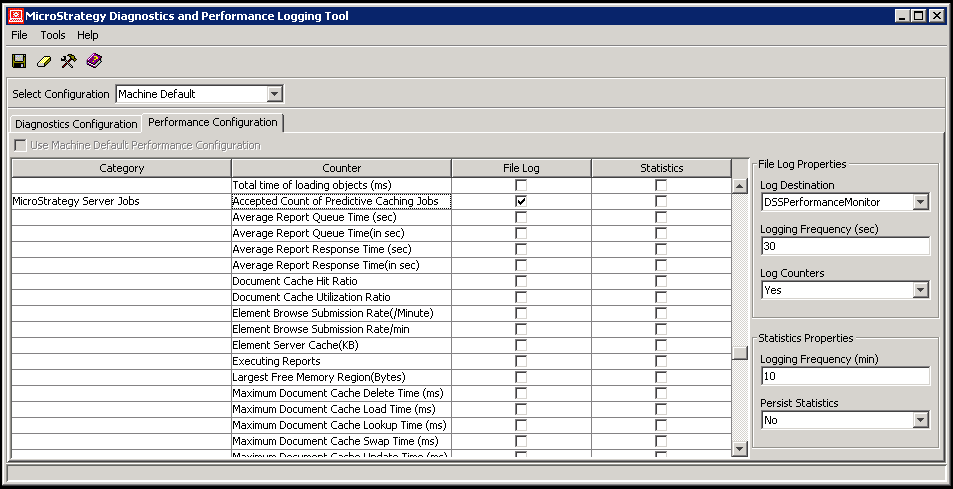
    . A simpler way is to use Performance Counters to display the count of rejected and accepted predictive caching requests. This is done by accessing the “Performance Configuration” of the Strategy Diagnostic and Performance Logging Tool and then enabling the
    Accepted Count of Predictive Caching Jobs
    and
    Rejected Count of Predictive Caching Jobs
    counters. This will produce a time-stamped
    .csv
    file (named
    DSSPerformanceMonitor.csv 
    in the example below). From this file, you can easily determine whether there is any rejected predictive caching request.
ka0PW0000001JlDYAU_0EM2R000001HjAd.jpeg
  • With the
    DSSErrors.log
    and the Performance Counters tools in hand, you can verify that the throttling feature is working properly by following these steps.
    • Verify that regular/interactive jobs are not throttled
      Simply run a Dossier from Strategy Platform Web, Library, Workstation, Desktop, Mobile, or Developer and make sure that the
      DSSErrors.log
      does NOT contain any entry mentioned above. Using the Performance Counters, you could also ensure that NEITHER the
      Accepted Count of Predictive Caching Jobs
      nor the
      Rejected Count of Predictive Caching Jobs
      increases.
    • Verify the throttling behavior for predictive caching requests when I-Server is not busy
ka0PW0000001JlDYAU_0EM2R000001HjAn.jpeg
    • Inspect the
      DSSErrors.log
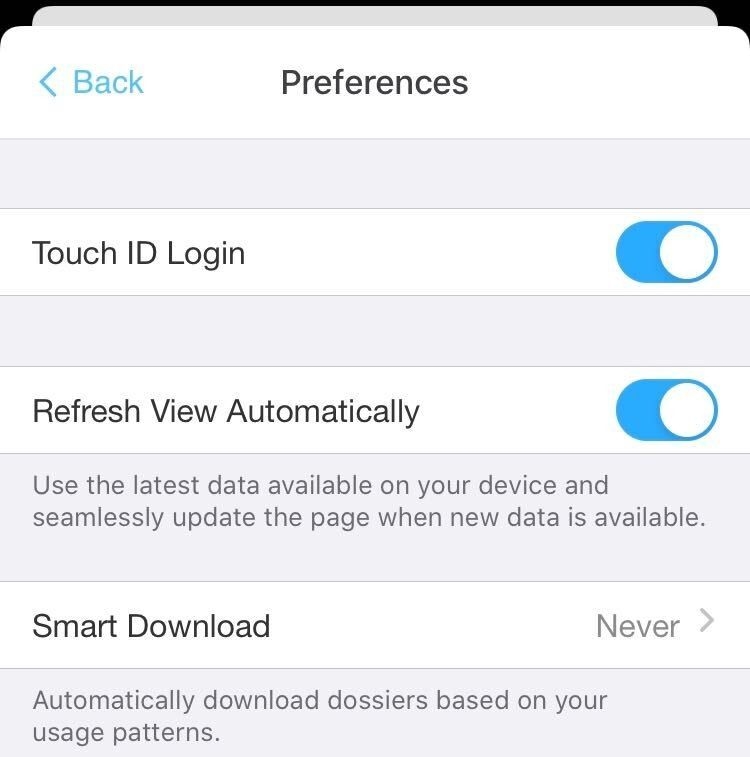
      and verify either (1) I-Server has never entered a busy status, or (2) it has returned to idle status. To do this, you can kill or wait until all interactive jobs are finished. Additionally, you should also make sure that the predictive caching feature is disabled from Strategy Mobile and Library on iOS and Android. This is accessible from the “Smart Download” part of the “Options → Preferences” page (see screenshot above). To send a predictive caching request, determine the target project and Dossier IDs (these should exist and operational in your metadata), and then send the following REST API commands to StrategyLibrary. Here, the first one is for project login while the predictive caching request is actually sent by the POST command in line 2.
      
      curl -X POST "http://<library_hostname>:8080/MicroStrategyLibrary/api/auth/login" -H "accept: application/json" -H "Content-Type: application/json" -d "{"username":"<user_name>","password":"<password>","loginMode":1,"maxSearch":3,"workingSet":10,"changePassword":false,"newPassword":"string","metadataLocale":"en_us","warehouseDataLocale":"en_us","displayLocale":"en_us","messagesLocale":"en_us","numberLocale":"en_us","timeZone":"UTC","applicationType":35}"
      
      curl -X POST "http://<library_hostname>:8080/MicroStrategyLibrary/api/dossiers/<dossier_id>/executionResult?resultType=binary" -H "accept: /" -H "X-MSTR-AuthToken: <x_mstr_token_from_login>" -H "X-MSTR-ProjectID: <project_id>" -H "Content-Type: application/json" -d "{"include":[],"mobilePrecaching":true}"

      Make sure that the
      DSSErrors.log
      does not contain any entry that indicates I-Server becomes busy nor any predictive caching request becomes rejected. You could also ensure that the
      Accepted Count of Predictive Caching Jobs 
      increases while the
      Rejected Count of Predictive Caching
      Jobs
      remains zero.
  • Verify the throttling behavior for predictive caching requests when I-Server is busy
    Trigger a heavy interactive job request (large subscription or cube publication is a good example) and then inspect the
    DSSErrors.log
    to verify that I-Server has entered a busy status. Then, trigger a predictive caching request through the
    /api/dossiers/<dossier_id>/executionResult 
    REST API endpoint as exemplified above. After that, re-open the
    DSSErrors.log
    and verify that I-Server the predictive caching request is rejected. If enabled, you could also verify that the
    Rejected Count of Predictive Caching Jobs
    in the Performance Counters is increased.

A more detailed step-by-step example to verify whether job throttling works properly is given in the video below. Note that the video start with some preparatory steps. The part that verifies of job throttling’s functionality starts at timestamp 2:15.
 

How to Tune the Criteria for Throttling

A background-generated Smart Download request is throttled when the following thresholds are met. Note that the thresholds, namely, 

AvailableMemoryThresholdInPercentage
,
JobWaitingCountThresholdInPercentOfCPUCores
,
CommandRunningThreadsThresholdInPercentage
, are also specified in the table below and can be configured through Registry Editor in Windows and
 MSIReg.reg
file in Linux.

  1. The amount of available memory for the server is less than the threshold AvailableMemoryThresholdInPercentage % of the total memory.
  2. The number of waiting jobs is larger than JobWaitingCountThresholdInPercentOfCPUCores % of the number of CPU cores.
    Here, waiting jobs refer to the those arrived at the Server but has not been executed. The default value is
    50
    and Strategy does not recommend changing this value.
  3. More than CommandRunningThreadsThresholdInPercentage % of the processing units (PUs) for processing incoming requests/commands are occupied.
    By default, the Server has 40 of such PUs (also known as “Command PUs“). The default value is
    50
    and Strategy does not recommend changing this value.

To improve performance, the above-mentioned Server states are cached and have a refresh interval of

ServerBusyRefreshIntervalInSeconds
seconds. According to the table below, the default interval is
5 
seconds. Strategy does not recommend changing this value.
The thresholds and interval mentioned above are listed in more details below: 

  1. They are not added by the installer, so you must add it manually into the
    HKEY_LOCAL_MACHINE\SOFTWARE\Wow6432Node\MicroStrategy\DSS Server\Predictive Request Throttling\Server Busy Thresholds
    path through Registry Editor in Windows.
  2. On the other hand, in Linux OS, they must be added into the
    HKEY_LOCAL_MACHINE\SOFTWARE\MicroStrategy\DSS Server\Predictive Request Throttling\Server Busy Thresholds
    path inside the
    MSIReg.reg 
    file.
  3. The thresholds are applied on-the-fly and do not require the Server to be restarted.


 Value NameDefault Value DataTypeValid RangeUnit1AvailableMemoryThresholdInPercentage20DWORD 32-bit (REG_DWORD)[0, 100]Percentage (%)2JobWaitingCountThresholdInPercentageOfCPUCores50DWORD 32-bit (REG_DWORD)[0, 1000]Percentage (%)3CommandRunningThreadsThresholdInPercentage50DWORD 32-bit (REG_DWORD)[1, 100]Percentage (%)4ServerBusyRefreshIntervalsInSeconds5DWORD 32-bit (REG_DWORD)[1, 3600]Seconds


 Value NameDefault Value DataTypeValid RangeUnit1AvailableMemoryThresholdInPercentage20DWORD 32-bit (REG_DWORD)[0, 100]Percentage (%)2JobWaitingCountThresholdInPercentageOfCPUCores50DWORD 32-bit (REG_DWORD)[0, 1000]Percentage (%)3CommandRunningThreadsThresholdInPercentage50DWORD 32-bit (REG_DWORD)[1, 100]Percentage (%)4ServerBusyRefreshIntervalsInSeconds5DWORD 32-bit (REG_DWORD)[1, 3600]Seconds


 Value NameDefault Value DataTypeValid RangeUnit1AvailableMemoryThresholdInPercentage20DWORD 32-bit (REG_DWORD)[0, 100]Percentage (%)2JobWaitingCountThresholdInPercentageOfCPUCores50DWORD 32-bit (REG_DWORD)[0, 1000]Percentage (%)3CommandRunningThreadsThresholdInPercentage50DWORD 32-bit (REG_DWORD)[1, 100]Percentage (%)4ServerBusyRefreshIntervalsInSeconds5DWORD 32-bit (REG_DWORD)[1, 3600]Seconds


 Value NameDefault Value DataTypeValid RangeUnit1AvailableMemoryThresholdInPercentage20DWORD 32-bit (REG_DWORD)[0, 100]Percentage (%)2JobWaitingCountThresholdInPercentageOfCPUCores50DWORD 32-bit (REG_DWORD)[0, 1000]Percentage (%)3CommandRunningThreadsThresholdInPercentage50DWORD 32-bit (REG_DWORD)[1, 100]Percentage (%)4ServerBusyRefreshIntervalsInSeconds5DWORD 32-bit (REG_DWORD)[1, 3600]Seconds


 Value NameDefault Value DataTypeValid RangeUnit1AvailableMemoryThresholdInPercentage20DWORD 32-bit (REG_DWORD)[0, 100]Percentage (%)2JobWaitingCountThresholdInPercentageOfCPUCores50DWORD 32-bit (REG_DWORD)[0, 1000]Percentage (%)3CommandRunningThreadsThresholdInPercentage50DWORD 32-bit (REG_DWORD)[1, 100]Percentage (%)4ServerBusyRefreshIntervalsInSeconds5DWORD 32-bit (REG_DWORD)[1, 3600]Seconds


 Value NameDefault Value DataTypeValid RangeUnit1AvailableMemoryThresholdInPercentage20DWORD 32-bit (REG_DWORD)[0, 100]Percentage (%)2JobWaitingCountThresholdInPercentageOfCPUCores50DWORD 32-bit (REG_DWORD)[0, 1000]Percentage (%)3CommandRunningThreadsThresholdInPercentage50DWORD 32-bit (REG_DWORD)[1, 100]Percentage (%)4ServerBusyRefreshIntervalsInSeconds5DWORD 32-bit (REG_DWORD)[1, 3600]Seconds


 Value NameDefault Value DataTypeValid RangeUnit1AvailableMemoryThresholdInPercentage20DWORD 32-bit (REG_DWORD)[0, 100]Percentage (%)2JobWaitingCountThresholdInPercentageOfCPUCores50DWORD 32-bit (REG_DWORD)[0, 1000]Percentage (%)3CommandRunningThreadsThresholdInPercentage50DWORD 32-bit (REG_DWORD)[1, 100]Percentage (%)4ServerBusyRefreshIntervalsInSeconds5DWORD 32-bit (REG_DWORD)[1, 3600]Seconds


 Value NameDefault Value DataTypeValid RangeUnit1AvailableMemoryThresholdInPercentage20DWORD 32-bit (REG_DWORD)[0, 100]Percentage (%)2JobWaitingCountThresholdInPercentageOfCPUCores50DWORD 32-bit (REG_DWORD)[0, 1000]Percentage (%)3CommandRunningThreadsThresholdInPercentage50DWORD 32-bit (REG_DWORD)[1, 100]Percentage (%)4ServerBusyRefreshIntervalsInSeconds5DWORD 32-bit (REG_DWORD)[1, 3600]Seconds


 Value NameDefault Value DataTypeValid RangeUnit1AvailableMemoryThresholdInPercentage20DWORD 32-bit (REG_DWORD)[0, 100]Percentage (%)2JobWaitingCountThresholdInPercentageOfCPUCores50DWORD 32-bit (REG_DWORD)[0, 1000]Percentage (%)3CommandRunningThreadsThresholdInPercentage50DWORD 32-bit (REG_DWORD)[1, 100]Percentage (%)4ServerBusyRefreshIntervalsInSeconds5DWORD 32-bit (REG_DWORD)[1, 3600]Seconds


 Value NameDefault Value DataTypeValid RangeUnit1AvailableMemoryThresholdInPercentage20DWORD 32-bit (REG_DWORD)[0, 100]Percentage (%)2JobWaitingCountThresholdInPercentageOfCPUCores50DWORD 32-bit (REG_DWORD)[0, 1000]Percentage (%)3CommandRunningThreadsThresholdInPercentage50DWORD 32-bit (REG_DWORD)[1, 100]Percentage (%)4ServerBusyRefreshIntervalsInSeconds5DWORD 32-bit (REG_DWORD)[1, 3600]Seconds


 Value NameDefault Value DataTypeValid RangeUnit1AvailableMemoryThresholdInPercentage20DWORD 32-bit (REG_DWORD)[0, 100]Percentage (%)2JobWaitingCountThresholdInPercentageOfCPUCores50DWORD 32-bit (REG_DWORD)[0, 1000]Percentage (%)3CommandRunningThreadsThresholdInPercentage50DWORD 32-bit (REG_DWORD)[1, 100]Percentage (%)4ServerBusyRefreshIntervalsInSeconds5DWORD 32-bit (REG_DWORD)[1, 3600]Seconds


 Value NameDefault Value DataTypeValid RangeUnit1AvailableMemoryThresholdInPercentage20DWORD 32-bit (REG_DWORD)[0, 100]Percentage (%)2JobWaitingCountThresholdInPercentageOfCPUCores50DWORD 32-bit (REG_DWORD)[0, 1000]Percentage (%)3CommandRunningThreadsThresholdInPercentage50DWORD 32-bit (REG_DWORD)[1, 100]Percentage (%)4ServerBusyRefreshIntervalsInSeconds5DWORD 32-bit (REG_DWORD)[1, 3600]Seconds


 Value NameDefault Value DataTypeValid RangeUnit1AvailableMemoryThresholdInPercentage20DWORD 32-bit (REG_DWORD)[0, 100]Percentage (%)2JobWaitingCountThresholdInPercentageOfCPUCores50DWORD 32-bit (REG_DWORD)[0, 1000]Percentage (%)3CommandRunningThreadsThresholdInPercentage50DWORD 32-bit (REG_DWORD)[1, 100]Percentage (%)4ServerBusyRefreshIntervalsInSeconds5DWORD 32-bit (REG_DWORD)[1, 3600]Seconds


 Value NameDefault Value DataTypeValid RangeUnit1AvailableMemoryThresholdInPercentage20DWORD 32-bit (REG_DWORD)[0, 100]Percentage (%)2JobWaitingCountThresholdInPercentageOfCPUCores50DWORD 32-bit (REG_DWORD)[0, 1000]Percentage (%)3CommandRunningThreadsThresholdInPercentage50DWORD 32-bit (REG_DWORD)[1, 100]Percentage (%)4ServerBusyRefreshIntervalsInSeconds5DWORD 32-bit (REG_DWORD)[1, 3600]Seconds


 Value NameDefault Value DataTypeValid RangeUnit1AvailableMemoryThresholdInPercentage20DWORD 32-bit (REG_DWORD)[0, 100]Percentage (%)2JobWaitingCountThresholdInPercentageOfCPUCores50DWORD 32-bit (REG_DWORD)[0, 1000]Percentage (%)3CommandRunningThreadsThresholdInPercentage50DWORD 32-bit (REG_DWORD)[1, 100]Percentage (%)4ServerBusyRefreshIntervalsInSeconds5DWORD 32-bit (REG_DWORD)[1, 3600]Seconds


 Value NameDefault Value DataTypeValid RangeUnit1AvailableMemoryThresholdInPercentage20DWORD 32-bit (REG_DWORD)[0, 100]Percentage (%)2JobWaitingCountThresholdInPercentageOfCPUCores50DWORD 32-bit (REG_DWORD)[0, 1000]Percentage (%)3CommandRunningThreadsThresholdInPercentage50DWORD 32-bit (REG_DWORD)[1, 100]Percentage (%)4ServerBusyRefreshIntervalsInSeconds5DWORD 32-bit (REG_DWORD)[1, 3600]Seconds


 Value NameDefault Value DataTypeValid RangeUnit1AvailableMemoryThresholdInPercentage20DWORD 32-bit (REG_DWORD)[0, 100]Percentage (%)2JobWaitingCountThresholdInPercentageOfCPUCores50DWORD 32-bit (REG_DWORD)[0, 1000]Percentage (%)3CommandRunningThreadsThresholdInPercentage50DWORD 32-bit (REG_DWORD)[1, 100]Percentage (%)4ServerBusyRefreshIntervalsInSeconds5DWORD 32-bit (REG_DWORD)[1, 3600]Seconds


 Value NameDefault Value DataTypeValid RangeUnit1AvailableMemoryThresholdInPercentage20DWORD 32-bit (REG_DWORD)[0, 100]Percentage (%)2JobWaitingCountThresholdInPercentageOfCPUCores50DWORD 32-bit (REG_DWORD)[0, 1000]Percentage (%)3CommandRunningThreadsThresholdInPercentage50DWORD 32-bit (REG_DWORD)[1, 100]Percentage (%)4ServerBusyRefreshIntervalsInSeconds5DWORD 32-bit (REG_DWORD)[1, 3600]Seconds


 Value NameDefault Value DataTypeValid RangeUnit1AvailableMemoryThresholdInPercentage20DWORD 32-bit (REG_DWORD)[0, 100]Percentage (%)2JobWaitingCountThresholdInPercentageOfCPUCores50DWORD 32-bit (REG_DWORD)[0, 1000]Percentage (%)3CommandRunningThreadsThresholdInPercentage50DWORD 32-bit (REG_DWORD)[1, 100]Percentage (%)4ServerBusyRefreshIntervalsInSeconds5DWORD 32-bit (REG_DWORD)[1, 3600]Seconds


 Value NameDefault Value DataTypeValid RangeUnit1AvailableMemoryThresholdInPercentage20DWORD 32-bit (REG_DWORD)[0, 100]Percentage (%)2JobWaitingCountThresholdInPercentageOfCPUCores50DWORD 32-bit (REG_DWORD)[0, 1000]Percentage (%)3CommandRunningThreadsThresholdInPercentage50DWORD 32-bit (REG_DWORD)[1, 100]Percentage (%)4ServerBusyRefreshIntervalsInSeconds5DWORD 32-bit (REG_DWORD)[1, 3600]Seconds


 Value NameDefault Value DataTypeValid RangeUnit1AvailableMemoryThresholdInPercentage20DWORD 32-bit (REG_DWORD)[0, 100]Percentage (%)2JobWaitingCountThresholdInPercentageOfCPUCores50DWORD 32-bit (REG_DWORD)[0, 1000]Percentage (%)3CommandRunningThreadsThresholdInPercentage50DWORD 32-bit (REG_DWORD)[1, 100]Percentage (%)4ServerBusyRefreshIntervalsInSeconds5DWORD 32-bit (REG_DWORD)[1, 3600]Seconds


 Value NameDefault Value DataTypeValid RangeUnit1AvailableMemoryThresholdInPercentage20DWORD 32-bit (REG_DWORD)[0, 100]Percentage (%)2JobWaitingCountThresholdInPercentageOfCPUCores50DWORD 32-bit (REG_DWORD)[0, 1000]Percentage (%)3CommandRunningThreadsThresholdInPercentage50DWORD 32-bit (REG_DWORD)[1, 100]Percentage (%)4ServerBusyRefreshIntervalsInSeconds5DWORD 32-bit (REG_DWORD)[1, 3600]Seconds


 Value NameDefault Value DataTypeValid RangeUnit1AvailableMemoryThresholdInPercentage20DWORD 32-bit (REG_DWORD)[0, 100]Percentage (%)2JobWaitingCountThresholdInPercentageOfCPUCores50DWORD 32-bit (REG_DWORD)[0, 1000]Percentage (%)3CommandRunningThreadsThresholdInPercentage50DWORD 32-bit (REG_DWORD)[1, 100]Percentage (%)4ServerBusyRefreshIntervalsInSeconds5DWORD 32-bit (REG_DWORD)[1, 3600]Seconds


 Value NameDefault Value DataTypeValid RangeUnit1AvailableMemoryThresholdInPercentage20DWORD 32-bit (REG_DWORD)[0, 100]Percentage (%)2JobWaitingCountThresholdInPercentageOfCPUCores50DWORD 32-bit (REG_DWORD)[0, 1000]Percentage (%)3CommandRunningThreadsThresholdInPercentage50DWORD 32-bit (REG_DWORD)[1, 100]Percentage (%)4ServerBusyRefreshIntervalsInSeconds5DWORD 32-bit (REG_DWORD)[1, 3600]Seconds


 Value NameDefault Value DataTypeValid RangeUnit1AvailableMemoryThresholdInPercentage20DWORD 32-bit (REG_DWORD)[0, 100]Percentage (%)2JobWaitingCountThresholdInPercentageOfCPUCores50DWORD 32-bit (REG_DWORD)[0, 1000]Percentage (%)3CommandRunningThreadsThresholdInPercentage50DWORD 32-bit (REG_DWORD)[1, 100]Percentage (%)4ServerBusyRefreshIntervalsInSeconds5DWORD 32-bit (REG_DWORD)[1, 3600]Seconds


 Value NameDefault Value DataTypeValid RangeUnit1AvailableMemoryThresholdInPercentage20DWORD 32-bit (REG_DWORD)[0, 100]Percentage (%)2JobWaitingCountThresholdInPercentageOfCPUCores50DWORD 32-bit (REG_DWORD)[0, 1000]Percentage (%)3CommandRunningThreadsThresholdInPercentage50DWORD 32-bit (REG_DWORD)[1, 100]Percentage (%)4ServerBusyRefreshIntervalsInSeconds5DWORD 32-bit (REG_DWORD)[1, 3600]Seconds


 Value NameDefault Value DataTypeValid RangeUnit1AvailableMemoryThresholdInPercentage20DWORD 32-bit (REG_DWORD)[0, 100]Percentage (%)2JobWaitingCountThresholdInPercentageOfCPUCores50DWORD 32-bit (REG_DWORD)[0, 1000]Percentage (%)3CommandRunningThreadsThresholdInPercentage50DWORD 32-bit (REG_DWORD)[1, 100]Percentage (%)4ServerBusyRefreshIntervalsInSeconds5DWORD 32-bit (REG_DWORD)[1, 3600]Seconds


 Value NameDefault Value DataTypeValid RangeUnit1AvailableMemoryThresholdInPercentage20DWORD 32-bit (REG_DWORD)[0, 100]Percentage (%)2JobWaitingCountThresholdInPercentageOfCPUCores50DWORD 32-bit (REG_DWORD)[0, 1000]Percentage (%)3CommandRunningThreadsThresholdInPercentage50DWORD 32-bit (REG_DWORD)[1, 100]Percentage (%)4ServerBusyRefreshIntervalsInSeconds5DWORD 32-bit (REG_DWORD)[1, 3600]Seconds


 Value NameDefault Value DataTypeValid RangeUnit1AvailableMemoryThresholdInPercentage20DWORD 32-bit (REG_DWORD)[0, 100]Percentage (%)2JobWaitingCountThresholdInPercentageOfCPUCores50DWORD 32-bit (REG_DWORD)[0, 1000]Percentage (%)3CommandRunningThreadsThresholdInPercentage50DWORD 32-bit (REG_DWORD)[1, 100]Percentage (%)4ServerBusyRefreshIntervalsInSeconds5DWORD 32-bit (REG_DWORD)[1, 3600]Seconds


 Value NameDefault Value DataTypeValid RangeUnit1AvailableMemoryThresholdInPercentage20DWORD 32-bit (REG_DWORD)[0, 100]Percentage (%)2JobWaitingCountThresholdInPercentageOfCPUCores50DWORD 32-bit (REG_DWORD)[0, 1000]Percentage (%)3CommandRunningThreadsThresholdInPercentage50DWORD 32-bit (REG_DWORD)[1, 100]Percentage (%)4ServerBusyRefreshIntervalsInSeconds5DWORD 32-bit (REG_DWORD)[1, 3600]Seconds


Comment

0 comments

Details

Knowledge Article

Published:

June 15, 2020

Last Updated:

March 21, 2024