When running the Platform Analytics Consumer, the following error information may exist in
platform-analytics-consumer.err.
2020-06-26 11:18:11,666 WARN  BasicResourcePool C3P0PooledConnectionPoolManager[identityToken->2ssayxaa1uwp80l5x59bf|60737b23]-HelperThread-#2 - com.mchange.v2.resourcepool.BasicResourcePool$ScatteredAcquireTask@4cbb13e2 -- Acquisition Attempt Failed!!! Clearing pending acquires. While trying to acquire a needed new resource, we failed to succeed more than the maximum number of allowed acquisition attempts (30). Last acquisition attempt exception:
org.postgresql.util.PSQLException: Connection to localhost:5432 refused. Check that the hostname and port are correct and that the postmaster is accepting TCP/IP connections.
at org.postgresql.core.v3.ConnectionFactoryImpl.openConnectionImpl(ConnectionFactoryImpl.java:280)
at org.postgresql.core.ConnectionFactory.openConnection(ConnectionFactory.java:49)
at org.postgresql.jdbc.PgConnection.<init>(PgConnection.java:195)
at org.postgresql.Driver.makeConnection(Driver.java:454)
at org.postgresql.Driver.connect(Driver.java:256)
at com.mchange.v2.c3p0.DriverManagerDataSource.getConnection(DriverManagerDataSource.java:175)
at com.mchange.v2.c3p0.WrapperConnectionPoolDataSource.getPooledConnection(WrapperConnectionPoolDataSource.java:220)
at com.mchange.v2.c3p0.WrapperConnectionPoolDataSource.getPooledConnection(WrapperConnectionPoolDataSource.java:206)
at com.mchange.v2.c3p0.impl.C3P0PooledConnectionPool$1PooledConnectionResourcePoolManager.acquireResource(C3P0PooledConnectionPool.java:203)
at com.mchange.v2.resourcepool.BasicResourcePool.doAcquire(BasicResourcePool.java:1176)
at com.mchange.v2.resourcepool.BasicResourcePool.doAcquireAndDecrementPendingAcquiresWithinLockOnSuccess(BasicResourcePool.java:1163)
at com.mchange.v2.resourcepool.BasicResourcePool.access$700(BasicResourcePool.java:44)
at com.mchange.v2.resourcepool.BasicResourcePool$ScatteredAcquireTask.run(BasicResourcePool.java:1908)
at com.mchange.v2.async.ThreadPoolAsynchronousRunner$PoolThread.run(ThreadPoolAsynchronousRunner.java:696)
Caused by: java.net.ConnectException: Connection refused: connect
This error occurs when the client connections reach the max connections on the database's server side.
There are two ways to increase the number of
max_connections:
alter system set max_connections = 200
postgresql.conffile:
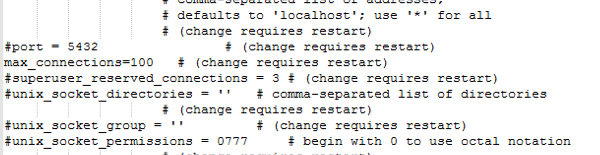
After modifying the the above setting, you must restart the PostgreSQL server for the settings to take effect.
