EducationSoftwareStrategy.com
StrategyCommunity

Knowledge Base

Product

Community

Knowledge Base

TopicsBrowse ArticlesDeveloper Zone

Product

Download SoftwareProduct DocumentationSecurity Hub

Education

Tutorial VideosSolution GalleryEducation courses

Community

GuidelinesGrandmastersEvents
x_social-icon_white.svglinkedin_social-icon_white.svg
Strategy logoCommunity

© Strategy Inc. All Rights Reserved.

LegalTerms of UsePrivacy Policy
  1. Home
  2. Topics

KB485762: Unable to connect to MicroStrategy project with MicroStrategy for Power BI Connector, see detail error “The user’s session has expired, please re-authenticate.”


Shuang Qi

Senior Cloud Support Engineer II • Strategy


This article outlines “The user’s session has expired, please re-authenticate.” issue when connecting to MicroStrategy project with MicroStrategy for Power BI Connector.

Symptom


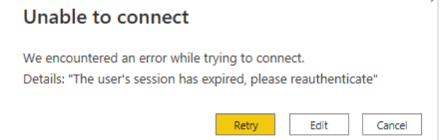
User may fail to login through Strategy for Power BI Connector with error “The user’s session has expired, please re-authenticate”. And this error only happens for specific user and on his/her machine. 
ka04W000000OaNeQAK_0EM4W000006GcNb.jpeg

Action


Clearing various caches of Power BI can resolve this issue. Power BI clear cache options are from File, Options and settings, Options, Data Load.


Comment

0 comments

Details

Knowledge Article

Published:

November 2, 2022

Last Updated:

November 2, 2022