In Strategy 2020, data is unable to import from an external data source due to an error when accessing information from the external data source. String data is right truncated and there is an error in column XXX.
SQL Pass 0 failed to execute
Error in accessing information from the external data source.
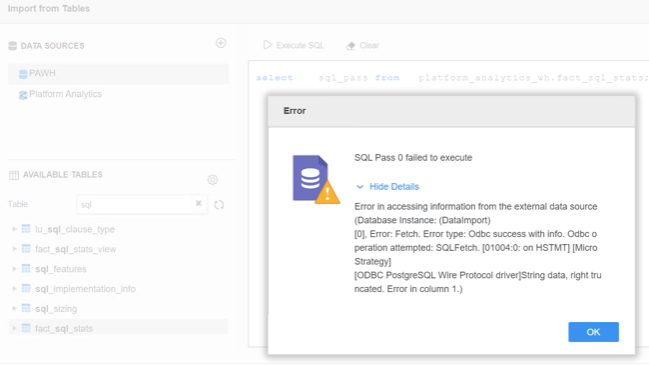
The amount of data stored in the table column XXX is exceeding the limitation configured at ODBC driver level.
Error message
Adjust the following query (by replacing the names in italics) in the Db Query Tool or Web and run it against your data source:
select length(column_name) as length from schema_name.table_name order by length DESC;
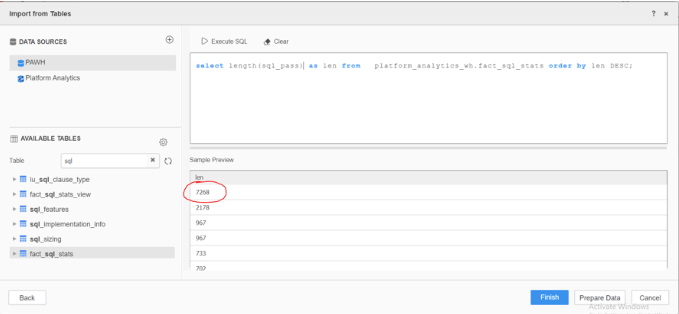
Check the column data type directly in the data source. In this case, the column can store longtext values in the database (LONGTEXT – 4GB (up to 4,294,967,295 characters)).
Compare the value with limits in your ODBC driver setup:
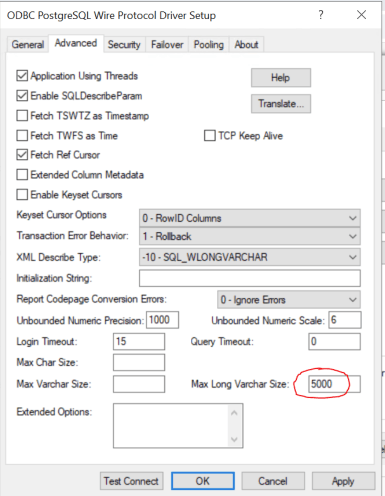
Increase the limitations at the driver level (5000) to be able to retrieve all the data from the data source via ODBC (>7268).
