EducationSoftwareStrategy.com
StrategyCommunity

Knowledge Base

Product

Community

Knowledge Base

TopicsBrowse ArticlesDeveloper Zone

Product

Download SoftwareProduct DocumentationSecurity Hub

Education

Tutorial VideosSolution GalleryEducation courses

Community

GuidelinesGrandmastersEvents
x_social-icon_white.svglinkedin_social-icon_white.svg
Strategy logoCommunity

© Strategy Inc. All Rights Reserved.

LegalTerms of UsePrivacy Policy
  1. Home
  2. Topics

KB483758: Unable to migrate History List messages from a flat file to a MySQL database via the Configuration Wizard in Linux


Lisha Ma

Senior Cloud Support Engineer III • MicroStrategy


This article explains how to resolve the error, "The migration of messages from flat file into database failed with an exit code of '255.' Please refer to the log files for more details on the problem." This error appears when migrating History List information from a flat file to a MySQL database through the Configuration Wizard.

Description


Migrating History List information from a flat file to a MySQL database via the Configuration Wizard causes the follow error to appear: 
"The migration of messages from flat file into database failed with an exit code of '255.' Please refer to the log files for more details on the problem."

ka02R000000g44BQAQ_0EM2R000000maHV.jpeg

In the HMLig<date>.log, the following appears:

Failed to initialize HLMigrator with error(0x80041404): Database error <%1>: %2mstrhlmgtr: WARNING: kernel patch level 3.10.0-957.5.1.el7.x86_64 is high; please use 2.6.32-992019-09-05 19:50:53.378-04:00 [HOST:tec-l-004218][SERVER:][PID:83853][THR:140033442193088][MSql][Error][UID:0][SID:0][OID:0] Error executing SQL: SET @@SESSION.SQL_MODE = 'S,NO_BACKSLASH_ESCAPES'2019-09-05 19:50:53.382-04:00 [HOST:tec-l-004218][SERVER:][PID:83853][THR:140033442193088][MSql][Error][0x80041404][UID:0][SID:0][OID:0] Database error <5>: Execute Query failed. Error type: Odbc error. Odbc operation attempted: SQLExecDirect. [HY000:1231: on SQLHANDLE] [MySQL][ODBC 8.0(w) Driver][mysqld-5.6.43-log]Variable 'sql_mode' can't be set to the value of 'S'

Why is this happening?


On Linux, the default setting for ODBC drivers on the Database Instance window is UTF-8. However, MySQL drivers cannot use UTF-8.

Solution


To resolve the error, use the steps below:

  • Return to the History List Information section of the Configuration Wizard.
  • Uncheck the Use UTF-8 encoding checkbox.
ka02R000000g44BQAQ_0EM2R000000maIs.jpeg
  • Click Finish in the Configuration Wizard.
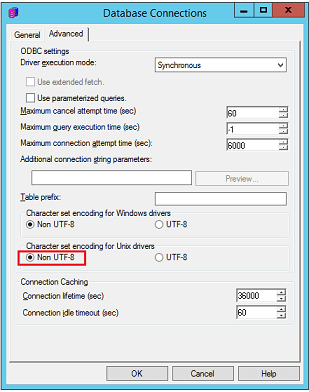
  • Open the Database Connection dialog and click the Advanced tab.
  • Select Non-UTF-8 for Character set encoding for Unix drivers.
ka02R000000g44BQAQ_0EM2R000000maJ2.jpeg
  • Click OK.

Comment

0 comments

Details

Knowledge Article

Published:

October 29, 2019

Last Updated:

October 29, 2019