SYMPTOM:
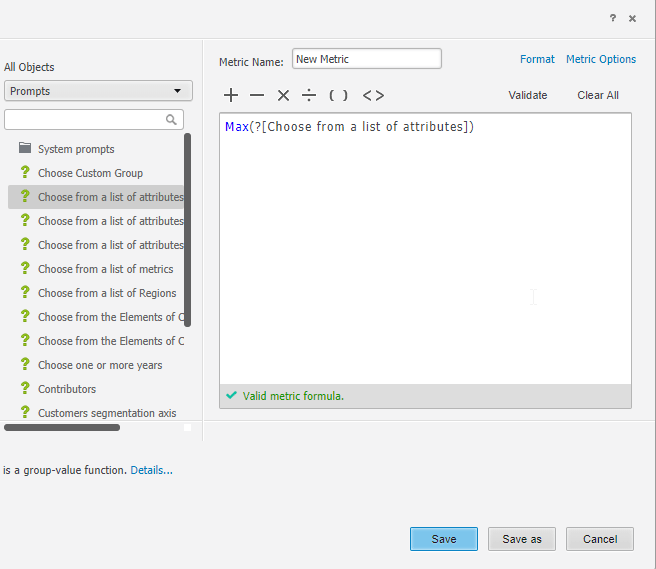
In Strategy Developer 10.x, when user perform a 'save' or 'save as' on a newly created metric created using an Object Prompt in the expression, nothing happens, the ‘save’ or ‘save as’ button does not work or respond. Saving the changes by closing the metric editor doesn’t work as well – change is not applied. No error appears, and metric definition shows as valid expression.
STEPS TO REPRODUCE:
1. In tutorial, make a copy of the Cost metric in the sale metric folder, or create a new metric.
2. Edit the metric, and replace the metric expression with "Max(<Object Prompt>", or type the expression for newly created metric. You can use any of the object prompts in the Prompt object folder.
3. Click validate, no error appears, and metric definition shows as valid expression.
4. Try to save the metric, nothing happens. Click on file > save as, nothing happens as well.
5. Close the metric editor, and select yes in the pop up window to save changes – change is not applied.
CAUSE:
This is a known issue in Strategy 10.4 HF4, and Strategy 10.8 and above.
WORKAROUND:
To workaround the issue, create and save the metric with the object prompt via Strategy Web as shown below:
ACTION:
This issue will be fixed in the next Strategy release 11.0. Tentatively scheduled to come out during Q3 2018. To apply the fix, upgrade to Strategy 10.4 Hotfix 8, or Strategy 11.0 to take advantage of the fix.
This issue has been logged as Rally ID:DE101083 and KB441176
