SYMPTOM
When attempting to send a report or document to history list from Strategy Developer users may encounter the following error
User '<xxxxx>' does not have Read access to the ServerDef object
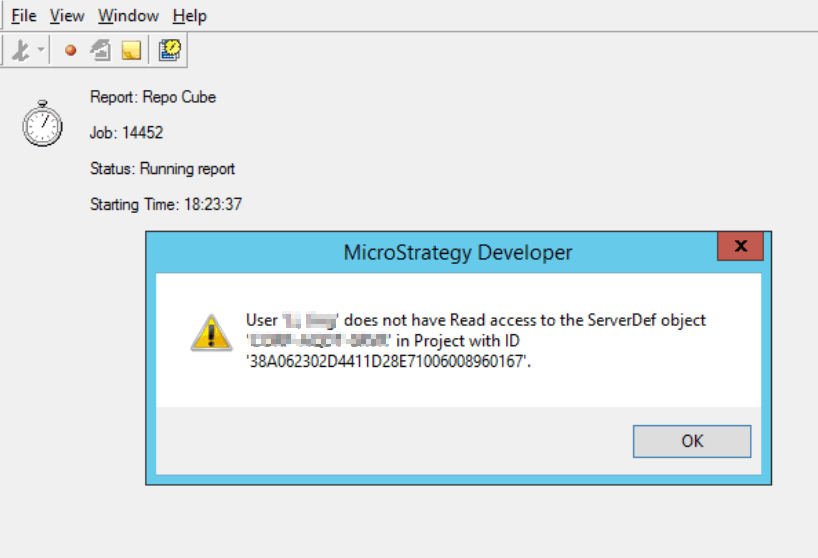
Users should note that the issue only occurs in Developer, the same user who encounters this issue in Developer will not encounter this error when attempting to send a report or document to history from Strategy Web.
CAUSE
This is a known issue in Strategy 11.x. The workflow for sending reports and documents to history list from Developer changed starting in 11.0 which is why the issue will not be seen in earlier versions of Strategy. This issue is logged internally as DE114908.
ACTION
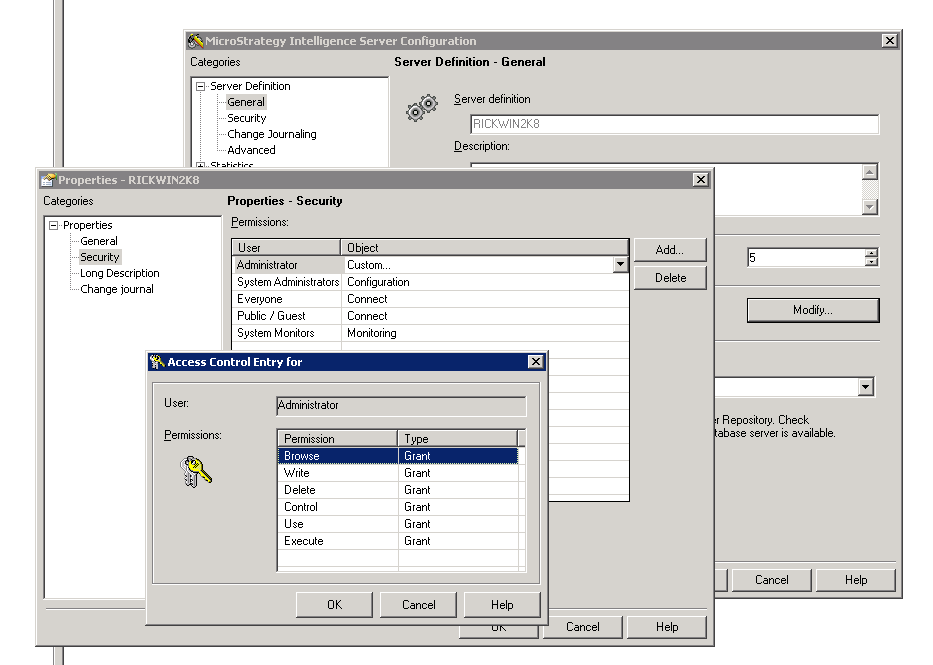
Users have 2 options to avoid this issue. The first is to send the report or document to history from Strategy Web. The error message discussed in this article only occurs in Strategy Developer. The second option is to grant the user in question Browse, Use, and Execute privileges to the ServerDef object. This can be done by opening Developer and from the toolbar browsing to Administration->Server->Configure Strategy Intelligence Server->Server Definition->General->Modify->Security and then granting the user appropriate ACLs to access the server definition object