EducationSoftwareStrategy.com
StrategyCommunity

Knowledge Base

Product

Community

Knowledge Base

TopicsBrowse ArticlesDeveloper Zone

Product

Download SoftwareProduct DocumentationSecurity Hub

Education

Tutorial VideosSolution GalleryEducation courses

Community

GuidelinesGrandmastersEvents
x_social-icon_white.svglinkedin_social-icon_white.svg
Strategy logoCommunity

© Strategy Inc. All Rights Reserved.

LegalTerms of UsePrivacy Policy
  1. Home
  2. Topics

KB439307: Unable to view "SQL Global Optimization" option under Query Optimizations when editing a Report VLDB Properties


Maria Lourdes Rodriguez Pedrido

Manager, Technical Support • Strategy


This article explains the reason why "SQL Global Optimization" option under Query Optimizations cannot be viewed when editing a Report VLDB Properties

SYMPTOM:
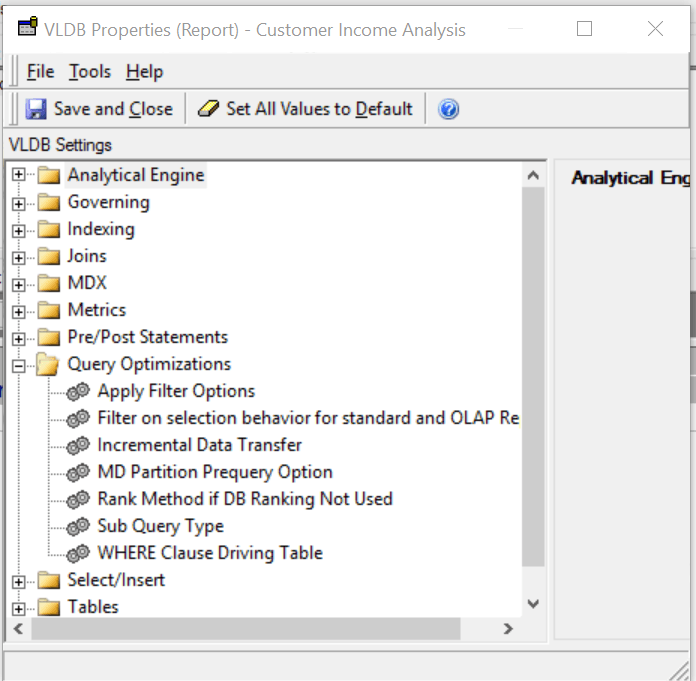
The option "SQL Global Optimization" under Query Optimizations is not available when a report VLDB properties need to be changed.
ka044000000kPBTAA2_0EM44000000QChG.png

CAUSE:
"SQL Global Optimization" under Query Optimizations is a hidden option that need to be made visible selecting "Show Advance Settings" under the menu option Tools in the VLDB Properties pane.
ACTION:

  • Please edit the report and go to VLDB Properties.
  • Select the menu option "Tools" - "Show Advance Settings" in the drop down menu and you will be able to see the "SQL Global Optimization" :
ka044000000kPBTAA2_0EM44000000QChL.png

  KB439307


Comment

0 comments

Details

Knowledge Article

Published:

December 22, 2017

Last Updated:

December 31, 2018