EducationSoftwareStrategy.com
StrategyCommunity

Knowledge Base

Product

Community

Knowledge Base

TopicsBrowse ArticlesDeveloper Zone

Product

Download SoftwareProduct DocumentationSecurity Hub

Education

Tutorial VideosSolution GalleryEducation courses

Community

GuidelinesGrandmastersEvents
x_social-icon_white.svglinkedin_social-icon_white.svg
Strategy logoCommunity

© Strategy Inc. All Rights Reserved.

LegalTerms of UsePrivacy Policy
  1. Home
  2. Topics

KB484077: Update AWS SSL Certificates


Hao Shen (TPO)

Director, Product Owner • Microstrategy, Inc.


This article explains how to update SSL certificates in AWS accounts.

Update SSL Certificates

To update AWS SSL certificates, you need the certificates provided by your Certificate Authority. You need to update the certificates in your AWS accounts, which will then be mapped to the LoadBalancers deployed during Strategy Platform deployment. 
 

Step 1: Add certificates to the AWS account

  • Open the Amazon EC2 console here .
  • On the navigation pane, go to LOAD BALANCING > Load Balancers. 
  • Select your load balancer. If your environments were deployed via the MCP console, you can type env- and search for loadbalancer. 
ka02R000000g6TrQAI_0EM2R000000nyPo.jpeg
  • Click on the Listeners tab > SSL Certificate > View/edit certificates.
  • At the top, click on the + sign > Import Certificates.
  • Select IAM. Do not use ACM.
  • Name the certificate wildcardTrialCloud2022.
  • In the Certificate Private Key field, add the contents from
    server.key.
  • In the Certificate Body field, add the contents from
    server.crt.
  • In the Certificate Chain field add the contents from
    intermediate.crt.
  • Click Import. 

Step 2: Edit the Listener to use the new certificates 

  • Open the Amazon EC2 console here .
  • On the navigation pane, go to LOAD BALANCING > Load Balancers. 
  • Select your load balancer. If your environments were deployed via the MCP console, you can type env- and search for loadbalancer. 
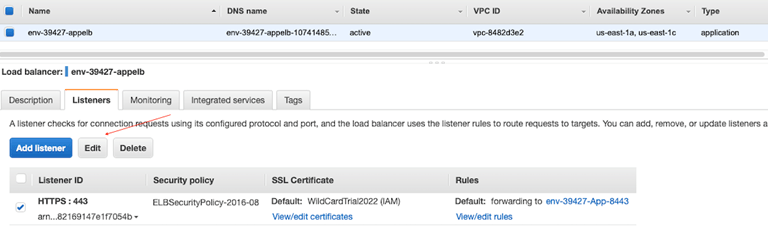
  • Locate your certificate and select its checkbox next to the Listener ID.
  • Click Edit.  
ka02R000000g6TrQAI_0EM2R000000nySO.jpeg
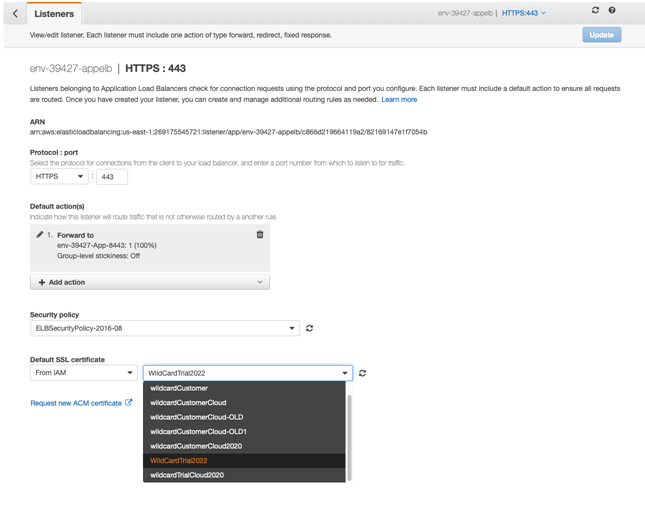
  • Under Default SSL certificate, use the drop-down to choose your newly added certificates.
ka02R000000g6TrQAI_0EM2R000000nyST.jpeg
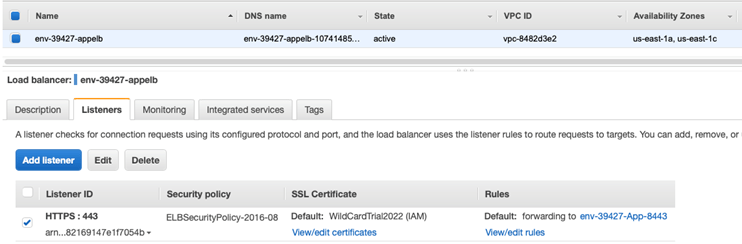
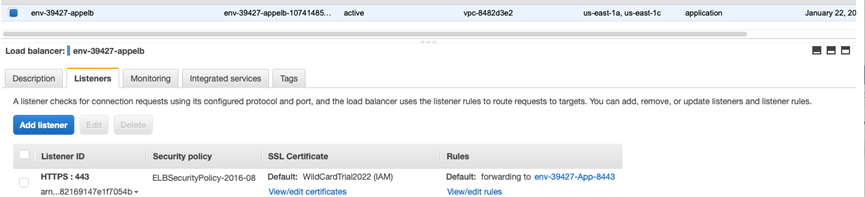
  • Once the certificates are updated, you can see it on the console.
ka02R000000g6TrQAI_0EM2R000000nySY.jpeg

Comment

0 comments

Details

Knowledge Article

Published:

February 25, 2020

Last Updated:

February 25, 2020