
Earlier this week, Apple released the much-anticipated iOS 15 and iPadOS 15 updates.
With the updates, Apple enforced a new requirement, in which the system now checks for a new, more secure code signature format. Apple has just made it a little stricter and safer for app owners and developers. They want to ensure the app is from a known source and that there have been no unwanted modifications, whether malicious or not, at the time of publication. This aligns with the recent attention to security challenges that have been arising on mobile operating systems and how Apple has been mitigating those.
The code signature changes have been identified to affect any custom compiled mobile applications (not just Strategy) utilizing certain macOS versions as described below.
Learn more about Apple’s new requirement.
As a result of these more security-offensive changes, if your custom app does not have the latest format required by Apple, this may result in breaking of existing mobile apps when consumed from an iOS 15 or iPadOS 15 device. In this scenario, users will experience the following error message, notifying developers to re-sign the app:
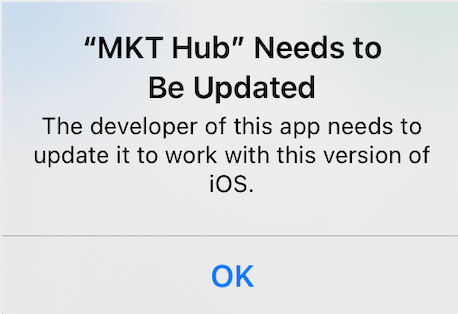
Currently, there has been some confusion in the Apple community as to whether these changes will affect deployed applications or not. Check out what’s happening in the Apple Community here.
Will my organization's Strategy app be impacted?
Note: Strategy Mobile apps include both Strategy Mobile and Library Mobile.
Strategy Mobile apps downloaded from the App Store are unaffected
App Store Connect has already taken care of the re-signing process. Apps should not break, and the upgrade should be smooth with any application downloaded directly from the App Store.
Custom apps compiled with A) the Strategy Mobile SDK or B) the Strategy Mobile SDK integrated with EMM may be impacted
If your application was compiled on macOS Catalina, then your users are likely to run into the error highlighted above.
What should I do if my app is affected?
macOS Big Sur environments
Based on information available via Apple Developer forums, if your current Dev environment includes macOS Big Sur, rebuild the app using Xcode. Your app should automatically have the latest signature format.
Older Dev environments
For all other cases, you may see the following error when trying to recompile for iOS 15 or iPadOS 15:

Use the following steps to re-sign your IPA via Mac Code Sign utility:
Note: In the following steps, the <app name>.app may be different depending on the given application name. For instance, for Library, you may need to locate Library.app.
codesign -s "<your code sign identity>" -f --preserve-metadata --generate-entitlement-der Strategy.app
Note: To confirm what your code sign identity is, you can run the following command:
security find-identity -v -p codesigning
What version of Xcode should I use?
We recommend you stay with the same version of Xcode that has been certified with the version of SDK.
In general, the resolution entails redo of code signing. This means that there is no need to update the Xcode version over the one used to compile your app.
Recommendations
Strategy recommends ensuring your enterprise apps are fully tested to ensure a smooth upgrade. Make sure your apps are re-signed and using the latest format introduced by Apple through the resolutions in the table below.
When recompiling the apps, please use the Xcode recommendations published with the version of your Strategy Mobile SDK:
macOS | Resolution |
Catalina | Re-sign using Mac Code Sign utility using above steps |
Big Sur | Re-build app(s) using Xcode |
For the modern enterprise, security is more critical than ever and Strategy strongly recommends to always use the latest version of development tools to benefit from all the security improvements in the latest operating system version. Read more about the latest news and resources on Apple security.
Have questions? Please feel free to reach out to the Strategy Support team.
