Note: This article is specific to 2021 Update 1.
From 2021 Update 2, the Library admin pages support basic and SAML authentication when only SAML authentication is enabled. The admin pages authentication is governed by the auth.admin.authMethod parameter in the WEB-INF/classes/config/configOverride.properties file. Refer to Library Admin Authentication for details.
You can protect the Library Admin pages using SAML admin groups or basic authentication.
web.xmlin the
WEB-INFfolder of the Strategy Library installation directory and open it for editing.
<!--and
-->tags. Make sure there are no sub comments in the text, as this may produce an error. If you decide to change to another authentication mode besides SAML in the future, you can reverse the changes done in this step.
<!-- IMPORTANT NOTICE: UNCOMMENT CONSTRAINTS WHEN SWITCHING TO ANY NON-SAML  AUTHENTICATION MODE -->
  <security-constraint>
    <web-resource-collection>
      <web-resource-name>samlConfig</web-resource-name>
      <url-pattern>/saml/config/*</url-pattern>
    </web-resource-collection>
    <auth-constraint>
      <role-name>admin</role-name>
    </auth-constraint>
    <user-data-constraint>
      <transport-guarantee>NONE</transport-guarantee>
    </user-data-constraint>
  </security-constraint>
	<!-- IMPORTANT NOTICE: END OF SECTION -->
	<!-- End SAML Config GUI -->
<!-- IMPORTANT NOTICE: UNCOMMENT CONSTRAINTS WHEN SWITCHING TO ANY NON-SAML AUTHENTICATION MODE --> <security-constraint> <web-resource-collection> <web-resource-name>consume-web admin / control panel</web-resource-name> <url-pattern>/admin</url-pattern> <url-pattern>/admin/*</url-pattern> </web-resource-collection> <auth-constraint> <role-name>admin</role-name> </auth-constraint> <user-data-constraint> <transport-guarantee>NONE</transport-guarantee> <!-- Change to "CONFIDENTIAL" to allow https only access --> </user-data-constraint> </security-constraint> <!-- IMPORTANT NOTICE: END OF SECTION -->
	<!-- IMPORTANT NOTICE: UNCOMMENT CONSTRAINTS WHEN SWITCHING TO ANY NON-SAML  AUTHENTICATION MODE -->
	<security-constraint>
		<web-resource-collection>
			<web-resource-name>Admin APIs</web-resource-name>
			<url-pattern>/api/admin/*</url-pattern>
			<url-pattern>/api/auth/admin/login</url-pattern>
		</web-resource-collection>
		<auth-constraint>
			<role-name>admin</role-name>
		</auth-constraint>
		<user-data-constraint>
			<transport-guarantee>NONE</transport-guarantee> <!-- Change to "CONFIDENTIAL" to allow https only access -->
		</user-data-constraint>
	</security-constraint>
	<!-- IMPORTANT NOTICE: END OF SECTION -->
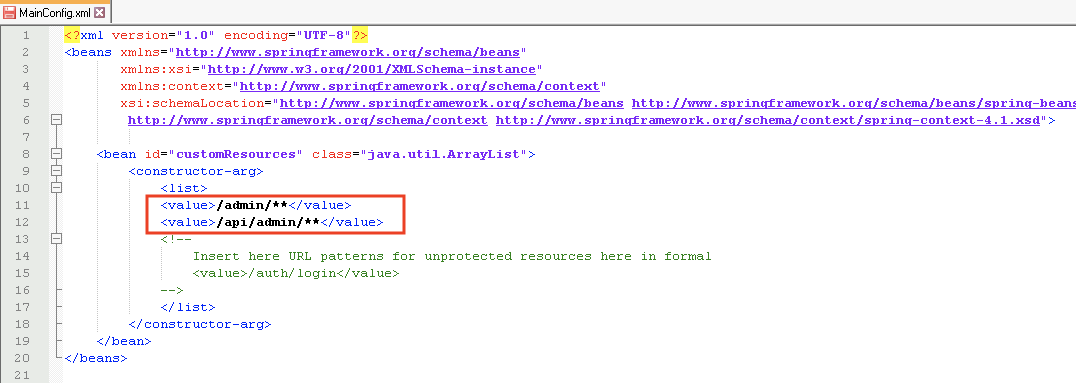
MainConfig.xmlin
StrategyLibrary_Deployment_Folder/WEB-INF/classes/auth/customand open it for editing.
<value>/admin/**</value>
<value>/api/admin/**</value>
Note: The
StrategyLibrary/saml/config/openpage is protected by both basic and SAML authentication.
