EducationSoftwareStrategy.com
StrategyCommunity

Knowledge Base

Product

Community

Knowledge Base

TopicsBrowse ArticlesDeveloper Zone

Product

Download SoftwareProduct DocumentationSecurity Hub

Education

Tutorial VideosSolution GalleryEducation courses

Community

GuidelinesGrandmastersEvents
x_social-icon_white.svglinkedin_social-icon_white.svg
Strategy logoCommunity

© Strategy Inc. All Rights Reserved.

LegalTerms of UsePrivacy Policy
  1. Home
  2. Topics

KB484541: Multiple end users to access PostgreSQL through the same database user with Kerberos authentication


Junjie Shi

Quality Engineer, Senior • MicroStrategy


This article introduces one use case for Kerberos authentication against PostgreSQL on MicroStrategy 2021.

Use Case

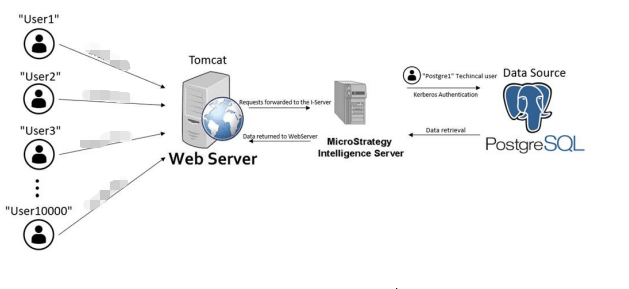
  1. There is a PostgreSQL technical user called postgreKrb.
  2. There are lots of end users which are logged into Strategy Web.
  3. Those users should be able to access the database through the postgreKrb technical user.
ka04W000000XPxrQAG_0EM4W000001IXzo.jpeg

Intelligence Server Configuration

  • Generate Kerberos 5 credentials (ticket) cache for the Kerberos user
    • kinit krbusertd@LABS.Strategy.COM -c /tmp/krb/krb5cc
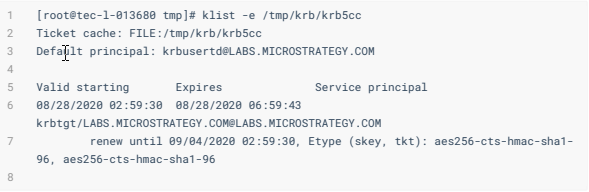
  • Verify the ticket cache.
ka04W000000XPxrQAG_0EM4W000001IXzy.jpeg
  • Add the following lines to 
    $MSTR_HOME/env/ODBC.sh
    :
    • export KRB5CCNAME=/tmp/krb/krb5cc
    • export KRB5_CONFIG=/tmp/krb/krb5.conf
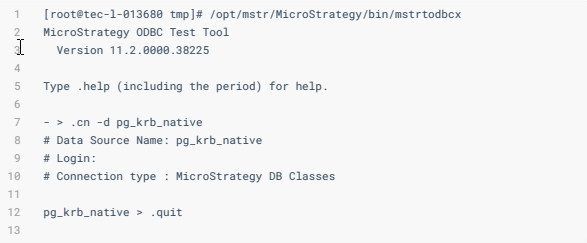
  • Use mstrtodbcx program to test the connection:
ka04W000000XPxrQAG_0EM4W000001IY03.jpeg
  • Restart the Intelligence Server to pick up the variables.

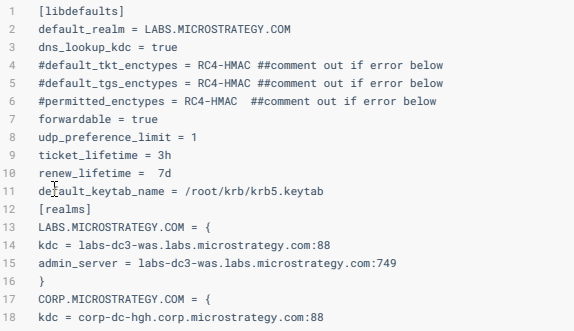
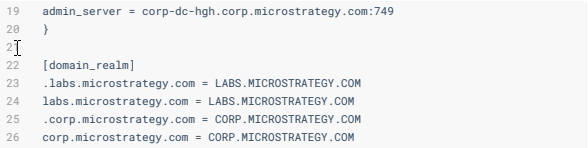
Content of /tmp/krb/krb5.conf

[libdefaults]default_realm = LABS.Strategy.COMdns_lookup_kdc = true #default_tkt_enctypes = RC4-HMAC ##comment out if error below#default_tgs_enctypes = RC4-HMAC ##comment out if error below#permitted_enctypes = RC4-HMAC ##comment out if error belowforwardable = trueudp_preference_limit = 1ticket_lifetime = 3hrenew_lifetime = 7ddefault_keytab_name = /root/krb/krb5.keytab[realms]LABS.Strategy.COMkdc = labs-dc3-was.labs.Strategy.com:749admin_server = labs-dc3-was.labs.Strategy.com:749}CORP.Strategy.COM = {kdc = corp-dc-hgh.corp.Strategy.com:88
ka04W000000XPxrQAG_0EM4W000001IY08.jpeg

admin_server = copr-dc-hgh.corp.Strategy.com:749}[domain_realm].labs.Strategy.com = LABS.Strategy.COMlabs.Strategy.com = LABS.Strategy.COM.corp.Strategy.com = CORP.Strategy.COM corp.Strategy.com = CORP.Strategy.COM
ka04W000000XPxrQAG_0EM4W000001IY0D.jpeg

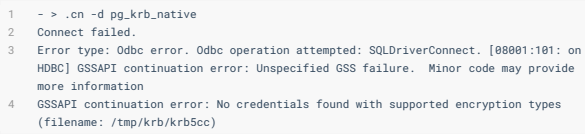
If you see the following error, you may need to comment out or choose the correct encryption types via

klist -e /tmp/krb/krb5cc
:
- > .cn -d pg_krb_native
Connect failed. 
Error type: Odbc error. Odbc operation attempted: SQLDriverConnect. [08001:101: on HDBC] GSSAPI continuation error: Unspecified GSS failure. Minor code may provide more information 
GSSAPI continuation error: No credentials found with supported encryption types (filename: /tmp/krb/krbb5cc)

ka04W000000XPxrQAG_0EM4W000001IY0I.jpeg


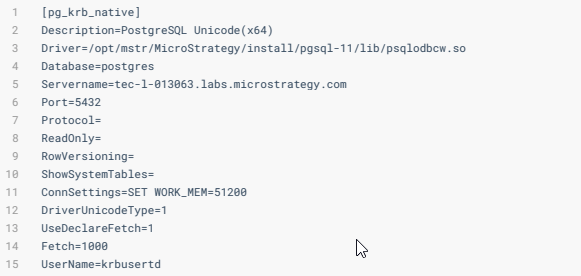
Sample DSN

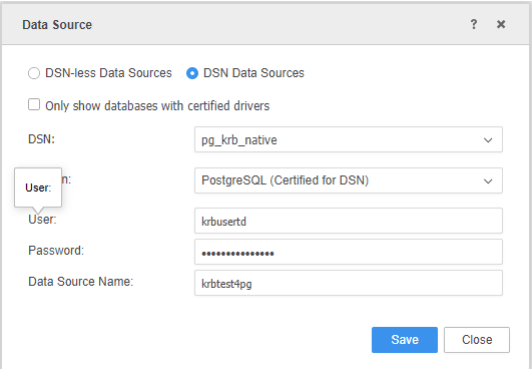
[pg_krb_native]Description=PostgreSQL Unicode(x64)Driver=/opt/mstr/MicroStrategy/install/pgsql-11/lib/psqlodbcw.soDatabase=postgresServername=tec-1-013063.labs.Strategy.comPort=5432Protocol=ReadOnly=RowVersioning=ShowSystemTables=ConnSettings=SET WORK_MEM=51200DriverUnicodeType=1UseDeclareFetch=1Fetch=1000UserName=krbusertd
ka04W000000XPxrQAG_0EM4W000001IY0N.jpeg

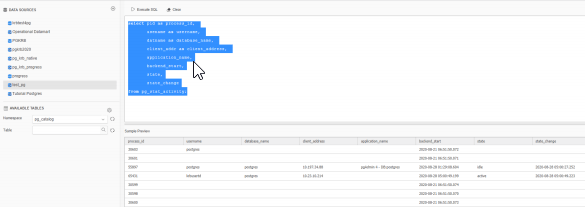
Connect to Strategy Web as an administrator (or any Strategy user)

  • Create a database role using the DSN with the Kerberos user. The password can be a dummy one.
ka04W000000XPxrQAG_0EM4W000001IY0S.jpeg
  • See that connectivity is ok and SQL can be executed successfully.
ka04W000000XPxrQAG_0EM4W000001IY0X.jpeg

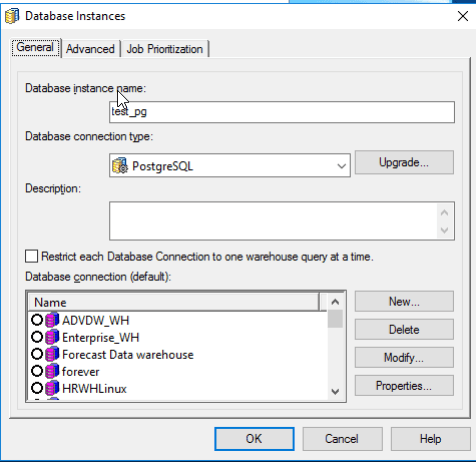
Connect to Strategy Developer as an administrator (or any Strategy user)

  • Clear any settings for Kerberos pass-through or Shared Kerberos.
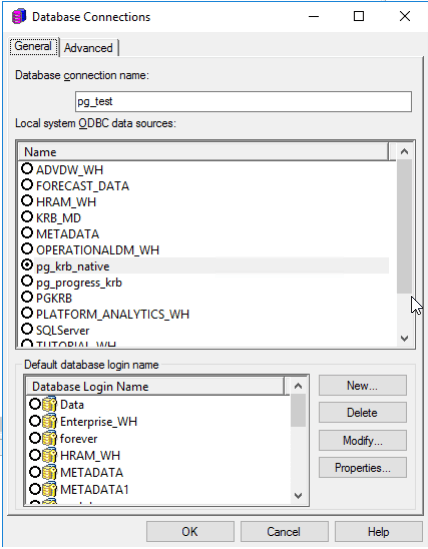
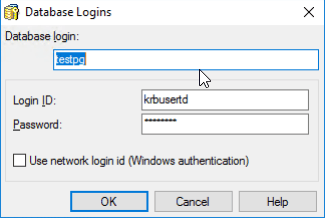
  • Create a database instance and add it to the Project. In the database login, input the Kerberos user; the password can be a dummy.
ka04W000000XPxrQAG_0EM4W000001IY0c.jpeg
ka04W000000XPxrQAG_0EM4W000001IY0m.jpeg
ka04W000000XPxrQAG_0EM4W000001IY0r.jpeg
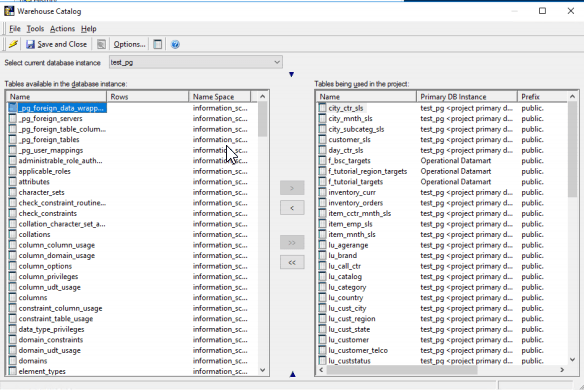
  • Run the Warehouse Catalog.
ka04W000000XPxrQAG_0EM4W000001IY0w.jpeg

Comment

0 comments

Details

Knowledge Article

Published:

September 1, 2020

Last Updated:

January 15, 2021