EducationSoftwareStrategy.com
StrategyCommunity

Knowledge Base

Product

Community

Knowledge Base

TopicsBrowse ArticlesDeveloper Zone

Product

Download SoftwareProduct DocumentationSecurity Hub

Education

Tutorial VideosSolution GalleryEducation courses

Community

GuidelinesGrandmastersEvents
x_social-icon_white.svglinkedin_social-icon_white.svg
Strategy logoCommunity

© Strategy Inc. All Rights Reserved.

LegalTerms of UsePrivacy Policy
  1. Home
  2. Topics

KB484418: User account gets locked when changing password in Web Preferences with "Lock after" enabled in Intelligence Server Configuration for MicroStrategy 10.4


Mengran (Molly) Wang

Senior Cloud Support Engineer III • MicroStrategy


This article describes the error encountered when changing the password in Web Preferences with an Account Lockout Policy setting enabled. This article also addresses the fix available in MicroStrategy 10.4.4 and later versions.

Description 


When changing the password in Web Preferences with the Lock after (failed attempt) option enabled in Strategy Intelligence Server Configuration, the user account may get locked. 
Steps to reproduce 

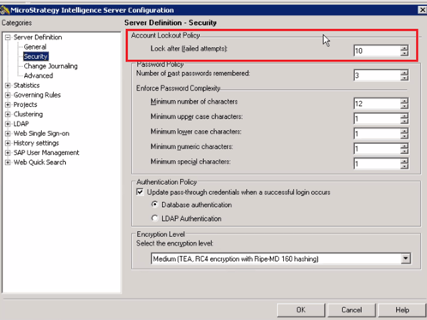
  • In Strategy Intelligence Server Configuration, set the Lock after (failed attempt) field to 10. The default value is -1. 
ka02R000000btMfQAI_0EM2R000001IDQv.jpeg
  • Create a new user account with all web privileges via Developer.
    Name the account test, and set the password to be 1111.
  • Log in to Web with the user, test, with standard authentication.
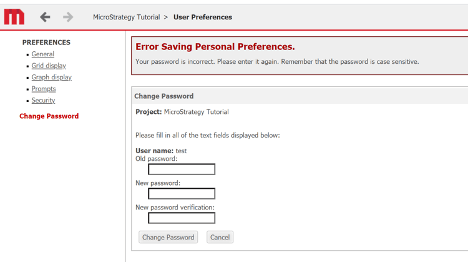
  • Change the password from Preferences and set the new password as 2222.

    The following error is received:
     
    Error Saving Personal Preferences
    Your password is incorrect. Please enter it again. Remember that the password is case sensitive.
ka02R000000btMfQAI_0EM2R000001IDRK.jpeg
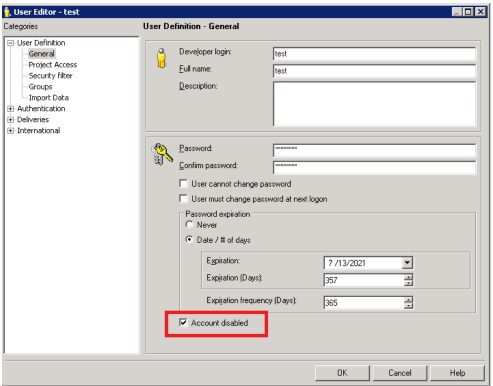
  • The account is also disabled in Developer.
ka02R000000btMfQAI_0EM2R000001IDRy.jpeg
  • Unlock the user and log in to Web. The new password takes effect.

Why is this happening?


This is a known issue identified in Strategy 10.4.

Solution


This issue has been addressed in Strategy 10.4.4. Please upgrade to take advantage of the fix.


Comment

0 comments

Details

Knowledge Article

Published:

July 22, 2020

Last Updated:

July 22, 2020