EducationSoftwareStrategy.com
StrategyCommunity

Knowledge Base

Product

Community

Knowledge Base

TopicsBrowse ArticlesDeveloper Zone

Product

Download SoftwareProduct DocumentationSecurity Hub

Education

Tutorial VideosSolution GalleryEducation courses

Community

GuidelinesGrandmastersEvents
x_social-icon_white.svglinkedin_social-icon_white.svg
Strategy logoCommunity

© Strategy Inc. All Rights Reserved.

LegalTerms of UsePrivacy Policy
  1. Home
  2. Topics

KB441162: 'User [...] does not have Write access to the Report Definition object '.xlsx' when publishing cube in MicroStrategy Web 10.4 and newer


Community Admin

• Strategy


This article discusses a known issue that affects cube re-publication. The issue is limited to when a user who is not the owner of the cube attempts publication, and it only affects cube containing GE attributes. This issue is resolved in MicroStrategy 11.0.

SYMPTOM:
A user attempts to republish a cube that was imported from Excel by a different user. Despite having the right permission to perform this action, an error occurs:

ka04W00000147rNQAQ_0EM44000000WV47.jpeg


Unable to publish the cube.
User [...] does not have Write access to the Report Definition object '<file_name>' in Project with ID '<project_ID>'. Error in Process method of Component: QueryEngineServer, Project <project_name>, Job <job_number>, Error Code= -2147214568.)
The issue does not occur with all cubes.
STEPS TO REPRODUCE:

  • login to Strategy Web as Administrator and import the Excel file attached to this article into Shared Reports > Subfolder 
  • set Subfolder ACL with Everyone = View 
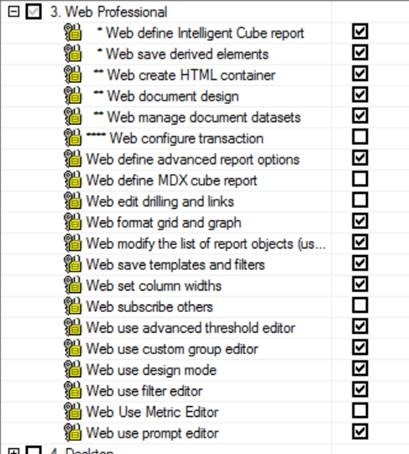
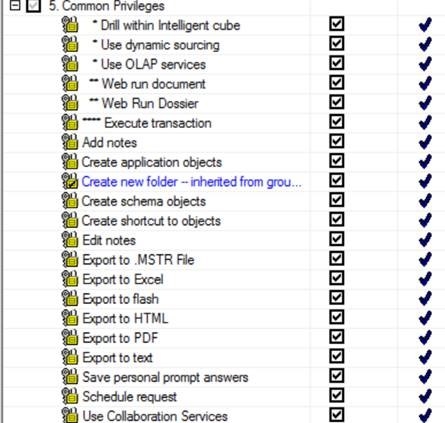
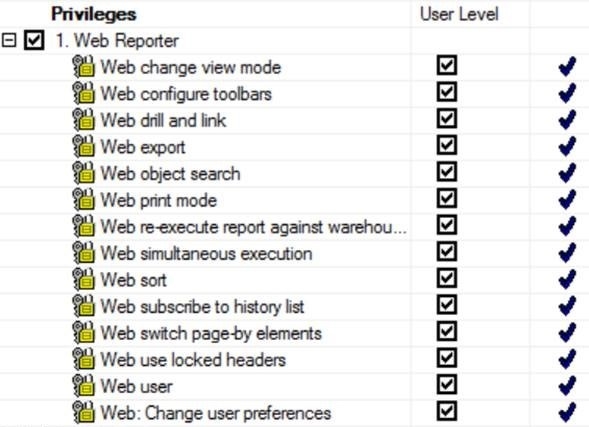
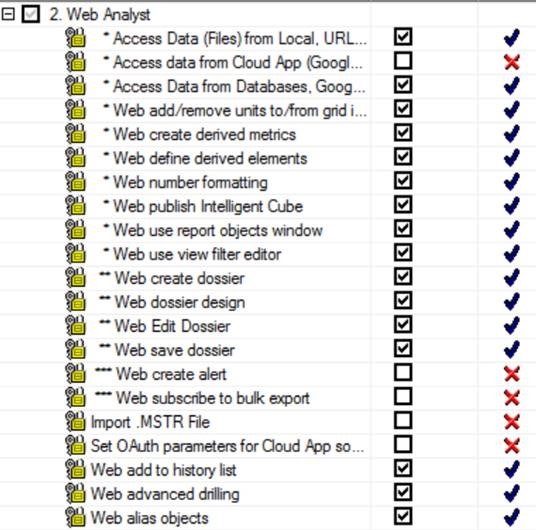
  • create a test user and assign privileges as per screenshots below:           
ka04W00000147rNQAQ_0EM44000000WV4R.jpeg
ka04W00000147rNQAQ_0EM44000000WV4W.jpeg
ka04W00000147rNQAQ_0EM44000000WV4b.jpeg
ka04W00000147rNQAQ_0EM44000000WV4g.jpeg
ka04W00000147rNQAQ_0EM44000000WV4l.jpeg
ka04W00000147rNQAQ_0EM44000000WV4q.jpeg
ka04W00000147rNQAQ_0EM44000000WV4v.jpeg
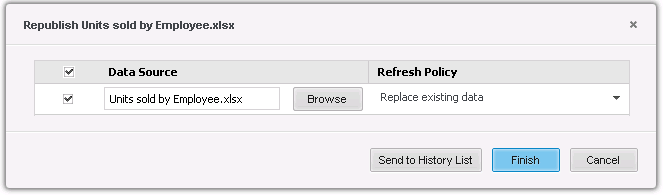
  • log into Web as the test user and attempt to republish the cube (“replace existing data” => pick same Excel files used in step 1)                                
ka04W00000147rNQAQ_0EM44000000WV50.png

CAUSE:
This is an identified defect in Strategy 10.4.x with cubes containing GEO attributes and derived columns.
ACTION:
This issue is resolved in Strategy 11.0. To take advantage of this fix, upgrade to Strategy 11.0 or later.
WORKAROUND:
Grant the affected user or user group the Collaborate privilege (in Developer it's called Modify privilege).
KB441162


Comment

0 comments

Details

Knowledge Article

Published:

June 27, 2018

Last Updated:

July 8, 2019