EducationSoftwareStrategy.com
StrategyCommunity

Knowledge Base

Product

Community

Knowledge Base

TopicsBrowse ArticlesDeveloper Zone

Product

Download SoftwareProduct DocumentationSecurity Hub

Education

Tutorial VideosSolution GalleryEducation courses

Community

GuidelinesGrandmastersEvents
x_social-icon_white.svglinkedin_social-icon_white.svg
Strategy logoCommunity

© Strategy Inc. All Rights Reserved.

LegalTerms of UsePrivacy Policy
  1. Home
  2. Topics

KB483721: After applying Microsoft's September 2019 or later Excel Update, exporting from MicroStrategy Developer to Microsoft Excel results in an error


Chris Robinson

Principal Product Specialist • Strategy


This article describes an issue where MicroStratgy Developer 10.x and 11.x cannot export to Microsoft Excel after applying the latest update update for Microsoft Excel.

Description

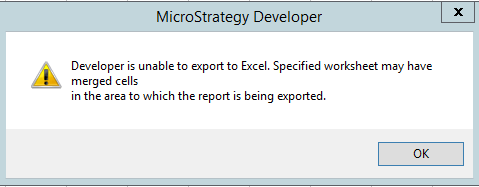
Users cannot export to Microsoft Excel when using Strategy Developer 10.x or 11.x after applying the September 2019 or later Excel update from Microsoft when using Excel 2016 or older. When trying to export a report, the following error appears:
"Developer is unable to export to Excel. Specified worksheet may have merged cells in the area to which the report is being exported."
This issue is specific to Microsoft Excel 2016 and older after applying a Microsoft Security Update such as KB4475579. The security update is only for Microsoft Excel 2016. Any supported Windows OS and Strategy versions can experience this issue. This issue has not been seen with the Office 365 version of Excel.
Steps to Reproduce

  • Download KB4475579 from Microsoft's website.
  • Restart you computer and export a report from Strategy Developer to Microsoft Excel.
ka04W000001IxB4QAK_0EM2R000000mLqy.jpeg

Workaround

There are multiple ways to avoid encountering this issue:

  1. Uninstall the Microsoft Excel update.
  2. Export from Strategy Web, instead of Strategy Developer.
  3. When exporting from Strategy Developer, ensure Microsoft Excel is open prior to performing the export.
  4. Update to Excel Office 365.

Solution


The issue has been fix confirmed in Strategy 2021 Update 5 and Strategy 2020, please upgrade to take a the advantage of the fix.


Comment

0 comments

Details

Knowledge Article

Published:

October 9, 2019

Last Updated:

September 29, 2022