Starting with the release of Strategy ONE (March 2024), dossiers are also known as dashboards.
SYMPTOM:
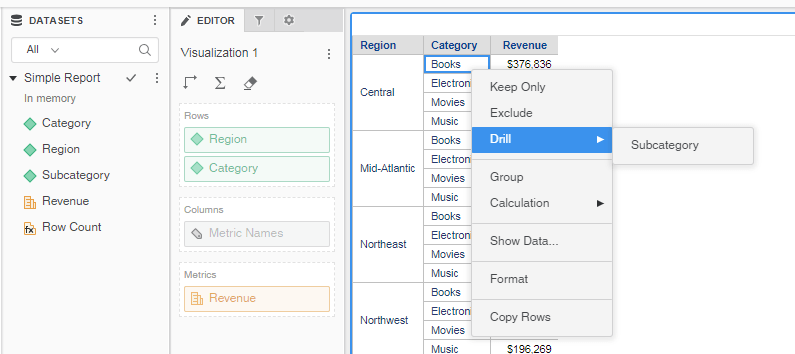
When users are denied or have not been granted the “Web drill and link” privilege, users can still right-click within a dossier and have the option to Drill. Users are limited to drilling within the dataset.
STEPS TO REPRODUCE:
1. Create a report with Region, Category, Subcategory, and the Revenue metric.
2. Create a dossier using the base report created in Step 1.
3. Add Region and Category to the rows and Revenue to the metrics.
4. Save the dossier.
5. Log in as a user without the “Web drill and link” privilege .
6. Right-click any of the attribute elements on the grid.
7. The option to Drill to Subcategory is available and users can drill down to any attributes not in the visualization.
CAUSE:
This is a known defect in Strategy 10.x.
ACTION:
Upgrade to Strategy 2019 to resolve this issue.
WORKAROUND:
An empty drill map can be added to the base report to prevent all users from drilling within the dossier. For additional details regarding custom drill maps, refer to the Report Designer guide.
KB441534
