Are you looking to enhance your Strategy knowledge? We offer a wide variety of courses and certifications that will help you to fully harness the power of our products, and with Strategy HyperIntelligence®, it is now easier than ever to browse and enroll in one of these best-in-class education offerings. Check out these five simple steps to start today!
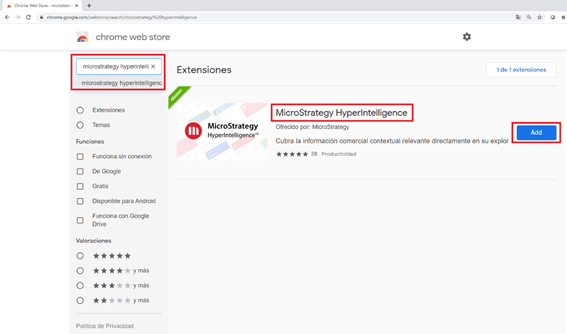
1. Navigate to the Chrome Web Store and install the Strategy HyperIntelligence browser extension.
2. Activate the “Strategy Courses” card. It is available within this environment URL: https://demo.microstrategy.com/MicroStrategyLibrary.

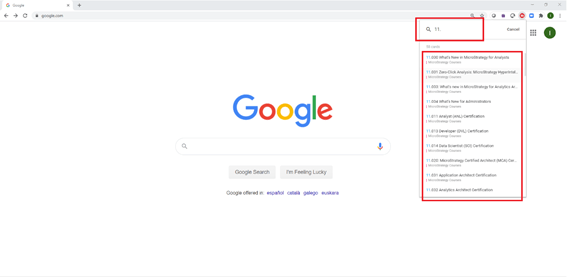
3. In the search bar at the top of the HyperIntelligence browser extension, type “11.” to see the list of available Strategy courses.
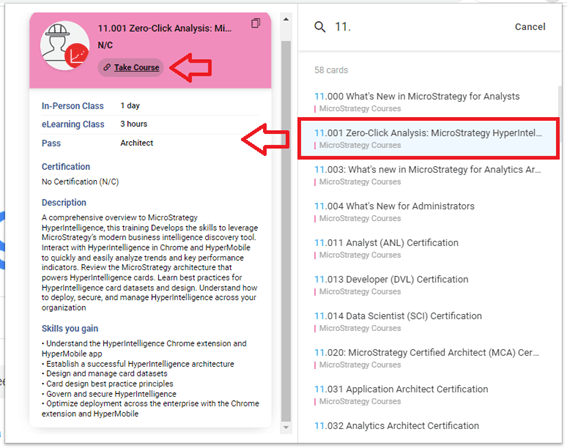
4. Click on the cards to see information about the course, including length and description.
5. Once you have found the course you would like to take, click “Take Course” and follow the steps to enroll.
It’s that easy— search for professional development opportunities and have fun with HyperIntelligence!
