Starting with the release of Strategy ONE (March 2024), dossiers are also known as dashboards.
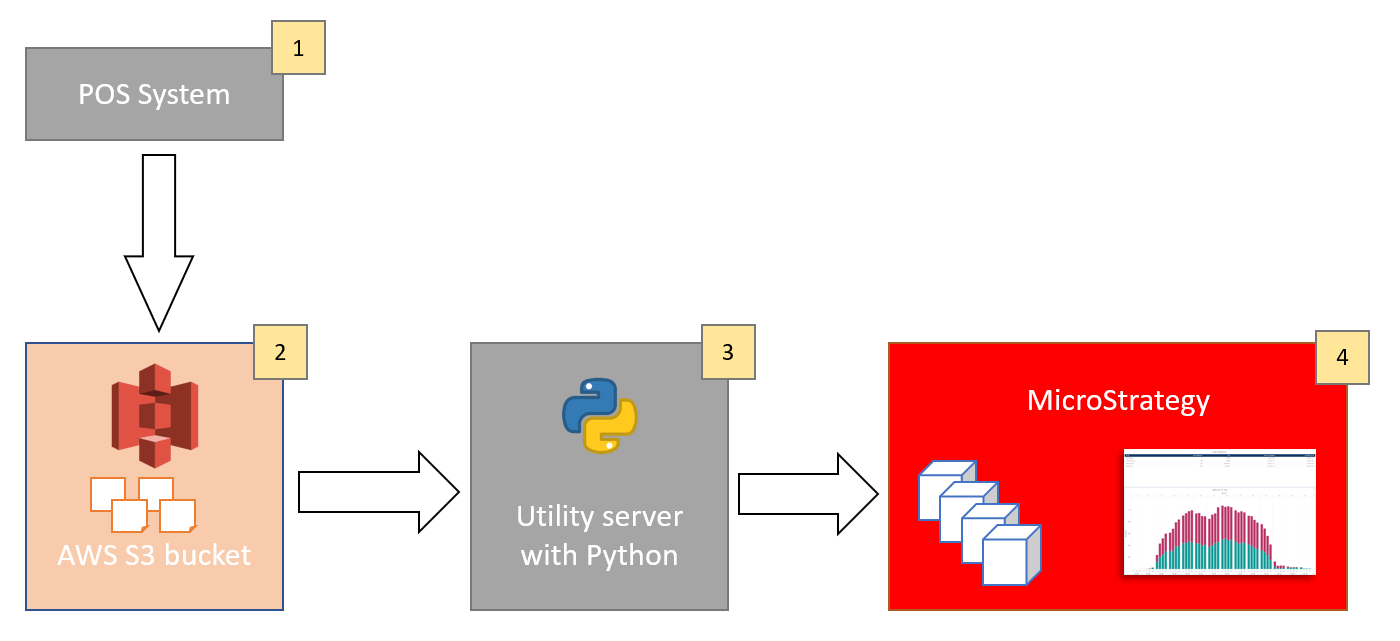
1. Data from hundreds of stores is being collected and aggregated into 4 topics/datasets: sales_products, sales_budget, sales_end_of_day, sales_stores. Some datasets contain millions of rows of data, others are smaller. They contain rolling history of the last 7 days on different level of aggregation. Datasets are being split into hundreds of parquet files and in this form they are moved to S3. Refresh rate is one hour (files are being completely replaced).
2. Hundreds of parquet files are stored in S3. Usually access to the S3 bucket is possible with Access Key / Secret Key. In this case other authentication method is being applied: STS (Security Token Service).
3. Python script has been written to handle data movement. Several libraries are being used.
- boto3 library allows connection and retrieval of files from S3.
- pandas library allows reading parquet files (+ pyarrow library)
- mstrio library allows pushing data to Strategy cubes
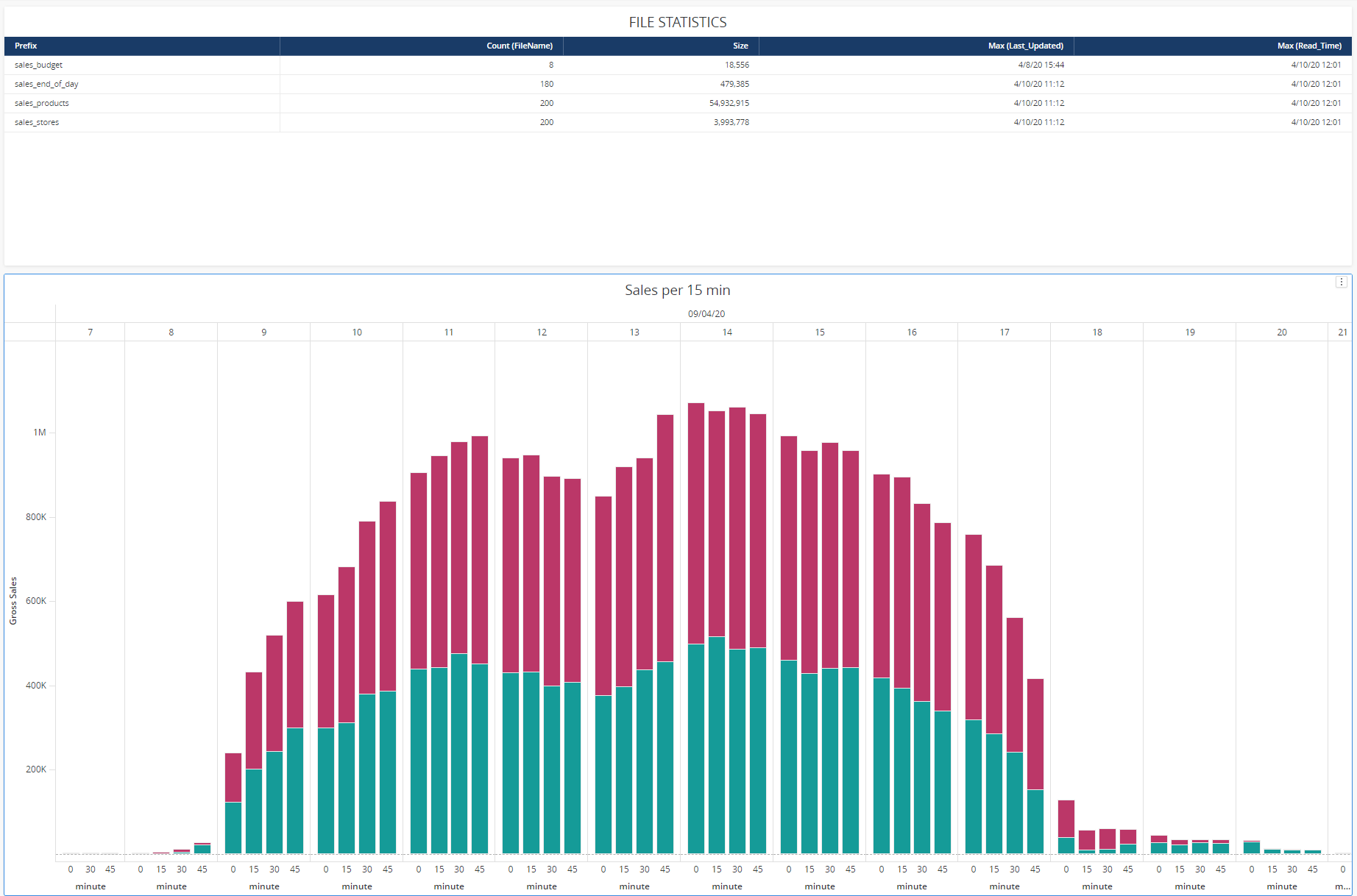
Four cubes are created for each dataset. There is an additional 5th cube that stores current statistics like: number of files processed, size of the files, datastamp of the last file update, datastamp of the last data push.
There is a simple schedule that connects to S3 every 10 minutes to check if there is new data. If not - it waits another 10 minutes. If there is fresh data (total size of files is being checked), then the data is processed and pushed to Strategy cubes.
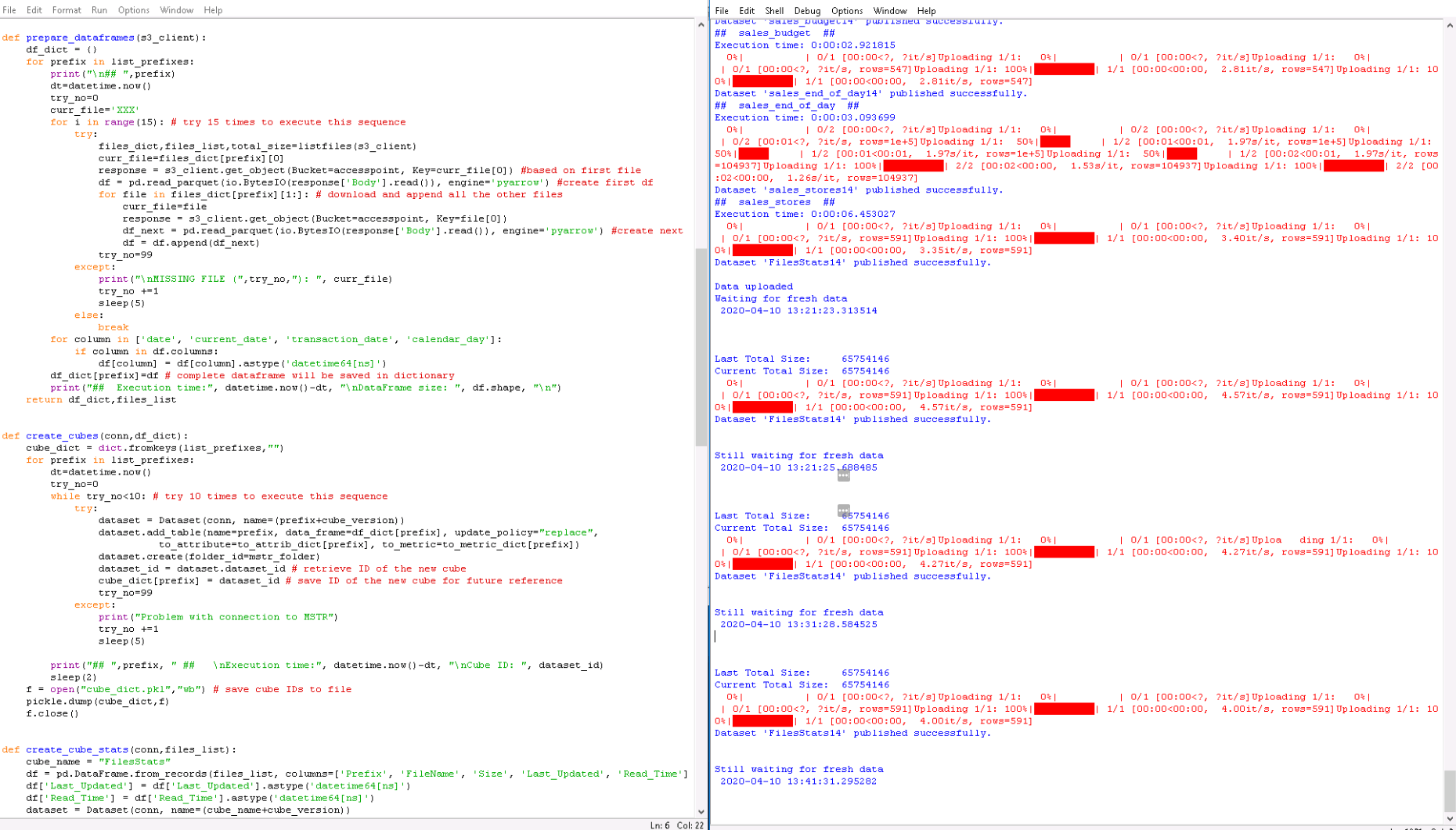
4. Main data cubes are being refreshed every hour. The cube that stores stats is refreshed every 10 minutes. While the data lands in Strategy cubes it is utilized in a dossier. Since refresh rate is 1 hour you can refresh your dossier either manually or with built-in dossier refresh parameter.
Instead of running Python script from a separate machine you can run them from within AWS using Lambda function. That would save some trouble with an additional computer and simplified authentication process. However, there is one limitation that prevented me from implementing this scenario. When you send your Python script to Lambda you need also to send all the libraries with it (important: those must be Linux versions of those libraries). Lambda has a hard limit of 262MB size of all attached libraries. Libraries used in this scenario are quite big (numpy, pyarrow) and the total size was way over 300 MB. I believe, that with careful evaluation of each library it is possible to delete some unessential files and get the package slim enough to fit into the Lambda limit.
Note - I've added color formatting in the code below (http://hilite.me). Code copied from here might not work due to indentation issues and some problems with quotes (""). In that case, use attached file with sample code.
import boto3, io, pickle
import pandas as pd
from mstrio.Strategy import Connection
from mstrio.dataset import Dataset
from datetime import datetime
from time import sleep
import credentials_customer2 #separate file that stores credentials

### AWS
list_prefixes = ['sales_products','sales_budget','sales_end_of_day','sales_stores']
df_dict = {}
filetype = 'parquet'
time_lag = 600
arnrole=credentials_customer2.arnrole
accesspoint=credentials_customer2.accesspoint

### MSTRIO
base_url = 'https://env-XXXXXX.customer.cloud.Strategy.com/StrategyLibrary/api'
login_mode = 1
project_id = 'B721C2AE11EA5A4733110080EFE53E8C'
mstr_folder = 'F378423611EA703C2A610080EFE5E26E'
mstr_username=credentials_customer2.mstr_username
mstr_password=credentials_customer2.mstr_password
cube_version = "14" # modify this (+1) after each change of data structure

'''Dictionaries below will help with propper mapping attrbiutes.
For example Category_ID = 23 will be recognized by MSTR as a metric (since it's an integer).
Those settings will force attribute object creation'''

to_metric_dict = {'sales_end_of_day':[],
                  'sales_products':[],
                  'sales_budget':[],
                  'sales_stores':[]}
to_attrib_dict = {'sales_end_of_day':[],
                  'sales_budget':['company_code'],
                  'sales_products':['category_id','group_id'],
                  'sales_stores':['hour','minute']}

### FUNCTIONS

def authenticate_aws(): # this is valid for assuming role; should be modified for "standard" authentication
    sts_client = boto3.client('sts')
    assumed_role_object=sts_client.assume_role(RoleArn=arnrole, RoleSessionName="AssumeRoleSession1")
    credentials=assumed_role_object['Credentials']

    s3_client=boto3.client(
        's3',
        aws_access_key_id=credentials['AccessKeyId'],
        aws_secret_access_key=credentials['SecretAccessKey'],
        aws_session_token=credentials['SessionToken'],
        )
    return s3_client


def authenticate_mstr():
    conn = Connection(base_url, mstr_username, mstr_password, project_id=project_id, login_mode=login_mode)
    conn.connect()
    return conn


def listfiles(s3_client):
    total_size=0
    files_dict = dict.fromkeys(list_prefixes,[])
    files_list=[]
    # add exception here - I've seen an error here, once
    contents = s3_client.list_objects_v2(Bucket=accesspoint)
    dt=datetime.now()
    for s3_file in contents['Contents']:
        total_size+=s3_file['Size']
        for prefix in list_prefixes:
            if (s3_file['Key'].startswith(prefix) and s3_file['Key'].endswith(filetype) and # check file prefix and extension
                (s3_file['Key'] != prefix+"/") and # eliminate folders
                (s3_file['Key'] not in files_dict[prefix])): # eliminate repetitions
                files_dict[prefix] = files_dict.get(prefix, []) + [[s3_file['Key'], s3_file['Size'], s3_file['LastModified']]]
                files_list.append([prefix, s3_file['Key'], s3_file['Size'], str(s3_file['LastModified']), dt])
    return files_dict, files_list, total_size


def prepare_dataframes(s3_client):
    df_dict = {}
    for prefix in list_prefixes:
        print("\n## ",prefix)
        dt=datetime.now()
        try_no=0
        curr_file='XXX'
        for i in range(15): # try 15 times to execute this sequence
            try:
                files_dict,files_list,total_size=listfiles(s3_client)
                curr_file=files_dict[prefix][0]
                response = s3_client.get_object(Bucket=accesspoint, Key=curr_file[0]) #based on first file
                df = pd.read_parquet(io.BytesIO(response['Body'].read()), engine='pyarrow') #create first df
                for file in files_dict[prefix][1:]: # download and append all the other files
                    curr_file=file
                    response = s3_client.get_object(Bucket=accesspoint, Key=file[0])
                    df_next = pd.read_parquet(io.BytesIO(response['Body'].read()), engine='pyarrow') #create next df
                    df = df.append(df_next)
                try_no=99
            except:
                print("\nMISSING FILE (",try_no,"): ", curr_file)
                try_no +=1
                sleep(5)
            else:
                break
        for column in ['date', 'current_date', 'transaction_date', 'calendar_day']:
            if column in df.columns:
                df[column] = df[column].astype('datetime64[ns]')
        df_dict[prefix]=df # complete dataframe will be saved in dictionary
        print("##  Execution time:", datetime.now()-dt, "\nDataFrame size: ", df.shape, "\n")
    return df_dict,files_list


def create_cubes(conn,df_dict):
    cube_dict = dict.fromkeys(list_prefixes,"")
    for prefix in list_prefixes:
        dt=datetime.now()
        try_no=0
        while try_no<10: # try 10 times to execute this sequence
            try:
                dataset = Dataset(conn, name=(prefix+cube_version))
                dataset.add_table(name=prefix, data_frame=df_dict[prefix], update_policy="replace",
                          to_attribute=to_attrib_dict[prefix], to_metric=to_metric_dict[prefix])
                dataset.create(folder_id=mstr_folder)
                dataset_id = dataset.dataset_id # retrieve ID of the new cube
                cube_dict[prefix] = dataset_id # save ID of the new cube for future reference
                try_no=99
            except:
                print("Problem with connection to MSTR")
                try_no +=1
                sleep(5)

        print("## ",prefix, " ##   \nExecution time:", datetime.now()-dt, "\nCube ID: ", dataset_id)
        sleep(2)
    f = open("cube_dict.pkl","wb") # save cube IDs to file
    pickle.dump(cube_dict,f)
    f.close()


def create_cube_stats(conn,files_list):
    cube_name = "FilesStats"
    df = pd.DataFrame.from_records(files_list, columns=['Prefix', 'FileName', 'Size', 'Last_Updated', 'Read_Time'])
    df['Last_Updated'] = df['Last_Updated'].astype('datetime64[ns]')
    df['Read_Time'] = df['Read_Time'].astype('datetime64[ns]')
    dataset = Dataset(conn, name=(cube_name+cube_version))
    dataset.add_table(name=cube_name, data_frame=df, update_policy="replace",
                      to_attribute=['Prefix', 'FileName', 'Last_Updated'], to_metric=['Size'])
    dataset.create(folder_id=mstr_folder)
    dataset_id = dataset.dataset_id # retrieve ID of the new cube
    f = open("cube_dict_stat.pkl","wb") # save cube IDs to file
    pickle.dump(dataset_id,f)
    f.close()

def update_cubes(conn,df_dict):
    f = open("cube_dict.pkl","rb") # read saved cube IDs from file
    cube_dict = pickle.load(f)
    f.close()
    for prefix in list_prefixes:
        dt=datetime.now()
        try_no=0
        while try_no<10: # try 10 times to execute this sequence
            try:
                dataset = Dataset(connection=conn, dataset_id=cube_dict[prefix])
                dataset.add_table(name=prefix, data_frame=df_dict[prefix], update_policy="replace")
                dataset.update()
                dataset.publish()
                try_no=99
            except:
                print("Problem with connection to MSTR")
                try_no +=1
                sleep(5)

        sleep(2)
        print("## ",prefix, " ##   \nExecution time:", datetime.now()-dt)


def update_cube_stats(conn,files_list):
    f = open("cube_dict_stat.pkl","rb") # read saved cube IDs from file
    dataset_id = pickle.load(f)
    f.close()
    df = pd.DataFrame.from_records(files_list, columns=['Prefix', 'FileName', 'Size', 'Last_Updated', 'Read_Time'])
    cube_name = "FilesStats"
    dataset = Dataset(connection=conn, dataset_id=dataset_id)
    dataset.add_table(name=cube_name, data_frame=df, update_policy="replace")
    dataset.update()
    dataset.publish()

def main():
    choice = None
    s3_client= authenticate_aws()
    conn= authenticate_mstr()
    last_total_size=1
    while choice != "0":
        print \
        ("""
        ---MENU---
        0 - Exit
        1 - Prepare DataFrames
        2 - MSTR - create new cubes
        3 - MSTR - update cubes - 1 time
        4 - MSTR - update cubes - start cycle
        5 - Review DFs details
        6 - List files
        """)

        choice = input("Your choice: ")
        if choice == "0":
            print("Good bye!")
        elif choice == "1":
            conn.renew()
            df_dict,files_list = prepare_dataframes(s3_client)
        elif choice == "2":
            conn.renew()
            cube_dict=create_cubes(conn,df_dict)
            files_dict,files_list,total_size=listfiles(s3_client)
            create_cube_stats(conn,files_list)
        elif choice == "3":
            conn.renew()
            files_dict,files_list,total_size=listfiles(s3_client)
            update_cubes(conn,df_dict)
            update_cube_stats(conn,files_list)
        elif choice == "4":
            while last_total_size > 0:
                s3_client= authenticate_aws()
                print("\nLast Total Size:    ", last_total_size)
                files_dict,files_list,total_size=listfiles(s3_client)
                print("Current Total Size: ", total_size)
                if last_total_size != total_size:
                    sleep(30) # Just in case the files are beeing uploaded right now
                    files_dict,files_list,total_size=listfiles(s3_client)
                    print("New Data! Let's crunch it!\n", datetime.now(), "\nTotal Size: ", total_size)
                    df_dict,files_list = prepare_dataframes(s3_client)
                    conn.renew()
                    update_cubes(conn,df_dict)
                    print("\n\nStatistics...")
                    update_cube_stats(conn,files_list)
                    print("\nData uploaded \nNow waiting for fresh data\n",datetime.now(), "\n\n")
                    last_total_size=total_size
                else:
                    update_cube_stats(conn,files_list)
                    print("\nStill waiting for fresh data\n",datetime.now(), "\n\n")
                    sleep(time_lag) # wait time
        elif choice == "5":
            for prefix in list_prefixes:
                print("\n## ",prefix, " ##")
                print(df_dict[prefix].info())
                print(df_dict[prefix].head(10))
                print("\n\n")
        elif choice == "6":
            conn.renew()
            s3_client= authenticate_aws()
            files_dict,files_list,total_size=listfiles(s3_client)
            for prefix in list_prefixes:
                print("\n## ",prefix, " - number of files: ", len(files_dict[prefix]))
                file_count=0
                for file in files_dict[prefix]:
                    print(file[0], " - ", file[1], " - ", file[2])
                    file_count+=1
                    if file_count==10: # list just 10 files for each prefix
                        break
            for prefix in list_prefixes:
                print(prefix, " - number of files: ", len(files_dict[prefix]))
            print("\nTotal File Size: ", total_size)
            last_total_size=total_size
        else:
            print(" ### Wrong option ### ")


main()

# TODO: autostart the program with batch
# TODO: correct time zone related time difference
