EducationSoftwareStrategy.com
StrategyCommunity

Knowledge Base

Product

Community

Knowledge Base

TopicsBrowse ArticlesDeveloper Zone

Product

Download SoftwareProduct DocumentationSecurity Hub

Education

Tutorial VideosSolution GalleryEducation courses

Community

GuidelinesGrandmastersEvents
x_social-icon_white.svglinkedin_social-icon_white.svg
Strategy logoCommunity

© Strategy Inc. All Rights Reserved.

LegalTerms of UsePrivacy Policy
  1. Home
  2. Topics

KB483179: Using ScanMD to fix known logical metadata inconsistencies in the Strategy Product Suite


Stefano Antonellis

Principal Product Specialist • Strategy


Use ScanMD to fix known logical metadata inconsistencies in the MicroStrategy product.

What is ScanMD?


ScanMD is a troubleshooting application whose aim is to provide a quick resolution to known metadata logical inconsistencies. Logical inconsistencies are errors within an object's definition structure. The word 'known' means that those erroneous structures have already been investigated and processed by Strategy Technical Support and as a result, a Test has been implemented in ScanMD.
It is not the intention that ScanMD be used as a proactive method for addressing metadata inconsistencies. If you find yourself proactively running ScanMD and/or finding inconsistencies through ScanMD, please contact Strategy Technical Support as this means that there is, most likely, a deeper problem to be investigated.
For Strategy 2021 or later, the latest ScanMD version must be used for troubleshooting metadata logical inconsistencies. The installation file can be found attached to this article. 
Please contact Strategy Technical Support if you require a previous Strategy version of the ScanMD tool. 
 

Considerations and Guidelines 

  • ScanMD is to be used as a troubleshooting application and a vehicle to provide a quick resolution after a problem has been identified as a metadata inconsistency. In other words, ScanMD should not be run on a "schedule" or "after every migration".
  • Before running ScanMD, a database backup of the metadata must be made. With a backup of the metadata in place, proposed fixes should only be accepted if the full impact of the fix is understood.
  • When a Fix is performed on a project, the Strategy Intelligence Server should be stopped, or that Project unloaded. No users should be connected to the project undergoing a fix.
  • Always use the latest version of ScanMD, which is the one supplied in this document.
  • For cases where ScanMD is used, there may still be questions as to how the metadata got into this state. To help answer that question -- customers encountering inconsistency issues should make note of Schema-related changes (if the problem is affecting Schema objects), Object Migrations, or error messages prior to experiencing the problem. Change Journaling, if it has been enabled, can help in preserving this information.

ScanMD Concepts and Highlights 


The ScanMD can only load custom tests with the same version. Load a different version of the custom test within ScanMD will hit the below error.
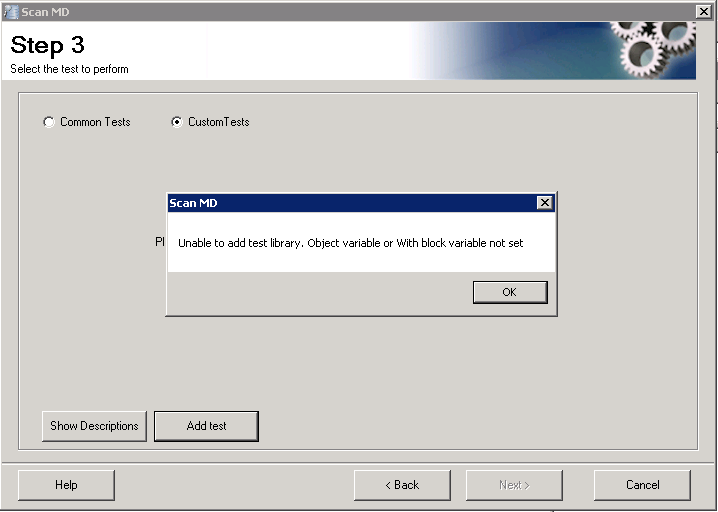
ka0PW000000606zYAA_0EM2R000000gr2I.jpeg

Requirements

  • The Strategy user account using ScanMD must have the e"Bypass all object security access checks" privilege
  • ScanMD can only connect through a 2-tier (direct) Project Source
  • Strategy Developer installed
  • Microsoft Core XML Services (MSXML) 6.0
  • Microsoft Visual C++ 2005 SP1 Redistributable Package (x86)

Certified Systems


ScanMD supports all the Microsoft Windows Systems supported by Strategy Developer except Vista. The following are certified:

  • Windows Server 2019
  • Windows Server 2016
  • Windows Server 2012 R2 Enterprise
  • Windows Server 2012 Enterprise
  • Windows Server 2008 R2 Enterprise
  • Windows Server 2003 R2 Enterprise Edition SP2
  • Windows Server 2003 R2 Standard Edition SP 2
  • Windows Server 2003 R2 Enterprise X64 Edition SP 2
  • Windows 7 Enterprise
  • Windows 8.1
  • Windows 10
  • Windows XP Professional Version 2002 SP3

Download


Download the file attached to this KB article.

ScanMD Check-only Mode


The current version of ScanMD does not provide the ability to execute one or more common tests in check-only mode. Due to the new feature enforcing the inter-object dependencies, check-only mode is not possible in this release. Consider one example, before executing Schema Collection Verification test which ensures all schema objects are in the Schema collection, the ScanMD will execute Table Verification test and eliminate table objects with invalid definition. Therefore, the execution sequence is crucial to maintain the metadata consistency. Check-only mode may generate misleading results by ignoring inter-object dependencies and execution sequence.
How to Use ScanMD

  • Go to Start > Programs > Strategy > Tools and run ScanMD. 
  • Click Next to pass the ScanMD introduction and go to the next step.
  • In Step 1, choose a project source from the drop-down. 
  • Enter the login and password credentials with administrative privileges to the metadata and click Next. 
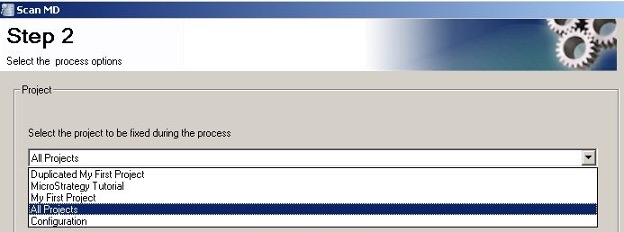
  • In Step 2, choose a single project, All Projects, or Configuration from the drop-down. 
ka0PW000000606zYAA_0EM4W0000029Buk.jpeg
  • Select a different location for the log file, if desired, and click Next. 
    Note: During the transition from Step 2 to Step 3, ScanMD will check the compatibility between the Metadata version and the version of the Strategy platform present on the machine where ScanMD is running.
ka0PW000000606zYAA_0EM4W0000029BvE.jpeg
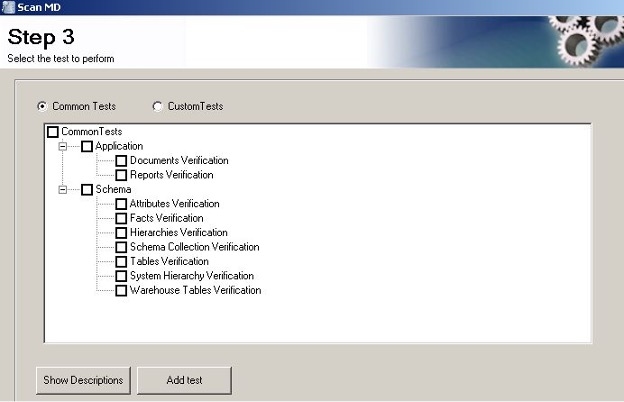
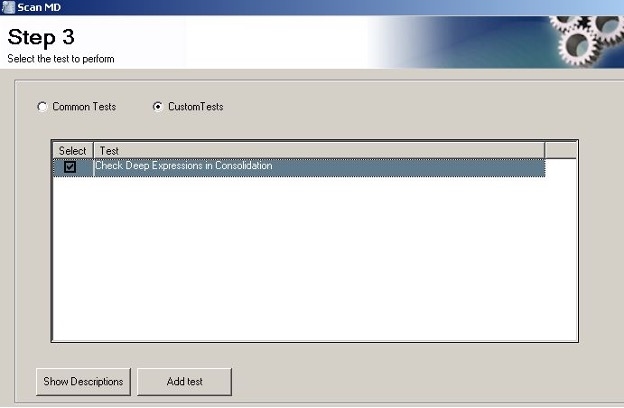
  • In Step 3, choose between Common Tests and Custom Tests. If a Custom Test is not yet added, click Add test to browse to its location. Make your test selections and Click Next. 
ka0PW000000606zYAA_0EM4W0000029BvO.jpeg
ka0PW000000606zYAA_0EM4W0000029Bw2.jpeg
  • Note:
    • Multiple Common Tests can be chosen at once, but only one Custom Test can run one at a time.
    • Either Common Tests or Custom Tests can be selected, but not both.
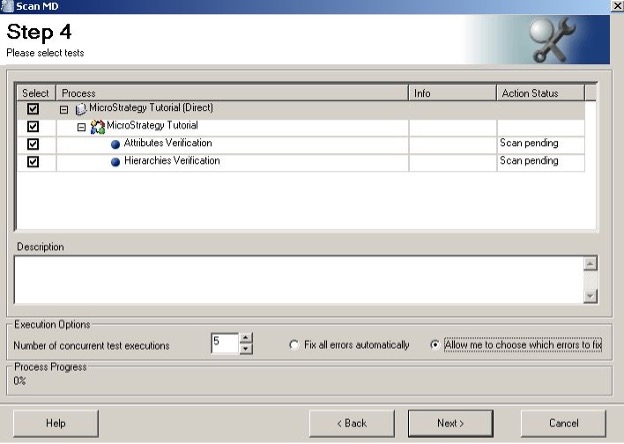
  • In Step 4, adjust the tests against project(s) chosen in Step 2, select a number of concurrent test executions, and choose either Fix all errors automatically or Allow me to choose which errors to fix.
    Click Next to begin the scan. If any errors are found, ScanMD will show a dialog for each set of Common Tests that was executed. 
ka0PW000000606zYAA_0EM4W0000029DLN.jpeg
  • Note:
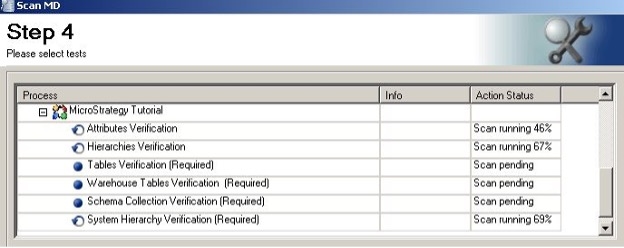
    Some ScanMD Common Tests must be run in a specific order. If Common Tests is chosen in Step 3, ScanMD will automatically add any other Common Tests that are required.
ka0PW000000606zYAA_0EM4W0000029DLX.jpeg
  • Based your test selections, Scan MD has identified some additional tests which need to be run in order to ensure the integrity of your Metadata. The required tests will be added to your selections.

    Though only Attribute Verification and Hierarchies Verification are selected, four other common tests are added with suffix
    "(Required)":

ka0PW000000606zYAA_0EM4W0000029DNd.jpeg
    • Those tests do not have dependencies are still allowed to execute in parallel. 
    • Concurrent test executions usually reduce the overall execution time when running on a computer with multiple cores or CPUs and against remote metadatas (e.g., not a local database such as Access).
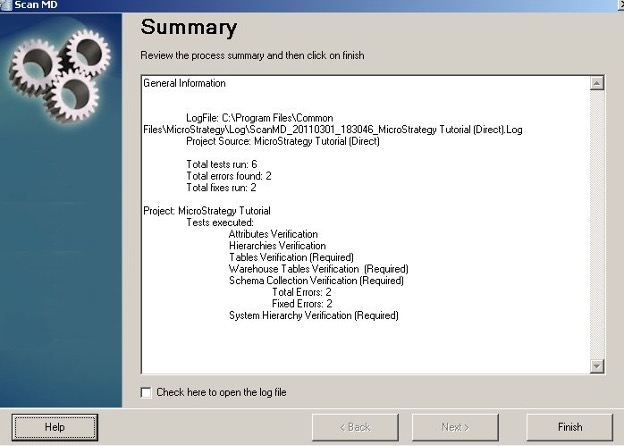
  • In the Summary step, select Check here to open the log file if you wish to review, after clicking Close, the actions that ScanMD performed. Otherwise, simply close Close.
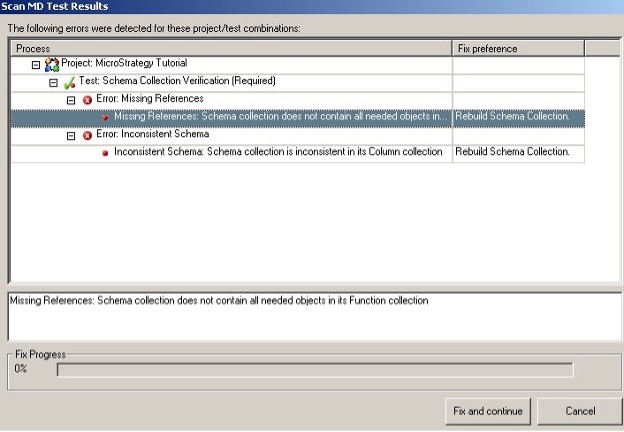
    ScanMD test results:
ka0PW000000606zYAA_0EM4W0000029DQD.jpeg
  • ScanMD summary step:
ka0PW000000606zYAA_0EM4W0000029DQI.jpeg
  • Restart the Intelligence Server if the changes cannot be reflected in a 3-tier environment.
     

Disclaimer:The utility application is provided "as is" and without warranty of any kind. Strategy Expressly disclaims all warranties, express, implied or statutory, including, without limitation, the implied warranties of merchantability, fitness for a particular purpose, satisfactory quality and noninfringement.
Limitation of Liability: Strategy shall have no liability to licensee for any damages of any kind, including, but not limited to, liability for direct, indirect, special, incidental or consequential, damages (which shall include, but not be limited to, loss of data or information, loss of revenue or anticipated profits or lost business).
KB483179


Comment

0 comments

Details

Knowledge Article

Published:

April 16, 2019

Last Updated:

June 13, 2025